Introduction
This manual provides detailed instructions for the setup, operation, and maintenance of your Platinet pzadr Digital Alarm Clock. Please read this manual thoroughly before using the device to ensure proper functionality and to maximize its lifespan.
Product Overview
The Platinet pzadr is a compact digital alarm clock designed for ease of use. It features a clear digital display, an alarm function with snooze, and a backlight for visibility in low-light conditions.

Figure 1: Front view of the Platinet pzadr Digital Alarm Clock. Shows the digital display and the overall compact, grey design.
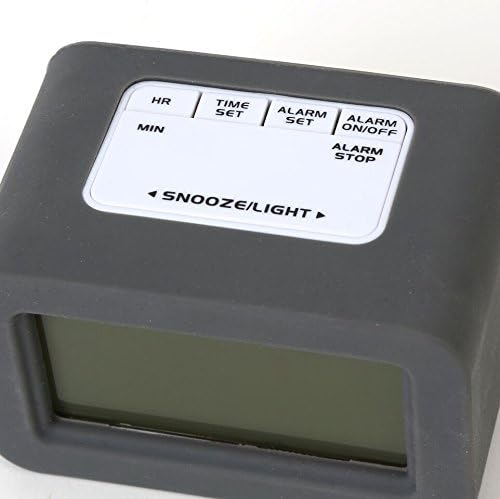
Figure 2: Top view of the Platinet pzadr Digital Alarm Clock, highlighting the control buttons: HR, MIN, TIME SET, ALARM SET, ALARM ON/OFF, ALARM STOP, and SNOOZE/LIGHT.
Setup
1. Battery Installation
- Locate the battery compartment on the back or bottom of the alarm clock.
- Carefully remove the silicone cover, if present, and open the battery compartment lid.
- Insert the required AAA batteries (not included) according to the polarity indicators (+ and -) inside the compartment.
- Close the battery compartment lid and replace the silicone cover.
- The display should now light up, indicating successful battery installation.
2. Setting the Time
- Press the TIME SET button once. The hour digits will begin to flash.
- Use the HR button to adjust the hour.
- Press the TIME SET button again. The minute digits will begin to flash.
- Use the MIN button to adjust the minutes.
- Press the TIME SET button a third time to confirm and exit time setting mode.
Operating Instructions
1. Setting the Alarm
- Press the ALARM SET button once. The alarm hour digits will begin to flash.
- Use the HR button to adjust the alarm hour.
- Press the ALARM SET button again. The alarm minute digits will begin to flash.
- Use the MIN button to adjust the alarm minutes.
- Press the ALARM SET button a third time to confirm and exit alarm setting mode.
2. Turning the Alarm On/Off
- To activate the alarm, press the ALARM ON/OFF button. An alarm icon (e.g., a bell) should appear on the display.
- To deactivate the alarm, press the ALARM ON/OFF button again. The alarm icon will disappear.
3. Snooze and Backlight Function
- When the alarm sounds, press the large SNOOZE/LIGHT button to activate the snooze function. The alarm will pause for a few minutes (typically 5-10 minutes) and then sound again.
- To illuminate the display with the backlight, press the SNOOZE/LIGHT button at any time. The backlight will remain on for a few seconds.
4. Stopping the Alarm
To stop the alarm completely after it sounds (without snooze), press the ALARM STOP button. The alarm will reset for the next day.
Maintenance
1. Cleaning
Wipe the clock with a soft, dry cloth. Do not use abrasive cleaners or solvents, as these may damage the surface or internal components. Avoid exposing the clock to excessive moisture.
2. Battery Replacement
When the display becomes dim or the clock functions erratically, it is time to replace the batteries. Follow the battery installation steps outlined in the "Setup" section. Always use fresh AAA batteries and dispose of old batteries responsibly.
Troubleshooting
- Display is blank or dim:
- Check if batteries are inserted correctly with correct polarity.
- Replace old batteries with new AAA batteries.
- Alarm does not sound:
- Ensure the alarm is activated (alarm icon visible on display).
- Verify that the alarm time is set correctly.
- Check battery level.
- Buttons are unresponsive:
- Remove and reinsert batteries to perform a soft reset.
- Ensure no foreign objects are obstructing the buttons.
Specifications
| Brand | Platinet |
| Model | pzadr |
| Color | Grey |
| Display Type | Digital |
| Special Feature | Alarm |
| Power Source | Battery Powered |
| Shape | Rectangular |
| Material | Rubber |
| Frame Material | Plastic |
| Batteries Included | No |
| Mounting Type | Tabletop |
| Dimensions (approx.) | 10.3 x 6.5 x 6.3 cm |
Warranty and Support
Specific warranty information for the Platinet pzadr Digital Alarm Clock is not provided in this manual. Please refer to the product packaging or the retailer's website for details regarding warranty coverage and customer support. For technical assistance or inquiries, please contact Platinet customer service through their official channels.


