
T'nB TCHDMI3IN1
T'nB Multiport Type-C to HDMI/USB 3.1/Type-C PD2 Adapter User Manual
Model: TCHDMI3IN1
Introduction
This manual provides comprehensive instructions for the T'nB Multiport Type-C Adapter, Model TCHDMI3IN1. This device allows you to connect your USB-C enabled computer or smartphone to an HDMI display, while also providing a standard USB 3.1 port for peripherals and a USB-C Power Delivery (PD2) port for charging.
Please read this manual carefully before using the product to ensure proper operation and to maximize its lifespan.
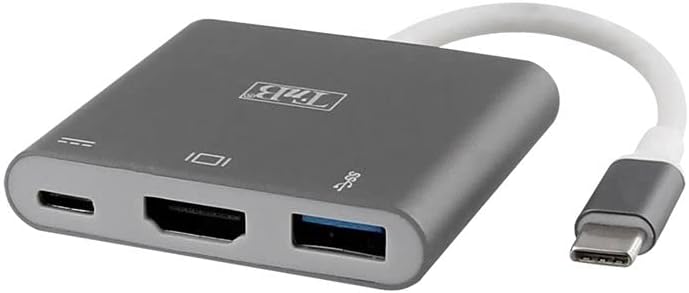
Figure 1: Front view of the T'nB Multiport Type-C Adapter, illustrating the HDMI, USB 3.1, and USB-C ports for connectivity.
Setup Instructions
- Connect to Host Device: Plug the USB-C connector cable of the T'nB adapter into an available USB-C port on your computer, laptop, or smartphone. Ensure your device's USB-C port supports video output (DisplayPort Alternate Mode) for HDMI functionality.
- Connect HDMI Display: Connect an HDMI cable from your monitor or TV to the HDMI port on the T'nB adapter.
- Connect USB Peripherals: Plug your USB devices (e.g., mouse, keyboard, USB drive) into the USB 3.1 port on the adapter.
- Connect Power (Optional): If your host device requires charging or if you are connecting power-intensive USB devices, connect a USB-C power adapter to the USB-C PD2 port on the T'nB adapter. This will provide power passthrough to your host device.

Figure 2: Top-down view of the adapter, showing the T'nB logo and port indicators.
Operating Instructions
Once connected, the T'nB Multiport Type-C Adapter operates automatically. Your operating system should detect the connected display and USB devices.
- HDMI Output: The adapter supports video output up to 4K resolution. You may need to adjust display settings on your computer (e.g., resolution, display mode - extend/duplicate) through your operating system's display preferences.
- USB 3.1 Port: This port provides high-speed data transfer for USB 3.1 compatible devices. It is backward compatible with USB 2.0 devices.
- USB-C Power Delivery (PD2) Port: This port is for power input only. Connect your original USB-C power adapter to this port to charge your host device while using the adapter. It does not support data transfer.
Maintenance
- Keep the adapter clean and free from dust. Use a soft, dry cloth for cleaning.
- Avoid exposing the adapter to extreme temperatures, humidity, or direct sunlight.
- Do not attempt to disassemble or repair the adapter yourself. This may void the warranty and cause damage.
- Store the adapter in a safe place when not in use to prevent physical damage.
Troubleshooting
- No display on HDMI monitor:
- Ensure your host device's USB-C port supports DisplayPort Alternate Mode (video output). Not all USB-C ports support this feature.
- Check if the HDMI cable is securely connected to both the adapter and the monitor.
- Verify that the monitor is set to the correct input source (e.g., HDMI 1, HDMI 2).
- Try connecting the adapter to a different USB-C port on your host device, if available.
- Restart your computer or host device.
- USB devices are not recognized:
- Ensure the USB device is properly plugged into the USB 3.1 port.
- If it's a high-power USB device, ensure a power adapter is connected to the USB-C PD2 port on the T'nB adapter.
- Try connecting the USB device directly to your computer to confirm it's functional.
- Host device is not charging via USB-C PD port:
- Ensure your USB-C power adapter is connected to the USB-C PD2 port on the T'nB adapter and is functioning correctly.
- Verify that your host device supports USB-C Power Delivery.
- Check the power output of your USB-C power adapter; it should meet or exceed the power requirements of your host device.
Specifications
| Brand: | T'nB |
| Model Number: | TCHDMI3IN1 |
| Color: | White (Adapter body is grey, cable is white) |
| Connector Type: | USB-C (Input), HDMI, USB 3.1, USB-C PD2 (Outputs) |
| Number of Ports: | 3 (1x HDMI, 1x USB 3.1, 1x USB-C PD2) |
| Compatible Devices: | Computers, Smartphones with USB-C port supporting DisplayPort Alt Mode and Power Delivery |
| HDMI Resolution: | Up to 4K |
| USB Data Transfer Speed: | Up to 5 Gbps (USB 3.1 Gen 1) |
| Dimensions (L x W x H): | 50 x 57 x 10 millimeters (approximate) |
| Country of Origin: | China |

Figure 3: Product packaging displaying key specifications and compatibility information.
Warranty and Support
For warranty information and technical support, please refer to the documentation included with your purchase or visit the official T'nB website. Keep your proof of purchase for warranty claims.
For further assistance, you may contact T'nB customer service directly. Contact details are typically available on the product packaging or the manufacturer's website.
Ask a question about this manual
Ask about setup, troubleshooting, compatibility, parts, safety, or missing instructions. Manuals+ will review the question and use this page’s manual context to help answer it.