Product Overview
The Satco S9920 is a 2.5 Watt Dimmable LED C11 Light Bulb designed to provide warm white illumination equivalent to a 25-watt incandescent bulb. Featuring a candelabra (E12) base, this energy-efficient LED bulb is suitable for various fixtures requiring a smaller base type. Its clear finish and filament-style LEDs offer a traditional aesthetic while providing modern energy savings.
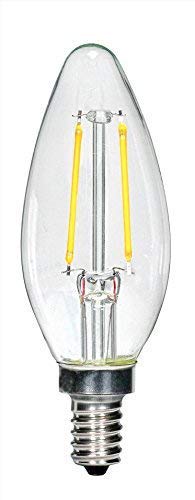
Image: A clear, candelabra-base LED light bulb (Satco S9920) with visible yellow LED filaments inside, designed to mimic traditional incandescent bulbs.
Setup and Installation
Follow these steps for safe and proper installation of your Satco S9920 LED light bulb:
- Safety First: Before installing or replacing any light bulb, ensure the power to the fixture is turned OFF at the circuit breaker or wall switch.
- Allow Cooling: If replacing an old bulb, allow it to cool completely before handling to prevent burns.
- Unscrew Old Bulb: Carefully unscrew the old bulb by turning it counter-clockwise. Dispose of old bulbs according to local regulations.
- Insert New Bulb: Gently screw the Satco S9920 LED bulb into the candelabra (E12) socket by turning it clockwise until it is snug. Do not overtighten.
- Restore Power: Once the bulb is securely installed, restore power to the fixture.
- Test: Turn on the light switch to confirm the bulb is functioning correctly.
Important: This bulb is designed for indoor use in dry locations unless specified otherwise by the fixture. Ensure the fixture's wattage rating is compatible with the bulb's 2.5W consumption.
Operating Instructions
The Satco S9920 LED bulb operates like a standard light bulb once installed. It is dimmable, allowing for adjustable light output when used with compatible dimmer switches.
- Standard Operation: Simply use your existing wall switch to turn the light on or off.
- Dimming Functionality: If connected to a compatible dimmer switch, adjust the dimmer control to achieve the desired brightness level. For optimal performance and to avoid flickering or buzzing, use LED-compatible dimmer switches. Consult your dimmer switch manufacturer's instructions for specific compatibility.
This bulb is designed for 120 Volts AC power supply.
Maintenance
LED bulbs generally require minimal maintenance. Follow these guidelines to ensure longevity and optimal performance:
- Cleaning: Before cleaning, ensure the power to the fixture is off and the bulb has cooled. Wipe the bulb with a soft, dry, lint-free cloth. Do not use liquid cleaners or abrasive materials, as they may damage the bulb's surface or internal components.
- Handling: Handle the bulb by its base, not the glass envelope, to avoid transferring oils from your skin, which can affect performance or appearance over time.
- Storage: If storing unused bulbs, keep them in their original packaging in a cool, dry place to protect them from damage.
Troubleshooting
If you encounter issues with your Satco S9920 LED bulb, consider the following common troubleshooting steps:
| Problem | Possible Cause | Solution |
|---|---|---|
| Bulb does not light up. |
|
|
| Bulb flickers or buzzes. |
|
|
| Light output is too low or too high. |
|
|
If these steps do not resolve the issue, please contact Satco customer support for further assistance.
Specifications
| Feature | Detail |
|---|---|
| Brand | Satco |
| Model Number | S9920 (Part Number: S29920) |
| Light Type | LED |
| Wattage | 2.5 Watts (25W Equivalent) |
| Voltage | 120 Volts |
| Bulb Shape Size | C11 |
| Base Type | Candelabra (E12) |
| Light Color | Warm White |
| Color Temperature | 2700 Kelvin |
| Dimmable | Yes |
| Material | Copper (internal components) |
| Unit Count | 6.0 Count (per pack) |
| Item Weight | 7.1 ounces (for the pack) |
| Connectivity Technology | Normal bulb |
| Certification | UL Listed |
Warranty and Support
For information regarding warranty coverage, technical support, or any product-related inquiries, please contact Satco customer service directly. Refer to the packaging or the official Satco website for the most current contact information and warranty details.
Manufacturer: Satco
Website: www.satco.com (Please check the official website for current contact details and support options.)


