
1. Introduction
This manual provides essential information for the safe and effective operation, maintenance, and setup of your Truper Professional 750W Jig Saw, Model 15423. Please read these instructions thoroughly before using the tool to ensure proper function and to prevent injury.
2. General Safety Instructions
Always follow basic safety precautions when using electrical tools to reduce the risk of fire, electric shock, and personal injury.
- Work Area Safety: Keep the work area clean and well-lit. Cluttered or dark areas invite accidents. Do not operate power tools in explosive atmospheres, such as in the presence of flammable liquids, gases, or dust.
- Electrical Safety: Power tool plugs must match the outlet. Never modify the plug in any way. Avoid body contact with earthed or grounded surfaces such as pipes, radiators, ranges, and refrigerators.
- Personal Safety: Always wear eye protection. Use safety equipment such as dust masks, non-skid safety shoes, hard hats, or hearing protection when appropriate. Dress properly; avoid loose clothing or jewelry.
- Tool Use and Care: Do not force the power tool. Use the correct power tool for your application. Disconnect the plug from the power source before making any adjustments, changing accessories, or storing power tools.
- Maintenance: Maintain power tools. Check for misalignment or binding of moving parts, breakage of parts, and any other condition that may affect the power tool’s operation.
3. Product Overview and Components
The Truper Professional 750W Jig Saw is designed for precise cutting in various materials. Key features include:
- 750W Motor: Provides ample power for demanding cutting tasks.
- Grip Handle: Ergonomically designed for enhanced control and comfort during operation.
- Ball Bearing Construction: Extends the operational life of the machine.
- 1/4 Turn Quick Blade Change System: Allows for fast and tool-free blade replacement.
- Continuous Use Button: For extended operation without holding the trigger.
- 6-Level Speed Regulator: Enables precise speed adjustment for different materials and applications.
- Tilting Shoe Control: Allows for miter cuts at angles of 15°, 30°, and 45° on both sides.
- 4-Position Pendulum Action: Adjusts the blade's orbital motion for faster cutting in various materials.

Image Description: An exploded diagram of the Truper Professional 750W Jig Saw, illustrating its internal and external components. Labels point to the 6-level speed regulator, continuous use button, quick blade change system, ball bearing, tilting shoe, and 4-position pendulum action control.
4. Setup
4.1 Blade Installation
- Ensure the jig saw is unplugged from the power source.
- Locate the 1/4 turn quick blade change system on the front of the tool.
- Rotate the blade clamp 1/4 turn to open it.
- Insert the T-shank jig saw blade into the clamp until it clicks securely into place.
- Release the blade clamp. Gently pull on the blade to ensure it is firmly seated.
4.2 Base Plate Adjustment (Miter Cuts)
- Unplug the tool.
- Loosen the screws that secure the base plate to the tool.
- Tilt the base plate to the desired angle (15°, 30°, or 45°). The base plate has markings for common angles.
- Tighten the screws firmly to secure the base plate in position.

Image Description: A front-side view of the Truper Professional 750W Jig Saw, showcasing its orange and black body, the installed blade, and the adjustable base plate with a parallel guide attachment.
5. Operating Instructions
5.1 Powering On/Off and Continuous Use
- To start the tool, press the trigger switch.
- To stop the tool, release the trigger switch.
- For continuous operation, press the trigger switch and then press the continuous use button. To stop, press the trigger switch again.
5.2 Speed Control
The 6-level speed regulator allows you to match the cutting speed to the material and blade type. Rotate the dial to select the desired speed. Lower speeds are suitable for harder materials like metal, while higher speeds are for softer materials like wood.
5.3 Pendulum Action Control
The jig saw features a 4-position pendulum action control. This mechanism adjusts the orbital motion of the blade. Higher pendulum settings (e.g., position 4) provide faster, more aggressive cuts, ideal for rough cutting in wood. Lower settings (e.g., position 1 or 0 for no pendulum action) are for finer cuts in wood, plastic, or metal, where precision is critical.
5.4 Cutting Materials and Capacities
This jig saw is suitable for cutting wood, plastic, and steel. Refer to the specifications for maximum cutting capacities:
- Wood: Up to 100 mm (approximately 4 inches)
- Metal/Steel: Up to 0.39 inches (approximately 10 mm)
Always use the appropriate blade for the material being cut.

Image Description: A person wearing safety glasses and gloves is operating the Truper Professional 750W Jig Saw to cut a piece of wood on a workbench, demonstrating the tool in active use.
6. Maintenance
Regular maintenance ensures the longevity and safe operation of your jig saw.
- Cleaning: After each use, unplug the tool and clean dust and debris from the ventilation openings and around the blade area. Use a soft brush or compressed air.
- Blade Inspection: Regularly inspect blades for sharpness and damage. Replace dull or damaged blades promptly.
- Cord Inspection: Check the power cord for any signs of damage, cuts, or fraying. Do not use the tool if the cord is damaged.
- Ball Bearings: The tool features ball bearings designed to extend its life. No user lubrication is typically required for these sealed components.
- Storage: Store the jig saw in a dry, secure location out of reach of children.
7. Troubleshooting
If you encounter issues with your jig saw, refer to the following common troubleshooting steps:
- Tool Does Not Start:
- Check if the power cord is securely plugged into a functional outlet.
- Ensure the circuit breaker has not tripped.
- Blade Not Cutting Effectively:
- Verify the blade is installed correctly and securely.
- Replace the blade if it is dull or damaged.
- Adjust the speed setting for the material being cut.
- Adjust the pendulum action setting.
- Excessive Vibration:
- Ensure the blade is not bent or damaged.
- Check that the base plate is securely fastened.
For issues not resolved by these steps, contact customer support.
8. Specifications
| Feature | Specification |
|---|---|
| Model Number | 15423 (CALA-A5) |
| Power | 750 W |
| Voltage | 120 V |
| Frequency | 60 Hz |
| Consumption | 6.25 A |
| Variable Speed | 800 - 3000 cpm (cuts per minute) |
| Blade Type | "T" type hacksaw |
| Pendulum Action | 4 positions |
| Miter Cuts | 15°, 30°, 45° on both sides |
| Cutting Capacity (Wood) | 100 mm (4 inches) |
| Cutting Capacity (Metal/Steel) | 0.39 inches (10 mm) |
| Insulation Class | Class II |
| IP Grade | IP20 |
| Duty Cycle | 30 minutes work / 15 minutes rest (max daily 3 hours) |
| Weight | 2.4 kg (5.81 pounds) |
| Product Dimensions (L x W x H) | 19.61" x 9.45" x 12.44" (approx. 50 cm x 24 cm x 31.6 cm) |
| Included Components | Allen wrench, parallel guide, dust collector adapter |
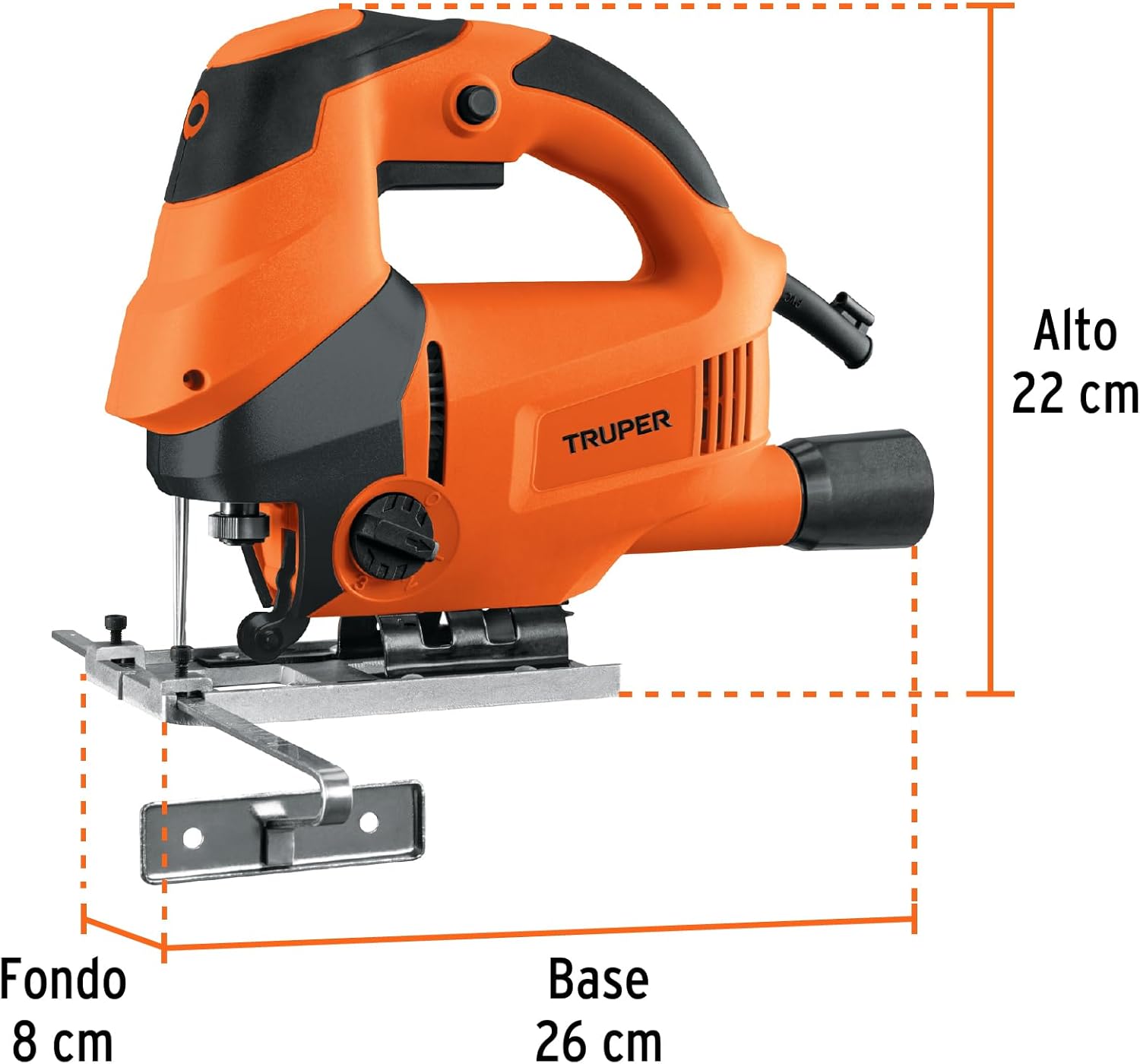
Image Description: A side view of the Truper Professional 750W Jig Saw with overlaid measurements indicating a height of 22 cm, a depth of 8 cm, and a base length of 26 cm.
9. Warranty and Support
The Truper Professional 750W Jig Saw comes with a 3-year warranty against manufacturing defects. Please retain your proof of purchase for warranty claims.
For technical assistance, spare parts, or warranty service, please contact Truper customer support through their official website or authorized service centers.
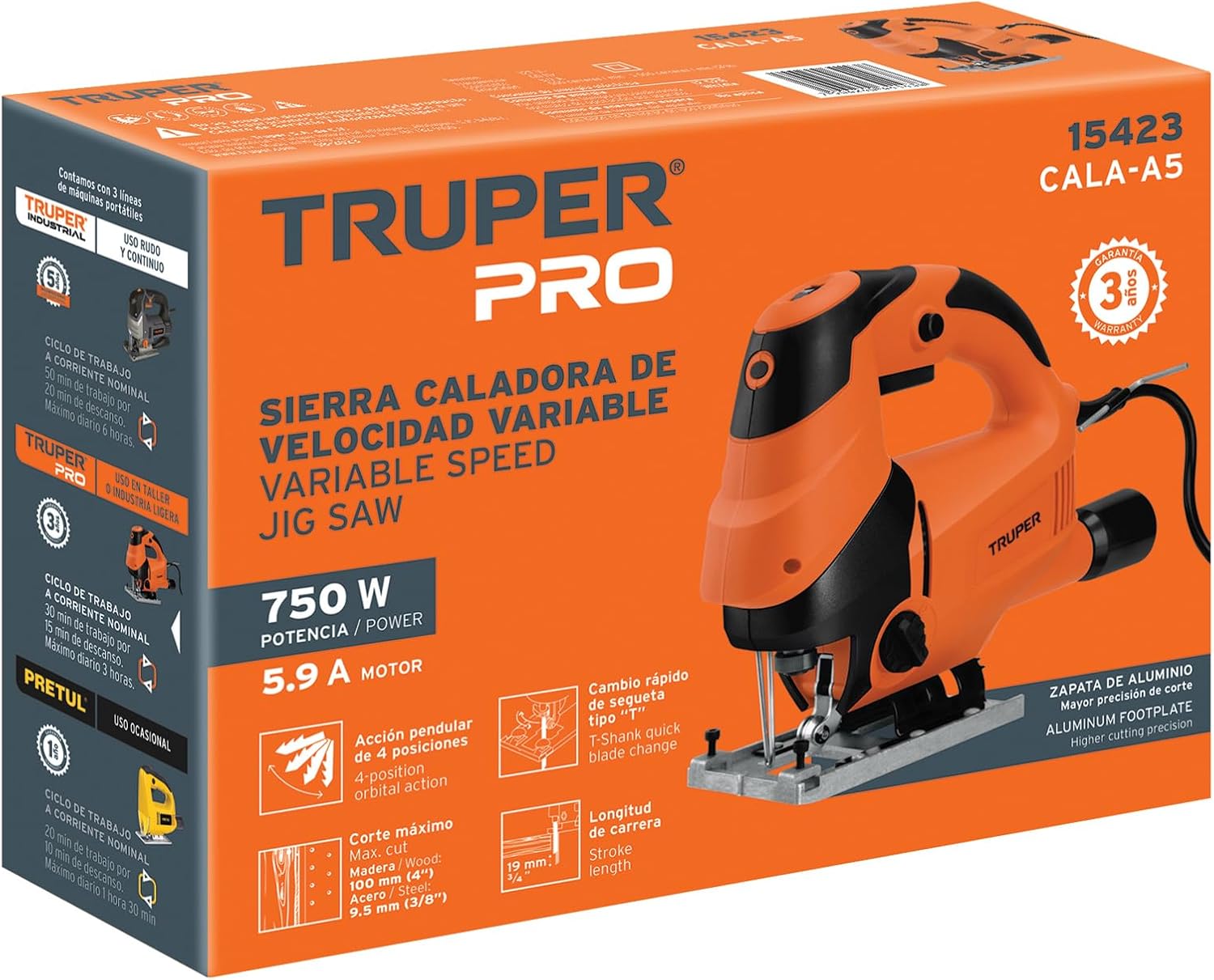
Image Description: The product packaging for the Truper Professional 750W Jig Saw, prominently displaying the Truper brand logo, product details, and a '3-year warranty' badge.