
1. Introduction
This manual provides detailed instructions for the installation, operation, and maintenance of your LowcostMobile RAD5G-ULTRA-7003800 4G 5G External Directional WiFi SMA Antenna. This antenna system is designed to improve 4G, 5G, and WiFi signal reception, particularly in areas with weak network coverage. Proper installation and orientation are crucial for optimal performance.
2. Product Features
- Wide Frequency Compatibility: Supports 2G, 3G, 4G, 4G+, and 5G networks across 698-3800 MHz, including common operator bands (700, 800, 900, 1800, 2100, 2600, 3500 MHz). Also compatible with 2.4 GHz WiFi.
- High Gain: Provides 7.5 to 10.5 dBi gain per antenna for enhanced signal strength.
- MIMO Configuration: Includes two antennas for MIMO (Multiple-Input Multiple-Output) technology, improving data speeds and connection stability.
- Low-Loss Cables: Equipped with two 10-meter WL240 black low-loss cables, each terminated with an SMA male connector.
- Durable Construction: Made from high-quality aluminum alloy for outdoor and indoor use.
- Directional Design: Log Yagi design for focused signal reception and transmission.
- Broad Compatibility: Connects to 4G LTE / LTE Advanced 5G routers with two SMA connectors, such as Huawei B525, B593, E5186, B310, B315, Dlink DWR 921, Asus 4G-AC55U, Netgear, and others (adapters may be required for some models like Freebox Delta, Huawei B528, E5180).
3. Package Contents
The LowcostMobile RAD5G-ULTRA-7003800 package includes:
- 2 x RAD5G-ULTRA-7003800 Directional Antennas, each with an integrated 10m WL240 cable and SMA male connector.
- Mounting kit for pole installation.
4. Specifications
| Specification | Value |
|---|---|
| Brand | LOW COST MOBILE |
| Model Number | RAD5G-ULTRA-10m |
| Antenna Type | 4G / 5G / WiFi Directional Log Yagi MIMO |
| Frequency Range | 698 - 3800 MHz |
| Gain | 7.5 - 10.5 dBi per antenna |
| Impedance | 50 Ohms |
| Cable Type | 2 x 10m WL240 Low-Loss Cable |
| Connector Type | SMA Male |
| Horizontal Beamwidth | 52° @1800Mhz |
| Vertical Beamwidth | 44° @1800Mhz |
| Antenna Dimensions (each) | 110 x 22 x 7 cm |
| Antenna Weight (each, with cable) | ~1 kg |
| Usage Environment | Outdoor or Indoor |
The graph below illustrates the antenna's gain across different frequency bands.

Image: Frequency response graph showing gain (dBi) across 600-3900 MHz, highlighting 4G, 5G, and WiFi bands.
5. Setup Instructions
5.1. Site Selection
Choose an installation location that offers a clear line of sight to the nearest cellular tower. Higher elevations, such as a rooftop or attic, generally provide better signal reception. Avoid obstructions like large buildings, trees, or metal structures.
5.2. Mounting the Antennas
The antenna system includes two directional antennas designed for MIMO operation. For optimal performance, these antennas should be mounted with a specific orientation relative to each other.
- Assemble Mounting Kit: Attach the provided mounting brackets to the antennas.
- Secure to Pole: Use the mounting kit to secure both antennas to a sturdy mast or pole. Ensure the pole is vertically stable.
- MIMO Orientation: For best MIMO performance, mount the two antennas at a 90-degree angle to each other (one horizontal, one vertical) or with a specific separation distance. Consult the manufacturer for precise distance recommendations based on the frequency band you intend to use.
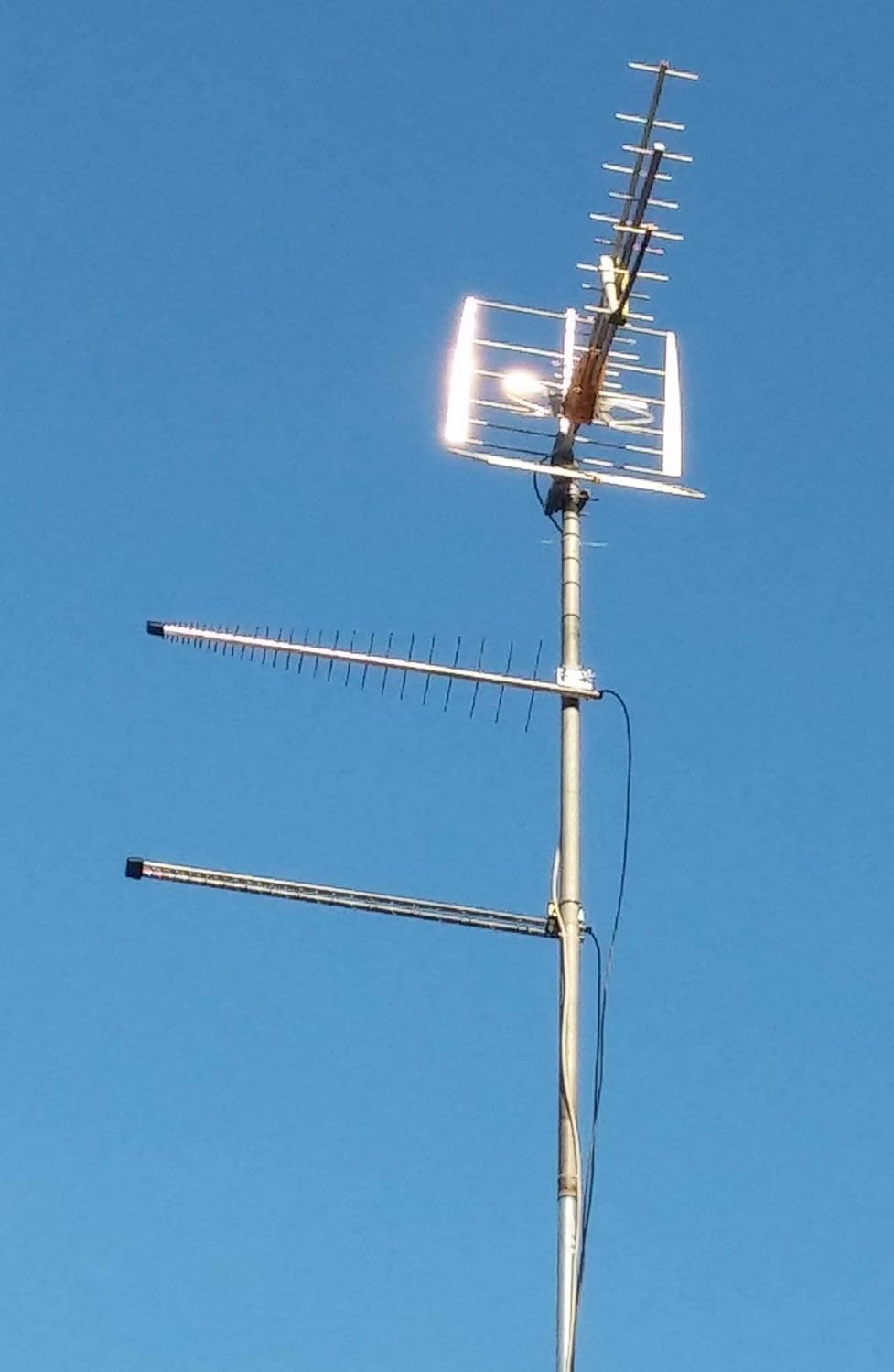
Image: Two RAD5G-ULTRA-7003800 antennas mounted on a pole, illustrating a typical outdoor installation.

Image: Close-up view of the mounting supports for the RAD5G-ULTRA-7003800 antennas, showing how they attach to a pole.
5.3. Cable Connection
Each antenna comes with a 10-meter WL240 low-loss cable terminated with an SMA male connector.
- Route Cables: Carefully route the cables from the antennas to your 4G/5G router, avoiding sharp bends or kinks that could damage the cable.
- Connect to Router: Connect the SMA male connectors from the antennas to the corresponding SMA female ports on your 4G/5G router. Ensure a secure connection.
- Adapters: If your router uses different connector types (e.g., TS9, CRC9, MHF4), you will need appropriate adapters (sold separately). For example, Huawei B528/E5180 may require SMA female to CRC9/TS9 male adapters, and Freebox Delta may require MHF4-SMA adapters.

Image: Detailed view of the SMA male connector and the WL240 cable, ready for connection to a compatible router.
5.4. Antenna Orientation
Precise orientation of the antennas towards the cellular tower is critical for maximizing performance. Use your router's signal strength indicators or a mobile application to find the optimal direction.
- Identify Tower Location: Research the location of the nearest cellular towers for your network provider.
- Initial Aim: Roughly aim the antennas in the direction of the identified tower.
- Fine-Tuning: While monitoring your router's signal strength (RSRP, RSRQ, SINR values) or performing speed tests, slowly adjust the horizontal and vertical angle of the antennas. Make small adjustments and wait a few seconds for the router to update its readings.
- Secure Position: Once the optimal signal strength and data speeds are achieved, securely tighten all mounting hardware to prevent movement due to wind.
6. Operating Instructions
Once the antennas are installed and connected, the system operates passively to enhance your router's signal reception. No additional configuration is typically required on the antenna itself.
- Power On Router: Ensure your 4G/5G router is powered on.
- Verify Connection: Check your router's interface or status lights to confirm that it recognizes the external antennas and is receiving a signal.
- Monitor Performance: Regularly check your internet speed and connection stability. If performance degrades, re-evaluate antenna orientation or check for new obstructions.
7. Maintenance
The LowcostMobile RAD5G-ULTRA-7003800 antenna is designed for durability and requires minimal maintenance.
- Regular Inspection: Periodically inspect the antennas, cables, and mounting hardware for any signs of damage, corrosion, or loosening, especially after severe weather conditions.
- Cleaning: If necessary, gently clean the antenna elements with a soft, damp cloth to remove dirt or debris that might accumulate and affect performance. Do not use harsh chemicals or abrasive materials.
- Cable Integrity: Ensure cables are not frayed, cut, or exposed to excessive strain. Replace damaged cables immediately to prevent signal loss.
8. Troubleshooting
If you experience issues with your antenna system, consider the following troubleshooting steps:
- No Signal or Weak Signal:
- Check Orientation: Re-adjust the antenna's direction. Even small changes can significantly impact signal strength. Ensure both antennas are correctly oriented for MIMO.
- Obstructions: Verify there are no new physical obstructions (e.g., new buildings, dense foliage) blocking the line of sight to the cellular tower.
- Cable Connections: Ensure all SMA connectors are securely fastened to the router and the antennas. Check for any damage to the cables.
- Router Settings: Confirm your router is configured to use external antennas if applicable. Some routers have settings to switch between internal and external antennas.
- Tower Status: Check with your network provider for any known outages or maintenance in your area.
- Slow Speeds:
- Antenna Orientation: Fine-tune the antenna orientation for optimal signal quality (RSRQ, SINR) in addition to signal strength (RSRP).
- Network Congestion: During peak hours, network congestion can affect speeds regardless of signal strength.
- Router Performance: Ensure your router itself is not the bottleneck.
- Intermittent Connection:
- Secure Mounting: Ensure the antennas are firmly mounted and not swaying in the wind, which can cause signal fluctuations.
- Cable Damage: Inspect cables for any signs of wear or damage that could lead to intermittent contact.
9. Warranty and Support
LowcostMobile provides customer support for this product.
- After-Sales Service: After-sales service is included and provided by our company in France.
- Contact: For support or warranty inquiries, please contact LowcostMobile via email or telephone. Refer to your purchase documentation for specific contact details.
- Spare Parts Availability: Spare parts are available for 5 years.