
Long Range Systems (LRS) RX-CS7
Long Range Systems Guest Pager Pro CS7 User Manual
Comprehensive guide for the setup, operation, and maintenance of your LRS Guest Pager Pro CS7.
1. Product Overview
The Long Range Systems (LRS) Guest Pager Pro CS7 is designed to expand existing LRS guest pager systems or replace missing wireless pagers. It is a robust and reliable solution for waitlist management in various environments such as restaurants, retail, and clinics. The CS7 pager replaces legacy RX-CS4 pagers and offers multiple alert modes including silent vibration, audible beep, flashing lights, or a glowing indicator.
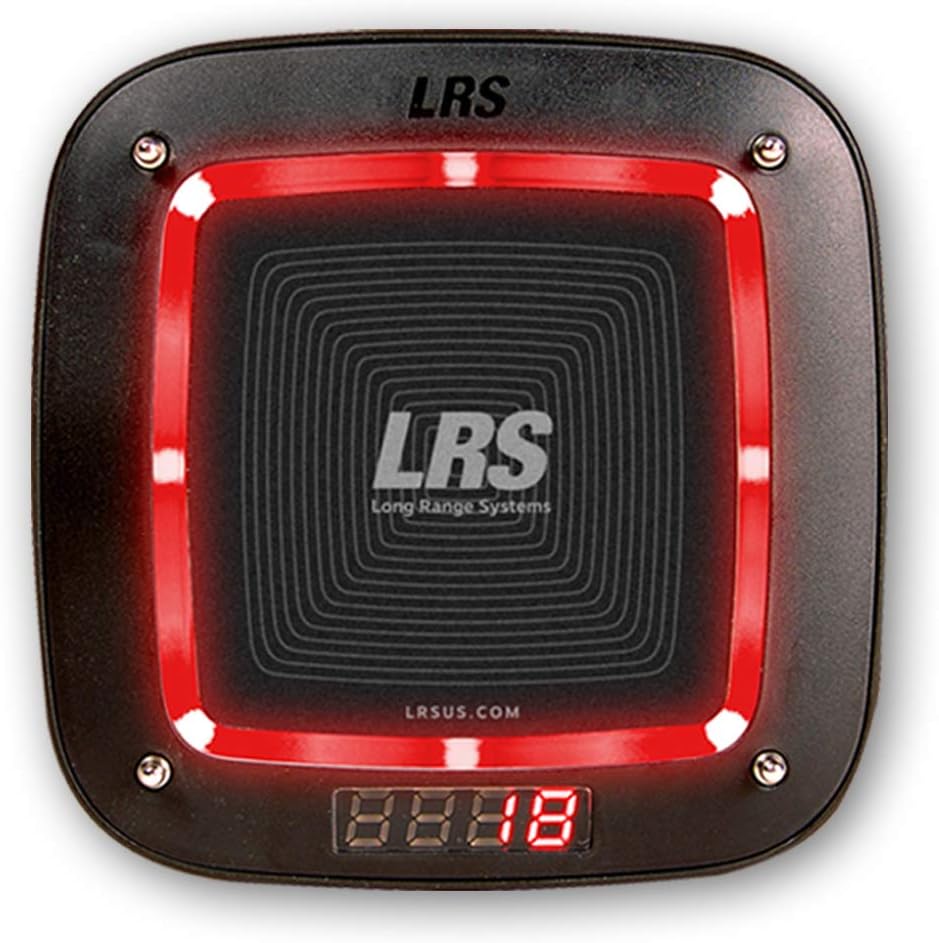
Image: A single Long Range Systems Guest Pager Pro CS7, black square with rounded corners, featuring a central LRS logo and a bright red glowing light around its perimeter. A small digital display at the bottom shows "88:88".
2. Key Features
- Compatibility: Adds to or replaces Long Range Systems coaster-style pagers, including legacy models like RX-CS4.
- Programmable: Shipped unnumbered but can be programmed with your LRS transmitter to any desired number.
- Alert Modes: Offers silent vibration, audible beep, flashing lights, or a glowing indicator for versatile notification.
- Durability: Designed for tough commercial use in high-traffic environments.
- Power: Requires 1 AAA battery (included).
3. Setup Guide
3.1. Unpacking and Initial Inspection
Carefully remove the Guest Pager Pro CS7 units from their packaging. Inspect each pager for any visible damage. Ensure all components are present. Note that these are pagers only; a compatible LRS transmitter and charging base are required for a complete system and are sold separately.
3.2. Initial Charging
Before first use, place the pagers on a compatible LRS charging base. Ensure the pagers are correctly seated and the charging indicators (if present on your base) confirm they are charging. Allow sufficient time for a full charge, typically several hours, to ensure optimal battery life.
3.3. Programming/Pairing with Transmitter
The CS7 pagers are shipped unnumbered and must be programmed to work with your specific LRS transmitter. The programming process typically involves placing the pager on the charging base and using the transmitter to assign a unique number to each pager. Refer to your LRS transmitter's user manual for detailed programming instructions. This process ensures the pager responds only to signals from your system.
- Ensure the pager is fully charged and placed on the charging base.
- Access the programming mode on your LRS transmitter (consult your transmitter manual).
- Enter the desired pager number on the transmitter.
- Initiate the programming command from the transmitter. The pager should confirm successful programming, often by flashing or vibrating.
- Repeat for all pagers.
4. Operating Instructions
4.1. Distributing Pagers
Once programmed, distribute the pagers to guests or customers as part of your waitlist management system. Instruct them on how the pager will alert them when it's their turn.
4.2. Receiving a Page
When a page is sent from your LRS transmitter, the Guest Pager Pro CS7 will activate according to its programmed alert mode:
- Vibration: The pager will vibrate to discreetly alert the user.
- Beep: An audible tone will sound.
- Flashing Lights: The perimeter lights on the pager will flash brightly.
- Glowing Indicator: The perimeter lights will illuminate and remain steady.
The digital display on the pager may show the pager number or a message depending on your system's configuration.
4.3. Returning Pagers
After use, guests should return the pagers to a designated collection point. Pagers should then be placed back on the charging base to ensure they are ready for the next use.
5. Maintenance
5.1. Cleaning
To clean the pagers, use a soft, damp cloth. Avoid using harsh chemicals, abrasive cleaners, or excessive moisture, as these can damage the pager's electronics or exterior finish. Ensure the pager is dry before placing it back on the charging base.
5.2. Battery Care
The Guest Pager Pro CS7 uses 1 AAA battery (included). While designed for long life, proper battery care is essential:
- Always return pagers to the charging base when not in use to maintain battery charge.
- If a pager is not holding a charge or its performance degrades significantly, the internal AAA battery may need replacement. Consult LRS support or a qualified technician for battery replacement.
- Do not attempt to open the pager casing unless you are a trained professional, as this may void the warranty.
6. Troubleshooting
This section addresses common issues you might encounter with your Guest Pager Pro CS7. For more complex problems, contact LRS customer support.
| Issue | Possible Cause / Solution |
|---|---|
| Pager not responding to page. |
|
| Pager not charging. |
|
| Pager alerts continuously or erratically. |
|
7. Technical Specifications
- Model: RX-CS7 (Guest Pager Pro CS7)
- Dimensions: Approximately 12.2 x 7.95 x 4.76 inches (Package Dimensions)
- Weight: Approximately 1 pound (Item Weight)
- Power Source: 1 AAA battery (included)
- Alert Modes: Vibrate, Beep, Flash, Glow
- Compatibility: Designed for use with Long Range Systems (LRS) transmitters and charging bases.
- Operating Environment: For US installation only.
8. Warranty Information
Long Range Systems (LRS) products are manufactured to high-quality standards. For specific warranty terms and conditions applicable to your Guest Pager Pro CS7, please refer to the warranty documentation provided with your original purchase or visit the official Long Range Systems website. Keep your proof of purchase for any warranty claims.
9. Customer Support
If you require further assistance, have questions not covered in this manual, or need technical support, please contact Long Range Systems (LRS) customer service. You can typically find their contact information on their official website or through the vendor from whom you purchased the product.
Online Resources: Visit the Long Range Systems website for FAQs, additional manuals, and support resources.
Contact: Refer to your purchase documentation or the LRS website for phone numbers and email addresses.
Related Documents - RX-CS7
 |
LRS CS7 Coaster Pager Programming Guide with T-7471/T-7470 Transmitter Step-by-step instructions for programming LRS CS7 Coaster Pagers using the T-7471 or T-7470 transmitter, including helpful tips and menu navigation. |
 |
Retekess TD164 Pager System: Features, Specifications, and Package Details Explore the Retekess TD164 pager system, a long-range wireless calling solution with key features like keyboard mute, multiple prompt modes, and a one-to-many paging function. Includes detailed product specifications and package contents. |
 |
LRS CS8 User Manual - Features, Operation, and Troubleshooting Comprehensive user manual for the LRS CS8 guest pager system, covering enhancements, dimensions, features, cleaning, charging, operation, troubleshooting, error codes, warranty, and terms of service. |
 |
GGM Gastro Commercial Hot Chocolate Machine User Manual User manual for the GGM Gastro commercial electrical hot chocolate, sahlep, and milk machines (Models CS1-CS8), covering safety, operation, cleaning, maintenance, and troubleshooting. |
 |
Humantechnik signolux Mobiler Vibrations-Funkempfänger Bedienungsanleitung Umfassende Bedienungsanleitung für den Humantechnik signolux mobilen Vibrations-Funkempfänger. Erfahren Sie, wie Sie das Gerät einrichten, programmieren und optimal nutzen für zuverlässige Vibrationsalarme. |
 |
Yamaha Aventage Receiver Integration with ELAN Systems Guide detailing the integration of Yamaha Aventage AV receivers with ELAN home automation systems, covering supported features, connection diagrams, configuration, and common integration issues. |