
Overview
The Herman Miller Aeron Ergonomic Chair is designed with human-centered principles and advanced technology to provide exceptional support and comfort. Its 8Z Pellicle suspension system distributes body weight evenly across eight zones of varying tension. The PostureFit SL backrest supports the spine and maintains the natural forward tilt of the pelvis, featuring adjustable pads for lumbar support. The chair offers a full range of motion, ensuring smooth and balanced movement whether leaning forward or reclining.

Figure 1: Herman Miller Aeron Ergonomic Chair in Graphite, Size B.
Setup
The Herman Miller Aeron Ergonomic Chair comes fully assembled. No additional assembly is required before use.
Operating Instructions
The Aeron chair offers multiple adjustment points to customize your seating experience for optimal ergonomic support and comfort.
1. Height Adjustment
To adjust the chair's height, locate the lever on the right side, beneath the seat. Lift the lever while seated to raise the chair, or lift the lever while standing to lower it. Release the lever at your desired height.
Video 1: Demonstrates the height adjustment mechanism of the Herman Miller Aeron chair.
2. Tilt Limiter and Tension Control
The Tilt Limiter allows you to set the recline range at one of three postures: upright, mid-recline, or full-recline. The lever for this is typically on the left side, beneath the seat. The Tension Control knob, also beneath the seat, lets you adjust the amount of effort required to recline comfortably. Turn clockwise to increase tension (more effort to recline) and counter-clockwise to decrease tension (less effort to recline).

Figure 2: Illustration of the Tilt Limiter and Seat Angle Adjustment features.
3. Seat Angle Adjustment
This feature changes the seat angle from neutral (parallel to the floor) to an engaged 5-degree forward tilt. This can be adjusted using a lever located near the tilt limiter.
4. Adjustable PostureFit SL Support
The PostureFit SL backrest supports the sacral/lumbar region of the spine. Two individual pads flex independently and can be adjusted to fit the curve of your spine, providing targeted support and stabilizing the base of the spine.
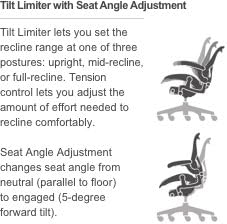
Figure 3: Visual guide for the Adjustable PostureFit SL Support.
5. Fully Adjustable Arms
The armrests are highly adjustable:
- Height: Adjusts from 6.8 inches to 10.8 inches above the seat.
- Depth: Slides backward and forward over a range of 2.5 inches.
- Pivot: Pivots 15 degrees outward and 17.5 degrees inward.

Figure 4: Detailed illustration of the fully adjustable armrests.
Video 2: Demonstrates the various adjustments of the Herman Miller Aeron ergonomic chair, including armrests and tilt.
Maintenance
To maintain the longevity and appearance of your Aeron chair, follow these simple care instructions:
- Cleaning: Wipe clean with a damp cloth. Avoid harsh chemicals or abrasive cleaners.
- Inspection: Periodically check all moving parts and fasteners to ensure they are secure.
Troubleshooting
If you experience any issues with your Herman Miller Aeron chair that cannot be resolved through adjustments, please contact Herman Miller customer support for assistance.
Specifications
| Feature | Detail |
|---|---|
| Brand | Herman Miller |
| Model Name | Aeron |
| Size | Size B |
| Color | Graphite |
| Product Dimensions | 16.75"D x 27"W x 41"H |
| Seat Height Range | 16"-20.5" |
| Item Weight | 41 pounds |
| Maximum Weight Recommendation | 300 Pounds |
| Materials | Aluminum, 8Z Pellicle, Faux Leather |
| Back Style | Open Back |
| Casters | 2.5-inch Standard Carpet Casters (durable black nylon) |
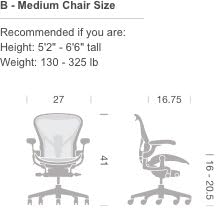
Figure 5: Dimensions and recommended user size for Aeron Chair Size B.

Figure 6: Detail of the 2.5-inch Standard Carpet Casters.
Warranty & Support
The Herman Miller Aeron Ergonomic Chair typically comes with a comprehensive 12-year warranty covering all parts of the chair. For detailed warranty information or to contact customer support, please visit the official Herman Miller website or refer to the documentation included with your purchase.


