
Epson PL1795F
Epson PowerLite 1795F 3LCD 1080p Full HD Wireless Mobile Projector User Manual
Model: PL1795F
Introduction
The Epson PowerLite 1795F is a highly portable 3LCD 1080p Full HD wireless mobile projector designed for business presentations and wireless video streaming. Its compact and lightweight design makes it ideal for professionals on the go, offering bright and clear images in various environments.
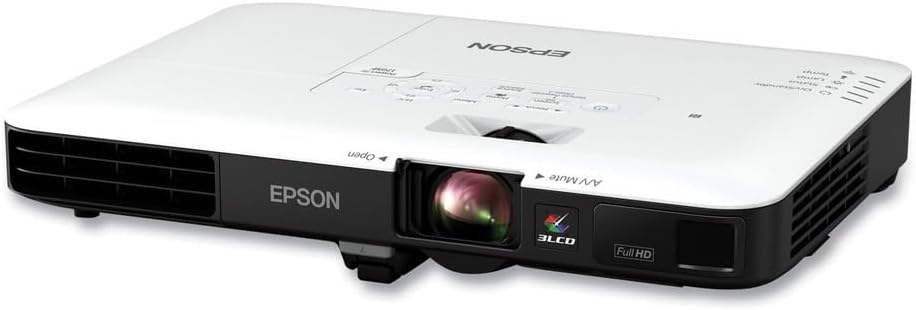
Front view of the Epson PowerLite 1795F projector, showcasing its compact design and lens.
What's in the Box
Upon unboxing your Epson PowerLite 1795F projector, verify that all the following components are included:
- PowerLite 1795F projector
- Power Cord
- VGA Cable
- USB cable
- Projector remote control with batteries
- Carrying Bag
- User Manual (this document)
- EasyMP software CD
- Registration card

Image showing the projector, carrying case, remote control, and various cables included in the box, along with the user manual CD.
Setup
Follow these steps for the initial setup of your projector:
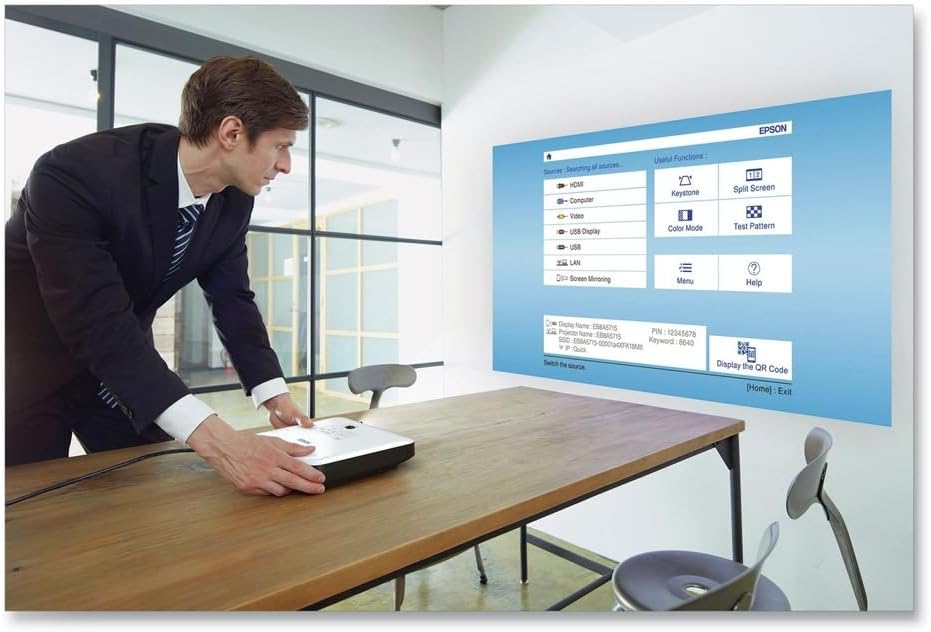
- Placement: Position the projector on a stable, flat surface. Ensure there is adequate ventilation around the unit.

A user placing the projector on a table, with the projected image visible on a wall, demonstrating easy setup and image adjustments.
- Power Connection: Connect the power cord to the projector's power inlet and then to a wall outlet.
- Connect Devices: Use the appropriate cables (HDMI, VGA, USB) to connect your computer, tablet, or other media devices to the projector.
Rear view of the projector highlighting its various connectivity ports including HDMI, VGA, and USB.
- Power On: Press the power button on the projector or the remote control to turn on the unit.
- Image Adjustment: The projector features fast and easy image adjustments. Use the focus ring near the lens and the keystone correction (automatic or manual via menu) to achieve a clear, rectangular image.

A person adjusting the projector to fit the screen, demonstrating the ease of image setup.
Operating Instructions
Basic Operation
- Source Selection: Use the "Source Search" button on the control panel or remote to cycle through available input sources (HDMI, Computer, USB, Wireless).
- Menu Navigation: Press the "Menu" button to access settings. Use the arrow keys to navigate and "Enter" to select.
- Volume Control: Adjust audio output using the volume buttons on the remote control.
Wireless Connectivity
The PowerLite 1795F supports wireless projection from various devices.
- Epson iProjection App: Download the Epson iProjection app on your smartphone or tablet. Connect your device to the same wireless network as the projector. The app allows you to project documents, photos, and web pages.
- Miracast: For direct screen mirroring from compatible Android devices or Windows PCs, select the Miracast source on the projector and follow the on-screen instructions to connect your device.

Illustration of wireless projection from a laptop and a smartphone to the projector, highlighting built-in wireless capabilities.
- NFC (Near Field Communication): For quick connection with NFC-enabled smartphones, simply tap your smartphone to the NFC tag on the projector. This will automatically launch the iProjection app and establish a connection.
Key Features
- Brilliant Full HD Performance: Enjoy sharp, widescreen images with 1080p resolution (1920 x 1080).

A projector displaying a "Welcome" message on a screen in a meeting room, illustrating its Full HD performance.
- High Brightness: Features 3,200 lumens of color brightness and 3,200 lumens of white brightness for clear images even in well-lit rooms.

An icon representing color and white brightness, emphasizing the projector's ability to produce bright and colorful images.
- 3LCD Technology: Provides 3x Higher Color Brightness and up to 3x Wider Color Gamut compared to competitive DLP projectors, ensuring accurate and vivid colors.
Official Product Video
This video provides an overview of the Epson PowerLite 1700 Series, highlighting its ultra-portable design, easy setup features like auto keystone correction and NFC connectivity, and professional performance with high color light output. It demonstrates how the projector can be easily carried in a bag and used for presentations with screen mirroring from smartphones or tablets.
Maintenance
Proper maintenance ensures the longevity and optimal performance of your projector:
- Cleaning the Lens: Use a soft, dry, lint-free cloth to gently wipe the projector lens. Avoid using abrasive cleaners or excessive force.
- Air Filter Cleaning/Replacement: Regularly check and clean the air filter to prevent dust buildup, which can affect performance and lamp life. Refer to the detailed user guide for specific instructions on filter maintenance.
- Lamp Replacement: The projector lamp has a finite lifespan. When the lamp indicator lights up or the image becomes dim, it's time to replace the lamp. Only use genuine Epson replacement lamps.
- Storage: When not in use, store the projector in its carrying bag in a cool, dry place away from direct sunlight and extreme temperatures.
Troubleshooting
| Problem | Possible Cause | Solution |
|---|---|---|
| No image projected |
|
|
| Image is blurry |
|
|
| Image is trapezoidal (not rectangular) |
|
|
| No sound |
|
|
| Wireless connection issues |
|
|
Specifications
| Feature | Detail |
|---|---|
| Model Number | PL1795F |
| Display Technology | 3LCD |
| Native Resolution | 1080p (1920 x 1080) |
| Color Brightness | 3,200 Lumens |
| White Brightness | 3,200 Lumens |
| Connectivity | HDMI, USB, Wi-Fi |
| Product Dimensions | 11.5 x 8.4 x 1.7 inches |
| Item Weight | 4 pounds |
| Recommended Use | Business |
Warranty and Support
For detailed warranty information and technical support, please refer to the official Epson website or contact their customer service. Keep your purchase receipt for warranty claims.
You can also find the official User Guide PDF here.
For additional support and product information, visit the Epson Store on Amazon.
Related documentsPL1795F


Ask a question about this manual
Ask about setup, troubleshooting, compatibility, parts, safety, or missing instructions. Manuals+ will review the question and use this page’s manual context to help answer it.