1. Introduction
The Teltonika FM1120 is a compact and reliable GPS/GLONASS tracker designed for vehicle tracking applications. This device provides real-time location data, ignition status, and other telemetry information, making it suitable for a wide range of vehicles including bikes, cars, vans, buses, and trucks. This manual provides essential information for the proper installation, operation, and maintenance of your FM1120 tracker.
2. Package Contents
Before proceeding with installation, please verify that all items are present in your package:
- 1 x Teltonika FM1120 GPS Tracker
- 1 x Harness Cable
If any components are missing or damaged, please contact your supplier immediately.
3. Product Overview
The FM1120 tracker is constructed from durable carbon fiber, ensuring robustness for various environments. Its compact dimensions (6.5 cm x 5.66 cm x 1.89 cm) allow for discreet installation.

Figure 3.1: Teltonika FM1120 GPS Tracker. This image shows the overall design of the device.
3.1 Device Label and Pinout
The device features a label indicating its model, power rating, and pinout for the main connector. The serial number for this unit is 06682458.

Figure 3.2: Top view of the FM1120 device, highlighting the label with power rating (10-30V DC, 250 mA r.m.s. Max) and the 2x5 socket pinout. Key pins include Ignition (DIN1), 1-Wire Power, DIN2, DIN3, DOUT1, DOUT2, AIN1, and GND.
3.2 Device Ports
The FM1120 includes a USB port for configuration and a main connector for power and I/O connections.
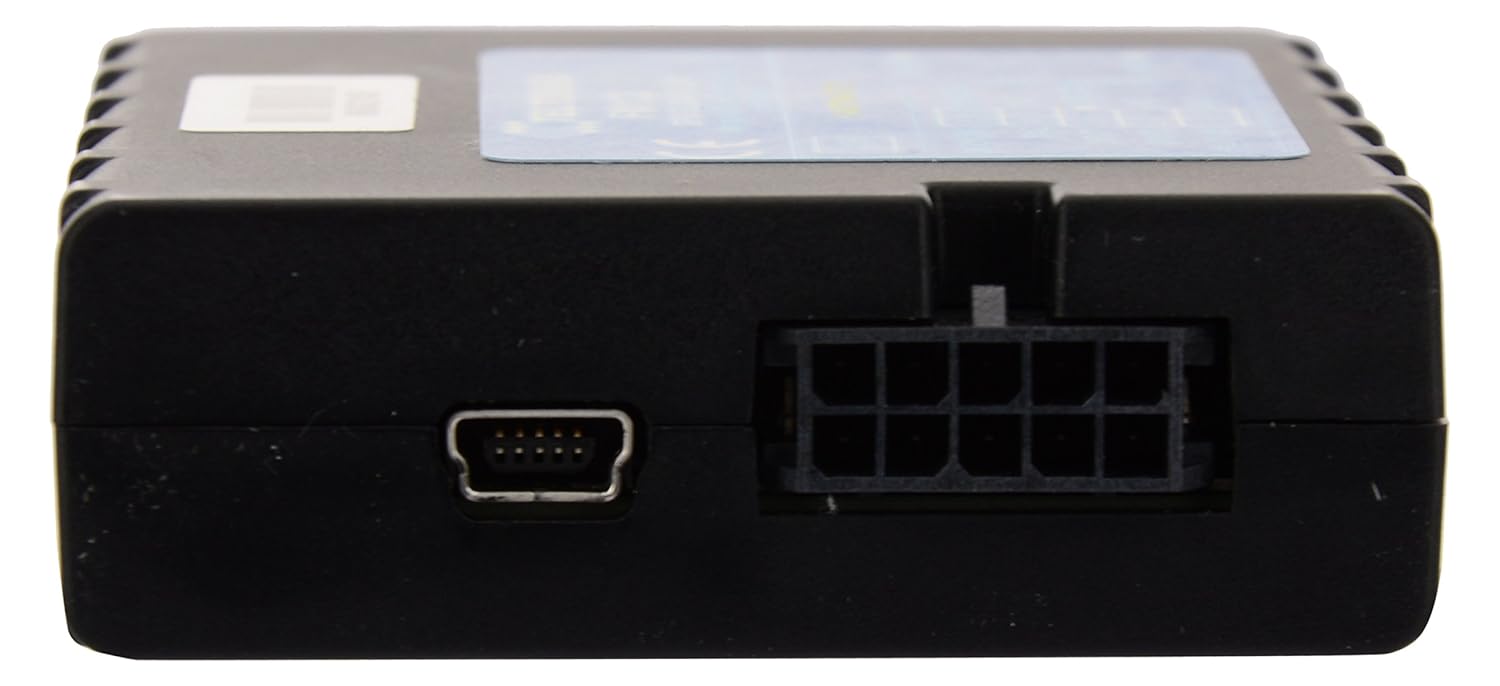
Figure 3.3: Side view of the FM1120, showing the mini-USB port on the left and the main 2x5 pin connector on the right.
3.3 Harness Cable
The included harness cable facilitates connection to the vehicle's power supply and various inputs/outputs.

Figure 3.4: The multi-colored harness cable provided with the FM1120, used for connecting the device to the vehicle's electrical system and external sensors.
4. Setup
Proper installation is crucial for the optimal performance of your FM1120 tracker. It is highly recommended that installation be performed by a qualified professional.
4.1 Power Connection
- Ensure the vehicle's ignition is off before beginning installation.
- Connect the harness cable to the FM1120 device.
- Connect the power wires of the harness to a stable power source within the vehicle. The device operates on a 9V to 36V DC supply. Ensure correct polarity: positive to positive, negative to ground.
- Connect the ignition (DIN1) wire to a switched ignition source in the vehicle to detect ignition status.
- Connect any additional input/output wires (DIN2, DIN3, DOUT1, DOUT2, AIN1, 1-Wire Data) as required for specific monitoring needs (e.g., AC on/off, temperature sensors). Refer to the device label for pin assignments.
4.2 SIM Card Insertion
The FM1120 requires a valid GSM SIM card with an active data plan to transmit tracking data. Carefully insert the SIM card into the designated slot on the device. Ensure the SIM card is correctly oriented as indicated on the device or in supplementary documentation.
4.3 Initial Power-Up and Configuration
Once all connections are secure and the SIM card is inserted, turn on the vehicle's ignition. The device will power on and attempt to establish a GPS/GLONASS fix and GSM network connection. Initial configuration, such as APN settings and server addresses, may be required using Teltonika's configuration software via the USB port. Refer to Teltonika's official documentation for detailed configuration instructions.
5. Operating Instructions
The Teltonika FM1120 GPS Tracker operates automatically once properly installed and configured. It continuously collects and transmits vehicle data to a designated server.
5.1 Real-Time Tracking
Access real-time vehicle location and status information through the provided user login credentials for a web-based tracking platform. A mobile application is also available for Android devices, offering convenient access to tracking features on the go.
5.2 Monitored Features
The FM1120 supports monitoring of various vehicle parameters, including:
- Ignition On/Off Status: Detects when the vehicle's engine is running or off.
- AC On/Off Status: Monitors the status of the vehicle's air conditioning system (requires proper wiring to an input).
- Temperature Monitoring: Capable of monitoring temperature (requires connection of a compatible temperature sensor to an analog input or 1-Wire interface).
6. Maintenance
The Teltonika FM1120 is designed for low maintenance. Follow these general guidelines to ensure its longevity and reliable operation:
- Keep Clean: Periodically clean the device exterior with a soft, dry cloth. Avoid using harsh chemicals or solvents.
- Environmental Conditions: Ensure the device is installed in an area protected from extreme temperatures, direct moisture, and excessive vibrations.
- Secure Connections: Regularly check that all cable connections are secure and free from corrosion or damage.
- Software Updates: Keep the device firmware updated to benefit from the latest features and security enhancements. Refer to Teltonika's support resources for firmware update procedures.
7. Troubleshooting
If you encounter issues with your FM1120 tracker, consider the following basic troubleshooting steps:
- Device Not Powering On:
- Check the power supply voltage (must be between 9V and 36V DC).
- Verify that the power connections (positive and ground) are correctly and securely made.
- Inspect the harness cable for any visible damage.
- No GPS Signal:
- Ensure the device has a clear view of the sky. Avoid installation under metallic objects or in enclosed spaces.
- Move the vehicle to an open area to acquire a GPS fix.
- No Data Transmission (No Tracking):
- Check if the SIM card is correctly inserted and activated with a valid data plan.
- Verify GSM network coverage in the device's location.
- Confirm that the APN settings and server address are correctly configured in the device.
- Incorrect Sensor Readings (e.g., Ignition, AC, Temperature):
- Review the wiring of the respective input/output to ensure it matches the vehicle's signals.
- Check the device configuration for correct input type and threshold settings.
For persistent issues or advanced troubleshooting, please consult Teltonika's official support resources or contact your product supplier.
8. Specifications
| Feature | Specification |
|---|---|
| Model Number | FM1120 |
| Manufacturer | Teltonika |
| Material | Carbon Fiber |
| Color | Black |
| Dimensions (L x W x H) | 6.5 cm x 5.66 cm x 1.89 cm |
| Item Weight | 69 g |
| Power Source Type | 9V to 36V DC |
| Connectivity Technology | Satellite (GPS, GLONASS, GSM) |
| Supported Application | GPS |
| Specific Uses For Product | Vehicle Tracking |
| Special Features | Real Time Vehicle Tracking System with advanced GPS & GLONASS Technologies, With Ignition On/OFF, AC On/Off & Temperature Monitoring |
9. Warranty and Support
For information regarding the warranty period and terms for your Teltonika FM1120 GPS Tracker, please refer to the documentation provided at the time of purchase or visit the official Teltonika website. For technical support, troubleshooting assistance, or inquiries about advanced features, please contact your authorized Teltonika dealer or the Teltonika customer support team.


