
MINELAB 3300-0420
Contents
Minelab GPX 5000 Gold Detector User Manual
Model: GPX 5000
1. Introduction
The Minelab GPX 5000 is an advanced gold detector designed for serious prospectors. It incorporates Minelab's proprietary Multi Period Sensing (MPS), Dual Voltage Technology (DVT), and Smart Electronic Timing Alignment (SETA) to deliver exceptional performance in various ground conditions. This manual provides comprehensive instructions for the assembly, operation, maintenance, and troubleshooting of your GPX 5000 detector.

Figure 1.1: Assembled Minelab GPX 5000 Gold Detector.
2. Safety Information
Always observe the following safety precautions when using your Minelab GPX 5000:
- Do not operate the detector near live electrical wires or in areas with unexploded ordnance.
- Avoid using the detector during lightning storms.
- Always wear appropriate footwear and protective gear, especially when digging.
- Be aware of your surroundings and potential hazards such as uneven terrain, wildlife, or private property.
- Keep the detector away from extreme temperatures and direct sunlight for prolonged periods.
- Ensure all connections are secure before operation to prevent damage.
3. Package Contents
Verify that all items listed below are present in your GPX 5000 package:
- Minelab GPX 5000 Control Box
- 11-inch Double-D Search Coil
- 15x12-inch Monoloop Search Coil
- Shaft Assembly (Upper, Middle, Lower)
- Li-ion Battery Pack
- AC Charger with International Adapters
- Headphones
- Bungee Cord
- User Manual (this document)
- DVD (Instructional)
- Finds Bag
- Harness Assembly

Figure 3.1: Complete package contents of the Minelab GPX 5000.
4. Setup and Assembly
4.1 Assembling the Detector
- Attach the Search Coil: Securely attach your chosen search coil (11" Double-D or 15x12" Monoloop) to the lower shaft using the provided bolt and washers. Ensure the coil cable is wrapped snugly around the lower and middle shafts.
- Connect Shaft Sections: Connect the lower shaft to the middle shaft, and then the middle shaft to the upper shaft. Adjust the length of the shaft to a comfortable operating position.
- Mount the Control Box: Slide the control box onto the mounting bracket on the upper shaft. Ensure it clicks securely into place.
- Connect Coil Cable: Plug the search coil cable connector into the corresponding port on the control box. Twist the locking collar to secure the connection.
- Attach Battery: Connect the Li-ion battery pack to the control box. The battery can be worn on the included harness for balanced weight distribution.
- Connect Headphones: Plug the headphones into the audio jack on the control box.
4.2 Charging the Battery
Before first use, fully charge the Li-ion battery. Connect the AC charger to the battery pack and plug it into a wall outlet. The charging indicator light will show the charging status. A full charge typically takes several hours.
5. Operating Instructions
5.1 Basic Operation
- Power On: Press and hold the Power button on the control box until the LCD screen illuminates.
- Ground Balance: Perform a ground balance procedure to optimize performance for the current ground conditions. This is crucial for gold prospecting. Refer to the detailed instructions in the "Ground Balance" section of this manual.
- Sweep the Coil: Hold the detector with the coil parallel to the ground and sweep it slowly from side to side, overlapping each sweep.
- Target Response: Listen for changes in the audio tone, which indicate the presence of a target. The LCD screen may also display target information.
- Pinpointing: Once a target is detected, use the pinpoint mode (if available) or narrow down the target location by sweeping the coil in a cross-pattern.
5.2 Understanding Controls and Settings
The GPX 5000 offers extensive customization through its various controls and settings. Familiarize yourself with the control panel:
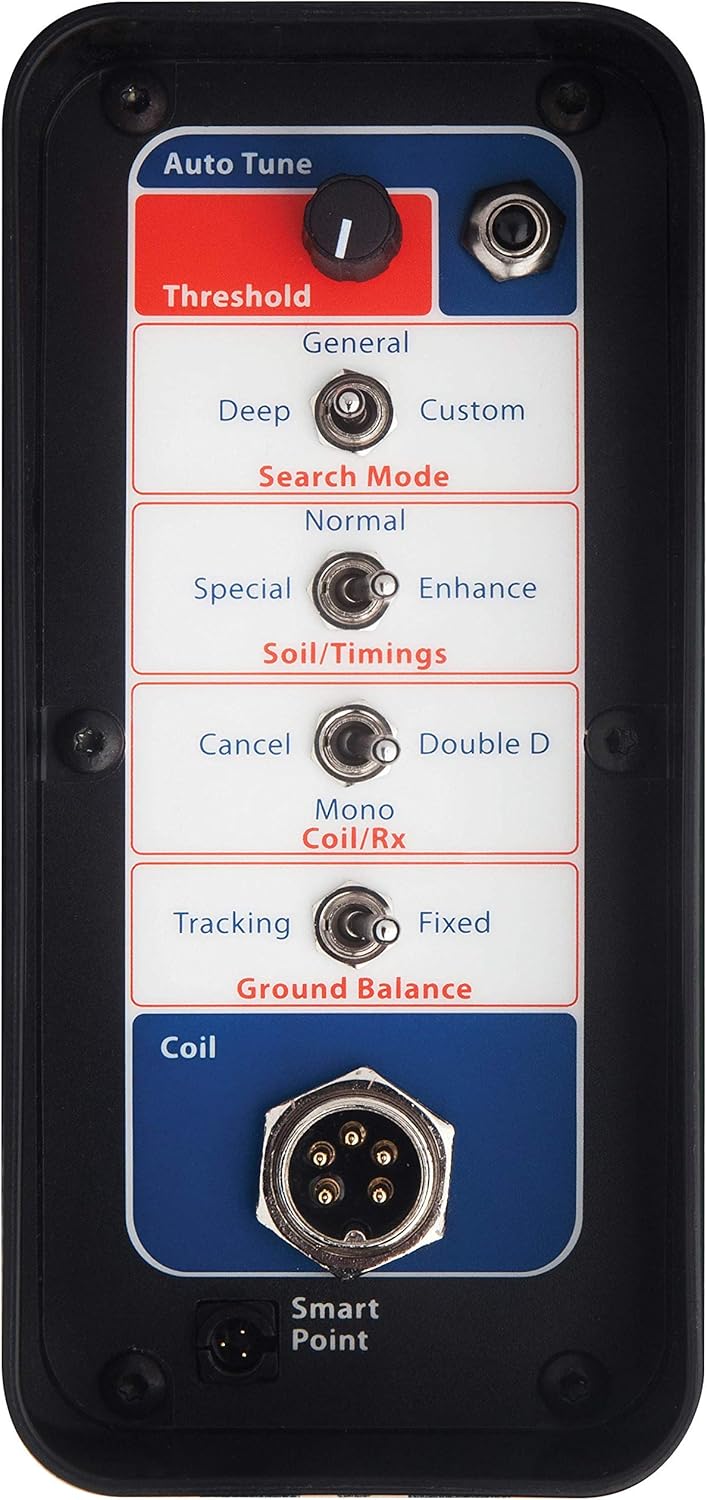
Figure 5.1: GPX 5000 Control Panel Layout.
- Threshold: Adjusts the continuous background hum. A slight audible hum is ideal for detecting faint targets.
- Search Mode: Select from preset modes like Coin/Relic, Salt/Gold, Fine Gold, High-Mineral, Patch, Hi-trash, and Pinpoint. Each mode is optimized for different detecting conditions and target types.
- Soil/Timings: Offers 8 soil timings (e.g., Normal, Sensitive Extra, Enhance, Sharp, Deep, Salt Gold, Fine Gold, Sens Smooth) to adapt to varying ground mineralization.
- Coil/Rx: Switch between Mono and Double-D coil types.
- Ground Balance: Choose between Tracking (automatic adjustment) and Fixed (manual adjustment).
- Audio Settings: Customize audio response, including tone, volume, and signal peak, to enhance target signals.


Figure 5.2: Examples of Search Modes and Custom Settings.
5.3 Advanced Technologies (MPS, DVT, SETA)
The GPX 5000 utilizes three key technologies for superior gold detection:
- Multi Period Sensing (MPS): This technology transmits a pulsed magnetic field into the ground and analyzes the decay of the received signal over multiple time periods. This allows for excellent sensitivity to small gold nuggets and deep targets in highly mineralized ground.
- Dual Voltage Technology (DVT): DVT uses two voltage levels to transmit the magnetic field, which further enhances sensitivity and ground balancing capabilities, especially in difficult ground conditions.
- Smart Electronic Timing Alignment (SETA): SETA provides precise control over the detector's timings, allowing for optimal performance across various ground types and target sizes. This reduces false signals and improves target identification.

Figure 5.3: Minelab's Core Technologies.
5.4 Gold Detecting in the Field
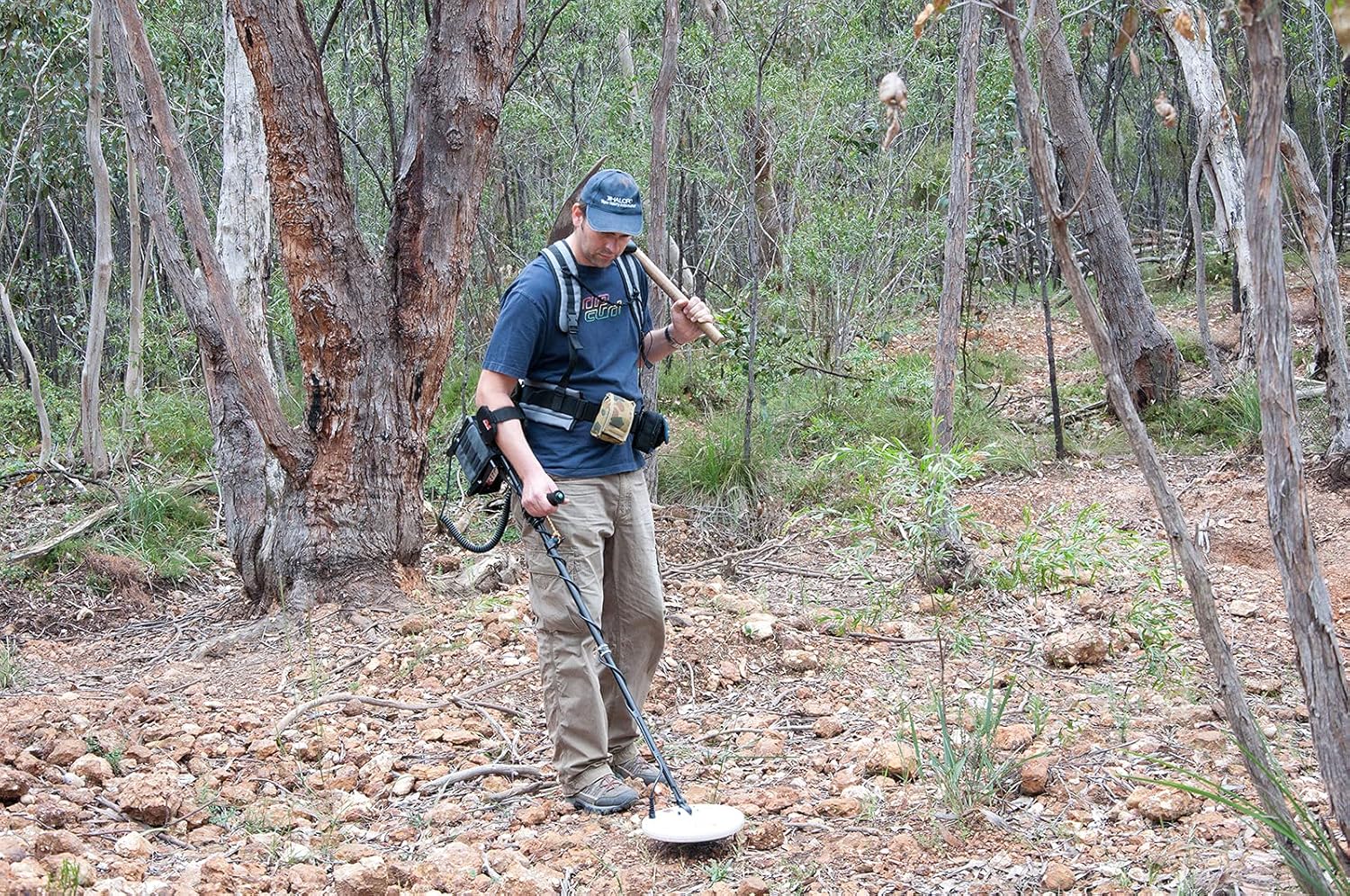
Figure 5.4: Prospecting with the GPX 5000.
For optimal gold detection, consider the following:
- Slow and Low: Sweep the coil slowly and keep it as close to the ground as possible without touching.
- Overlap Sweeps: Ensure each sweep overlaps the previous one by about half the coil's width to avoid missing targets.
- Listen Carefully: Pay close attention to subtle changes in the audio. Gold signals can be very faint.
- Dig All Signals: Especially when prospecting for gold, it's often recommended to dig all repeatable signals, as gold can produce varied responses.
Video 5.1: Demonstration of Superior Gold Detecting with the Minelab GPX 5000. This video shows the detector in use, highlighting its ability to find gold in various terrains.
6. Maintenance
- Cleaning: After each use, wipe down the detector with a damp cloth to remove dirt and dust. Do not use harsh chemicals or abrasive cleaners.
- Coil Care: Keep the search coil clean. Avoid dragging it excessively over rough surfaces to prevent wear.
- Cable Management: Ensure coil cables are not kinked or damaged. Secure them properly to the shaft.
- Battery Storage: Store the Li-ion battery in a cool, dry place. For long-term storage, charge the battery to approximately 50% capacity.
- Storage: Store the detector in a dry, secure location, away from extreme temperatures and direct sunlight.
- Inspections: Periodically check all connections and components for signs of wear or damage.
7. Troubleshooting
| Problem | Possible Cause | Solution |
|---|---|---|
| No power | Battery discharged or not connected properly. | Charge battery. Ensure battery cable is securely connected to the control box. |
| Excessive false signals | Incorrect ground balance, high mineralization, or electrical interference. | Re-ground balance. Adjust Soil/Timings setting. Move away from power lines or other electronic devices. Reduce sensitivity. |
| Weak or no target response | Coil cable loose or damaged, incorrect settings, or target too deep/small. | Check coil cable connection. Increase sensitivity. Try a different search mode or timing. |
| LCD screen not working | Loose connection or internal fault. | Ensure control box connections are secure. If problem persists, contact Minelab support. |
8. Specifications
| Feature | Detail |
|---|---|
| Model Name | GPX 5000 |
| Technology | MPS, DVT, SETA |
| Search Modes | 6 preset (Coin/Relic, Salt/Gold, Fine Gold, High-Mineral, Patch, Hi-trash, Pinpoint) |
| Soil Timings | 8 (Normal, Sensitive Extra, Enhance, Sharp, Deep, Salt Gold, Fine Gold, Sens Smooth) |
| Coils Included | 11" Double-D, 15x12" Monoloop |
| Ground Balance | Automatic Tracking, Fixed, Ground Balance Off |
| Battery | Li-ion Rechargeable |
| Display | Backlit LCD |
| Weight | Approximately 5.3 Pounds (2.4 kg) |
| Operating Frequency | Multi-frequency (Pulse Induction) |
9. Warranty and Support
9.1 Warranty Information
Minelab products are manufactured to the highest standards and come with a limited warranty. Please refer to the warranty card included with your product or visit the official Minelab website for detailed warranty terms and conditions specific to your region. Keep your proof of purchase for warranty claims.
9.2 Customer Support
For technical assistance, spare parts, or service, please contact Minelab Customer Support. You can find contact information on the official Minelab website or through your authorized dealer. When contacting support, please have your product model and serial number ready.
Minelab Official Website: www.minelab.com
Ask a question about this manual
Ask about setup, troubleshooting, compatibility, parts, safety, or missing instructions. Manuals+ will review the question and use this page’s manual context to help answer it.