
1. Introduction and Safety Information
This manual provides essential instructions for the safe and efficient operation, installation, and maintenance of your Candy CMXG20DW microwave oven. Please read this manual thoroughly before using the appliance and keep it for future reference.
Important Safety Instructions
- Do not attempt to operate this oven with the door open as this can result in harmful exposure to microwave energy.
- Do not place any object between the oven front face and the door, or allow soil or cleaner residue to accumulate on sealing surfaces.
- Do not operate the oven if it is damaged. It is particularly important that the oven door closes properly and that there is no damage to the: (1) door (bent), (2) hinges and latches (broken or loosened), (3) door seals and sealing surfaces.
- The oven should not be adjusted or repaired by anyone except properly qualified service personnel.
- Always ensure the glass turntable and turntable ring assembly are correctly positioned before cooking.
- All food and food containers must be placed on the glass turntable for cooking.
- Liquids or other foods must not be heated in sealed containers since they are liable to explode.
- Only use utensils that are suitable for use in microwave ovens.
- If smoke is observed, switch off or unplug the appliance and keep the door closed in order to stifle any flames.
- The microwave oven is intended for heating food and beverages. Drying of clothing and heating of warming pads, slippers, sponges, damp cloth and similar may lead to risk of injury, ignition or fire.
2. Product Overview
The Candy CMXG20DW is a 20-liter solo microwave oven with grill functionality, designed for convenient food preparation. It features an electronic control panel and a variety of automatic cooking programs.
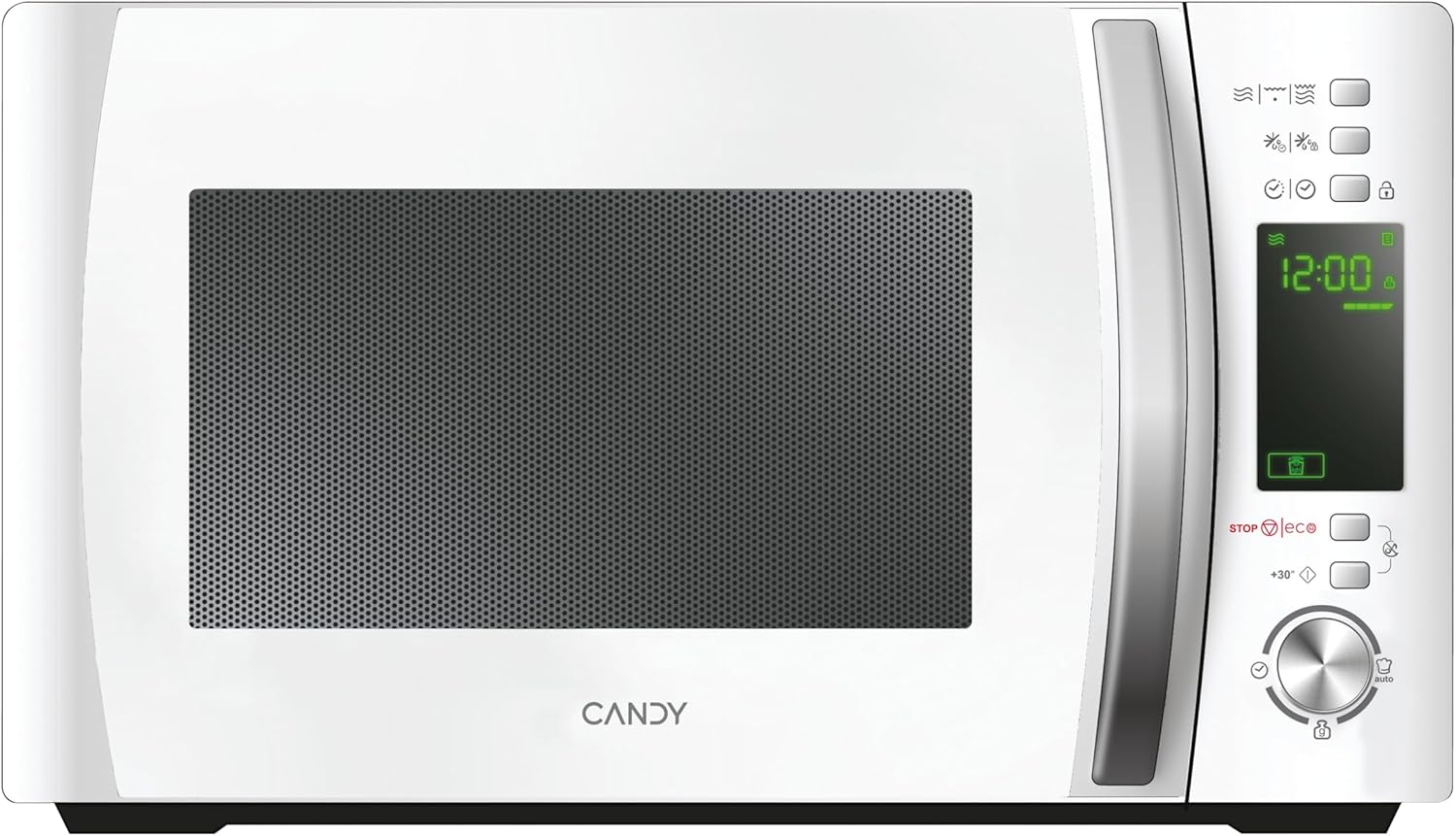
Figure 2.1: Front view of the Candy CMXG20DW microwave oven, showing the control panel and door.
Key Features
- Microwave and Grill Functions: Offers both microwave heating (700W) and grilling (1000W) capabilities.
- Electronic Control Programmer: Intuitive digital control panel for easy programming.
- Capacity: 20 Liters internal volume.
- Turntable: 24.5 cm diameter glass turntable for even cooking.
- Grill Accessory: Includes one grill rack.
- Automatic Menus: 10 pre-set automatic cooking programs for various food types (e.g., Pizza, potatoes, meat, fish, vegetables, hot drinks, pasta, pastries, baby food, light cooking).
- Automatic Defrost: Defrost by weight or time.
- Convenience Functions: Delayed start, express start, cooking duration programming, start time programming, 2-function automatic sequences.
- Safety and Efficiency: Child safety lock, Eco mode, Silence mode.
- Cook-in App Compatibility: Access recipes and usage tips via the dedicated Cook-in App.
3. Setup and Installation
Unpacking and Placement
- Remove all packaging materials and accessories. Inspect the oven for any damage such as dents or a broken door. Do not install if damaged.
- Place the microwave oven on a stable, level surface that can support its weight and the heaviest food item likely to be cooked in the oven.
- Ensure adequate ventilation. Leave a minimum of 20 cm (8 inches) of space above the oven, 10 cm (4 inches) at the rear, and 5 cm (2 inches) on each side.
- Do not block air vents. Blocking vents can damage the oven and affect cooking results.
- Keep the oven away from heat sources and strong magnetic fields.
- Do not place the oven in a cabinet unless specifically designed for built-in installation. This model is designed for freestanding use.
Turntable Installation
The turntable assembly is crucial for even cooking. Ensure it is correctly installed before use.
- Place the roller ring inside the oven cavity depression.
- Position the glass turntable on top of the roller ring, ensuring it sits securely in the center hub.
- Never place the glass tray upside down. The glass tray should never be restricted.
- The glass tray and turntable ring assembly must always be used during cooking.
- All food and food containers are always placed on the glass tray for cooking.

Figure 3.1: Interior view showing the glass turntable correctly installed with food items.
4. Operating Instructions
Your Candy CMXG20DW microwave oven offers various cooking modes and functions. Familiarize yourself with the control panel for optimal use.
Control Panel Overview
The electronic control panel features a digital display, function buttons, and a rotary knob for setting time and weight. Refer to the appliance for specific button layouts.
Basic Microwave Cooking
- Place food in a microwave-safe container on the glass turntable.
- Close the oven door securely.
- Select the desired microwave power level (5 levels available, maximum 700W).
- Use the rotary knob to set the cooking time.
- Press the Start button to begin cooking.
Grill Function
The grill function (1000W) is ideal for browning and crisping food.
- Place food on the grill rack provided, then place the rack on the glass turntable.
- Close the oven door.
- Select the grill function (1 power level available).
- Set the desired grilling time using the rotary knob.
- Press the Start button.
Microwave + Grill Combination
Combine microwave and grill for faster cooking with a browned finish (2 power levels available for combination).
- Place food in a suitable container on the grill rack or turntable.
- Close the oven door.
- Select one of the two available Microwave + Grill combination power levels.
- Set the cooking time.
- Press the Start button.
Automatic Defrost
Defrost food efficiently by weight or time.
- Defrost by Weight: Select the defrost by weight function, then use the rotary knob to input the food's weight. The oven will automatically calculate the defrosting time.
- Defrost by Time: Select the defrost by time function, then use the rotary knob to set the desired defrosting duration.
- Press the Start button to begin.
Automatic Menus (10 Programs)
The oven includes 10 pre-set automatic menus for common dishes. Consult the appliance's display or a quick guide for specific menu numbers and corresponding food types.
- Place the food in the oven.
- Select the desired automatic menu program.
- Adjust the quantity/weight if prompted (some menus may require this).
- Press the Start button.
Additional Functions
- Express Start: Allows for quick cooking at full power, typically in 30-second increments.
- Delayed Start: Program the oven to start cooking at a later time.
- Child Safety Lock: Prevents accidental operation by children. Refer to your appliance's control panel for activation/deactivation instructions.
- Eco Mode: Reduces energy consumption when the oven is idle.
- Silence Mode: Disables audible alerts for quiet operation.
Cook-in App
The Candy CMXG20DW is compatible with the free Cook-in App. Download the app to access additional recipes, usage tips, and maintenance advice for your microwave oven.
5. Maintenance and Cleaning
Regular cleaning and maintenance will ensure the longevity and efficient operation of your microwave oven.
- Oven Cavity: Clean the oven cavity after each use with a damp cloth. For stubborn stains, use a mild detergent. Avoid abrasive cleaners or scouring pads.
- Door and Seals: Wipe the door, door seals, and adjacent parts frequently with a damp cloth to remove spills and splatters.
- Glass Turntable and Roller Ring: These can be removed and washed in warm soapy water or in a dishwasher. Ensure they are completely dry before placing them back in the oven.
- Exterior: Clean the exterior surface with a soft, damp cloth. Do not use harsh chemicals or abrasive materials.
- Grill Rack: Wash the grill rack in warm soapy water after use.
- Odour Removal: To remove odors, combine a cup of water with the juice of one lemon in a microwave-safe bowl. Heat on high for 5-7 minutes, then let it sit in the oven for a few minutes before wiping clean.
- Always unplug the appliance from the power outlet before cleaning.
6. Troubleshooting
Before contacting customer service, please refer to the following table for common issues and their solutions.
| Problem | Possible Cause | Solution |
|---|---|---|
| Oven will not start. | Power cord not plugged in. Door not closed properly. Fuse blown or circuit breaker tripped. | Ensure the power cord is securely plugged into an electrical outlet. Close the oven door firmly. Check your household fuse/circuit breaker box. |
| Food is not heating. | Door not closed properly. Cooking time not set. Power level too low. | Ensure the oven door is completely closed. Set the desired cooking time. Increase the microwave power level. |
| Turntable makes noise or does not rotate. | Turntable or roller ring not correctly positioned. Food item too large or heavy, obstructing rotation. Debris under the turntable. | Re-position the turntable and roller ring. Use a smaller or lighter container. Clean the area under the turntable. |
| Display shows an error code. | Internal malfunction. | Unplug the oven for a few minutes, then plug it back in. If the error persists, contact qualified service personnel. |
7. Specifications
Technical details for the Candy CMXG20DW microwave oven.
| Brand | Candy |
| Model Number | CMXG20DW |
| Type | Solo Microwave with Grill |
| Capacity | 20 Liters |
| Microwave Power | 700 W (5 power levels) |
| Grill Power | 1000 W (1 power level) |
| Combination Power | 2 power levels (Microwave + Grill) |
| Turntable Diameter | 24.5 cm |
| Dimensions (L x W x H) | 44 x 35.75 x 25.9 cm |
| Weight | 11 kg |
| Color | White |
| Interior Material | Painted Cavity |
| Exterior Material | Aluminum |
| Voltage | 230 Volts |
| Special Features | Cook-in App, Child Safety Lock, Eco Mode, Silence Mode, Automatic Defrost |
8. Warranty and Support
For warranty information, please refer to the warranty card included with your product packaging or contact your retailer. Keep your proof of purchase for any warranty claims.
For technical support or service, please contact Candy customer service. Contact details can typically be found on the manufacturer's official website or in your product documentation.


