
Product Overview
The Rain Bird ESP-TM2 is a user-friendly 6-station irrigation controller designed for both indoor and outdoor installations. It features a familiar interface for easy navigation and programming, ensuring efficient management of your sprinkler system. Key functionalities include a rain sensor input with bypass capability, a master valve/pump start circuit, and non-volatile memory for program retention.
- Familiar, easy to navigate user interface
- Rain sensor input with bypass capability
- Master valve/pump start circuit
- Non-volatile (100 year) storage memory
- Electronic diagnostic circuit breaker
- Remote accessory port for Rain Bird approved accessory devices
Setup and Installation
The ESP-TM2 controller is designed for straightforward installation. Ensure the unit is mounted securely in a suitable indoor or outdoor location, away from direct sunlight and extreme weather conditions. Proper wiring of the power supply, zone valves, and any optional accessories is crucial for correct operation.
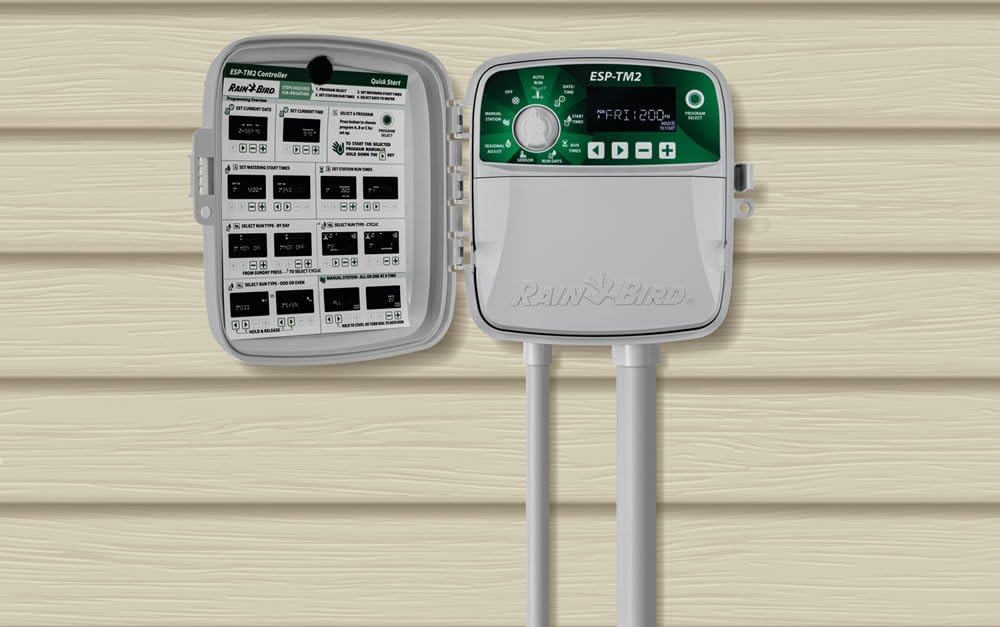
For detailed wiring instructions, refer to the installation guide provided with your controller. The unit supports 120 Volts (AC) power input.
Operating Instructions
The ESP-TM2 features a simple dial and button interface for programming. Rotate the dial to select different functions such as setting the date/time, start times, run times, and water days. Use the arrow buttons to adjust values.

Programming Your Schedule
- Set Date/Time: Rotate the dial to 'Date/Time' and use the +/- buttons to set the current date and time.
- Set Start Times: Rotate the dial to 'Start Times'. You can set up to four independent start times per program.
- Set Run Times: Rotate the dial to 'Run Times'. Select each station and set the desired watering duration in minutes.
- Set Water Days: Rotate the dial to 'Water Days'. Choose specific days of the week for watering, or select odd/even day watering.
Manual Watering
To manually water a specific station or all stations, rotate the dial to 'Manual Watering'. Select the desired station(s) and set the run time. The system will automatically return to its programmed schedule after manual watering is complete.
Seasonal Adjust
The 'Seasonal Adjust' feature allows you to globally increase or decrease watering durations for all stations by a percentage, adapting to changing weather conditions without reprogramming each station individually.
Rain Sensor Input
The controller includes a rain sensor input with bypass capability. Connect a compatible rain sensor to automatically suspend irrigation during rainfall, conserving water. The bypass feature allows you to override the sensor if needed.
Wi-Fi Connectivity (LNK Ready)
The ESP-TM2 is LNK Ready, meaning it can be upgraded with an optional Rain Bird LNK Wi-Fi Module (sold separately) for remote control and advanced features via a smartphone app. This allows for remote scheduling adjustments and monitoring.
Maintenance
Regular maintenance ensures the longevity and optimal performance of your Rain Bird ESP-TM2 controller and irrigation system. Periodically inspect wiring connections for any signs of wear or damage. Ensure the controller's housing is clean and free from debris, especially around ventilation openings.
- Seasonal Checks: Adjust seasonal watering percentages as weather patterns change to prevent over or under-watering.
- Rain Sensor: If a rain sensor is installed, periodically check its functionality and ensure it is free from obstructions.
- Battery Backup: The controller features non-volatile memory, eliminating the need for battery backup to retain programming during power outages.
Troubleshooting
If your ESP-TM2 controller is not functioning as expected, consult the following common troubleshooting tips:
- No Display/Power: Check the power connection and ensure the 120V AC power source is active. Verify the electronic diagnostic circuit breaker has not tripped.
- Stations Not Watering: Ensure the dial is set to 'AUTO'. Check individual station run times and water days. Verify that the master valve is functioning correctly.
- Over-watering: Check seasonal adjust settings and ensure the rain sensor (if installed) is properly connected and not bypassed during rain.
- Programming Issues: If programming seems incorrect, reset the controller (refer to the full manual for reset procedures) and reprogram.
Specifications
| Brand | Rain Bird |
| Model | TM2-6 |
| Voltage | 120 Volts (AC) |
| Product Dimensions (L x W x H) | 7.92"L x 3.51"W x 7.86"H |
| Material | Plastic |
| Display Type | LCD |
| Operating Temperature | 65 Degrees Celsius |
| Item Weight | 1.4 Kilograms |
| Included Components | 1 irrigation controller |
Warranty and Support
Rain Bird offers various protection plans for your ESP-TM2 controller to ensure long-term peace of mind. These plans may include extended coverage beyond the standard manufacturer's warranty.
- 3-Year Protection Plan: Available for purchase.
- 4-Year Protection Plan: Available for purchase.
- Complete Protect: A monthly plan covering eligible past and future purchases.
For specific warranty details, technical support, or to inquire about protection plans, please visit the official Rain Bird website or contact their customer service.


