
VisionTek 900920
VisionTek 16GB DDR4 2400MHz Desktop Memory (Model 900920) User Manual
Comprehensive guide for installation, operation, and maintenance.
1. Introduction
This manual provides essential information for the installation, operation, and maintenance of your VisionTek 16GB DDR4 2400MHz Desktop Memory module. This high-performance memory is designed to enhance your desktop computer's speed and multitasking capabilities by providing additional space for programs and applications to run efficiently.
2. Setup and Installation
Installing the VisionTek DDR4 DIMM is a straightforward process. Always refer to your computer's motherboard manual for specific instructions and safety precautions. Ensure your system is powered off and unplugged before beginning installation.
2.1 Safety Precautions
- Always disconnect the power cord from your computer before opening the case.
- Discharge any static electricity by touching a grounded metal object (e.g., the computer's metal chassis) before handling components. Consider using an anti-static wrist strap.
- Handle the memory module by its edges to avoid touching the gold connectors or integrated circuits.
2.2 Installation Steps
- Prepare Your System: Power down your computer completely and unplug the power cord. Open the computer case according to your system's instructions.
- Locate DIMM Slots: Identify the DDR4 DIMM slots on your motherboard. These are typically long slots with clips on each end. Consult your motherboard manual for the correct slot configuration for single or dual-channel memory.
- Open Clips: Gently push the clips at both ends of the DIMM slot outwards to open them.
- Align Module: Hold the VisionTek memory module by its edges. Align the notch on the bottom edge of the module with the key in the DIMM slot. DDR4 modules have a single notch slightly off-center. Do not force the module if it does not align.
- Insert Module: With the notch aligned, place the module into the slot. Apply firm, even pressure to both ends of the module simultaneously until the clips snap into place, securing the module.
- Verify Installation: Ensure both clips are fully closed and the module is seated firmly and evenly in the slot.
- Close Case and Power On: Close your computer case, reconnect the power cord, and power on your system. The system should automatically detect the new memory.
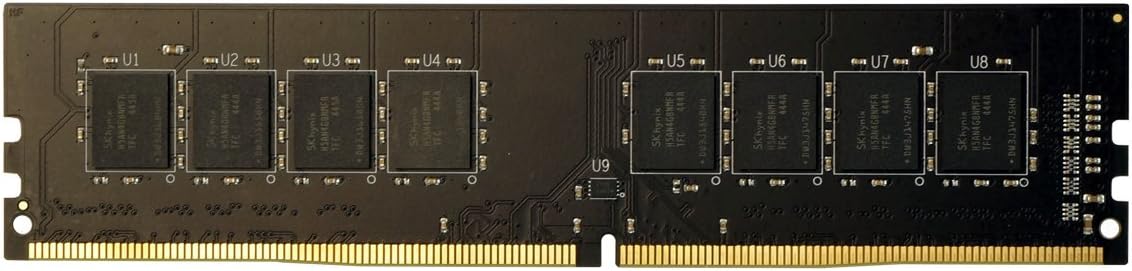
Figure 1: VisionTek 16GB DDR4 2400MHz Desktop Memory Module. This image shows the physical appearance of the memory module, highlighting its form factor and connectors, which are crucial for proper alignment during installation.
3. Operating Instructions
Once properly installed, the VisionTek DDR4 memory module operates automatically within your computer system. Modern operating systems and motherboards are designed to detect and utilize installed RAM without user intervention. The memory works continuously to store and retrieve data for the CPU, facilitating multitasking and overall system performance.
To verify that the memory is recognized, you can check your system's BIOS/UEFI settings or the system information within your operating system (e.g., Task Manager in Windows, About This Mac in macOS, or free -h command in Linux).
4. Maintenance
Memory modules generally require minimal maintenance. However, adhering to general computer maintenance practices can help ensure optimal performance and longevity:
- Keep System Clean: Regularly clean the interior of your computer case to prevent dust buildup, which can impede airflow and lead to overheating. Use compressed air to gently remove dust from components, including around the DIMM slots.
- Ensure Proper Ventilation: Operate your computer in a well-ventilated area to prevent excessive heat buildup, which can stress components.
- Avoid Physical Damage: Handle memory modules carefully if they need to be removed or reinstalled. Avoid bending or applying excessive force.
5. Troubleshooting
If you encounter issues after installing your VisionTek memory module, consider the following troubleshooting steps:
- System Not Booting / No Display:
- Ensure the memory module is fully seated in its slot and the clips are locked.
- Try reseating the module.
- If multiple modules are installed, try booting with only one module at a time to identify a potentially faulty module.
- Check your motherboard manual for specific beep codes that indicate memory issues.
- Incorrect Memory Amount Detected:
- Verify that the memory module is correctly seated.
- Ensure your motherboard supports the installed memory capacity and speed.
- Update your motherboard's BIOS/UEFI to the latest version, as this can improve memory compatibility.
- System Instability / Blue Screens (BSOD):
- Run a memory diagnostic tool (e.g., Windows Memory Diagnostic, MemTest86) to check for errors.
- Ensure your system's BIOS/UEFI settings for memory (e.g., XMP/DOCP profiles) are correctly configured or set to default.
6. Specifications
| Feature | Detail |
|---|---|
| Brand | VisionTek |
| Model Number | 900920 |
| Memory Capacity | 16 GB |
| RAM Memory Technology | DIMM (DDR4) |
| Memory Speed | 2400 MHz (PC4-19200) |
| Pin Type | 288-pin |
| Compatible Devices | Desktop Computers |
7. Warranty Information
Specific warranty details for the VisionTek 16GB DDR4 2400MHz Desktop Memory module are not provided in this document. For comprehensive warranty terms and conditions, please refer to the official VisionTek website or the documentation included with your purchase. Retain your proof of purchase for warranty claims.
8. Customer Support
If you require further assistance or have questions regarding your VisionTek memory module, please visit the official VisionTek support website or contact their customer service department. Contact information can typically be found on the manufacturer's website or product packaging.
VisionTek Official Website: www.visiontek.com (This is a placeholder link, please verify the actual support URL.)
Related documents900920


Ask a question about this manual
Ask about setup, troubleshooting, compatibility, parts, safety, or missing instructions. Manuals+ will review the question and use this page’s manual context to help answer it.