
1. Introduction
This manual provides essential information for the proper installation, operation, and maintenance of your Master Lock 389DAT Universal Trailer Coupler Lock. Designed for enhanced security, this lock is compatible with most 1-7/8 inch (48mm), 2 inch (51mm), and 2-5/16 inch (59mm) trailer couplers. Please read these instructions thoroughly before use to ensure optimal performance and security.
2. Product Features
- Universal Fit: Designed to fit most 1-7/8 inch (48mm), 2 inch (51mm), and 2-5/16 inch (59mm) couplers.
- Advanced Locking Mechanism: Provides robust resistance against picking and prying attempts.
- Durable Construction: Made from brass with a painted red finish, offering resistance to rust and corrosion.
- High Visibility: Bright red finish acts as a visual deterrent to potential thieves.
- Simple Operation: Easy installation and removal with a key-operated mechanism.
3. Compatibility
The Master Lock 389DAT is engineered for universal application, fitting a wide range of trailer couplers. It is specifically designed to secure couplers of the following sizes:
- 1-7/8 inch (48mm)
- 2 inch (51mm)
- 2-5/16 inch (59mm)
Ensure your trailer's coupler size falls within this range for proper fit and maximum security.
4. Package Contents
Your Master Lock 389DAT Universal Trailer Coupler Lock package includes:
- 1 x Master Lock 389DAT Coupler Lock
- 2 x Keys
5. Setup & Installation
Follow these steps to correctly install your Master Lock 389DAT Coupler Lock:
- Prepare the Lock: Insert one of the provided keys into the lock cylinder and turn it to unlock the mechanism. The two halves of the lock will separate or slide apart, revealing the internal components.
- Position on Coupler: Place the larger, fixed half of the lock over the top of your trailer's coupler. Ensure the internal ball-shaped component of the lock is positioned inside the coupler's opening, where the hitch ball would normally sit.
- Adjust and Secure: Slide the movable half of the lock towards the fixed half, ensuring it snugly encloses the coupler. The design allows for adjustment to fit various coupler sizes. Once the lock is tightly fitted around the coupler, turn the key to the locked position. Remove the key.
- Verify Installation: Gently attempt to pull the lock off the coupler. If installed correctly, the lock should be firmly in place and not easily removable, preventing unauthorized hitching of your trailer.
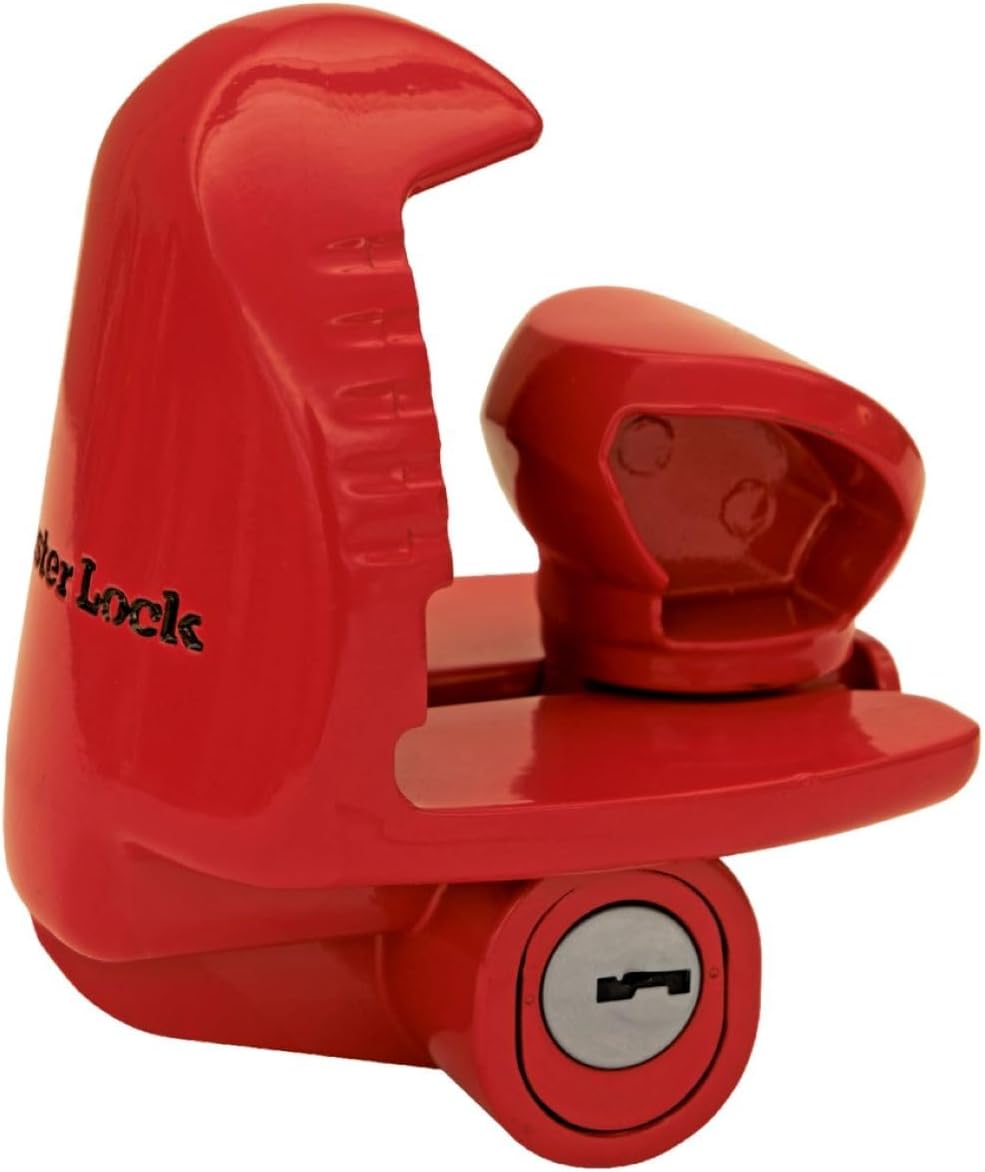
Figure 1: The Master Lock 389DAT Coupler Lock.

Figure 2: Close-up view of the Master Lock 389DAT installed on a trailer coupler.

Figure 3: Wider view of the Master Lock 389DAT installed on a trailer coupler.
Installation Videos:
Video 1: Demonstrates the installation process of the Master Lock Trailer Coupler Lock.
Video 2: Provides a detailed overview and installation guide for the Master Lock Trailer Coupler Lock.
Video 3: Explains how the Universal Trailer Lock works and its benefits.
Video 4: An honest review demonstrating the functionality of the Trailer Hitch Lock.
Video 5: Shows the Master Lock providing peace of mind for trailer security.
6. Operation
Operating the Master Lock 389DAT is straightforward:
- Locking: With the lock positioned correctly on the trailer coupler, ensure the two halves are fully engaged and snug. Insert the key and turn it clockwise (or counter-clockwise, depending on the lock mechanism) until it clicks into the locked position. Remove the key.
- Unlocking: Insert the correct key into the lock cylinder. Turn the key to the unlocked position. The movable half of the lock will release, allowing you to separate the two halves and remove the lock from the coupler.
Always remove the key after locking to prevent loss and maintain security.
7. Maintenance
To ensure the longevity and reliable performance of your Master Lock 389DAT, follow these maintenance guidelines:
- Regular Cleaning: Periodically clean the lock with a damp cloth to remove dirt, dust, and debris.
- Lubrication: Apply a small amount of graphite lubricant or a silicone-based spray to the keyway and internal locking mechanism every 6-12 months, or more frequently in harsh environments. This helps prevent corrosion and ensures smooth operation.
- Inspect for Damage: Regularly inspect the lock for any signs of wear, damage, or corrosion. If significant damage is observed, replace the lock to maintain optimal security.
- Key Care: Keep your keys clean and free from debris. Avoid using excessive force when inserting or turning the key.
8. Troubleshooting
If you encounter issues with your Master Lock 389DAT, consider the following:
- Lock is Stiff or Hard to Turn: This may be due to dirt or lack of lubrication. Clean the lock and apply lubricant as described in the Maintenance section.
- Key Does Not Insert Fully: Check for any foreign objects in the keyway. Ensure you are using the correct key.
- Lock Does Not Engage Properly: Ensure the lock is correctly positioned and fully enclosing the trailer coupler. Adjust the sliding mechanism to achieve a snug fit before attempting to lock.
- Lost Keys: Master Lock does not provide replacement keys based on a code. It is recommended to keep a spare key in a secure location. If all keys are lost, the lock may need to be professionally removed or replaced.
9. Specifications
| Attribute | Detail |
|---|---|
| Brand | Master Lock |
| Model Number | 389DAT |
| Lock Type | Key Lock |
| Material | Brass |
| Color | Red |
| Item Weight | 1 Pound |
| Product Dimensions (L x W x H) | 3.6 x 7.6 x 6.7 inches |
| Special Features | Advanced locking mechanism, Resists picking and prying, Rekeyable |
| Recommended Uses | Securing trailers |
10. Warranty & Support
The Master Lock 389DAT Universal Trailer Coupler Lock is backed by a Limited Lifetime Warranty. This warranty provides peace of mind, ensuring the product is free from defects in material and workmanship for the life of the product. For warranty claims or technical support, please refer to the official Master Lock website or contact their customer service department directly.
For additional information and support, visit the Master Lock Store.


