
1. Introduction
This manual provides detailed instructions for the safe and effective operation of your Profile 191000001 Digital Multimeter. This device is designed for measuring DC/AC voltage, DC current, resistance, diode forward voltage drop, and transistor hFE. Please read this manual thoroughly before use and retain it for future reference.
2. Safety Information
WARNING: Failure to follow these safety instructions can result in electric shock, fire, or personal injury.
- Always ensure the multimeter is in good working condition before use. Inspect test leads for damage.
- Do not apply more than the rated voltage (600V DC/AC) between the terminals or between any terminal and ground.
- Use extreme caution when working with voltages above 30V AC RMS, 42V peak, or 60V DC. These voltages pose a shock hazard.
- Always disconnect the test leads from the circuit before changing functions.
- Do not attempt to measure current on a circuit with voltage exceeding 600V.
- Ensure the correct function and range are selected for the measurement.
- Replace batteries when the low battery indicator appears to ensure accurate readings.
- Do not operate the multimeter in explosive atmospheres or in the presence of flammable gases or dust.
3. Package Contents
Verify that all items listed below are present in your package:
- Profile 191000001 Digital Multimeter
- One pair of Test Leads (Red and Black)
- Transistor hFE Test Adapter
- 2 x 1.5V AAA Batteries (may be pre-installed)
- User Manual

Figure 1: The Profile 191000001 Digital Multimeter, including the main unit, red and black test leads, and the hFE transistor test adapter.
4. Setup
4.1. Battery Installation
The multimeter requires two 1.5V AAA batteries for operation. These are typically included and may be pre-installed. If not, or if replacement is needed:
- Ensure the multimeter is turned OFF.
- Locate the battery compartment cover on the back of the unit.
- Use a screwdriver to remove the screw securing the cover.
- Insert the two AAA batteries, observing the correct polarity (+ and - markings).
- Replace the battery compartment cover and secure it with the screw.
4.2. Connecting Test Leads
The test leads are essential for making measurements. Connect them as follows:
- Insert the black test lead into the 'COM' (Common) jack.
- For most voltage, resistance, and diode measurements, insert the red test lead into the 'VΩmA' jack.
- For current measurements up to 10A, insert the red test lead into the '10A' jack.
5. Operating Instructions
The multimeter features a rotary switch to select the desired measurement function and range. The display will show the measurement value.
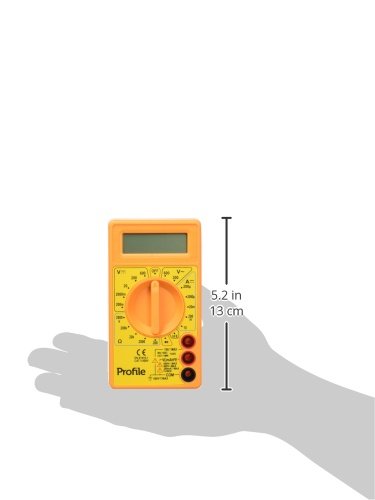
Figure 2: The Profile 191000001 Digital Multimeter with an overlay indicating its approximate dimensions (13 cm height).
5.1. Measuring DC Voltage (V---)
- Connect the red test lead to the 'VΩmA' jack and the black test lead to the 'COM' jack.
- Set the rotary switch to the desired DC Voltage range (e.g., 20V, 200V, 600V). If the voltage is unknown, start with the highest range and decrease as needed.
- Connect the test leads in parallel across the component or circuit to be measured.
- Read the voltage value on the display.
5.2. Measuring AC Voltage (V~)
- Connect the red test lead to the 'VΩmA' jack and the black test lead to the 'COM' jack.
- Set the rotary switch to the desired AC Voltage range (e.g., 200V, 600V).
- Connect the test leads in parallel across the AC source or component.
- Read the voltage value on the display.
5.3. Measuring DC Current (A---)
CAUTION: To avoid damage to the multimeter or the circuit, never connect the multimeter in parallel when measuring current. Always connect it in series.
- For currents up to 200mA, connect the red test lead to the 'VΩmA' jack. For currents up to 10A, connect the red test lead to the '10A' jack. The black test lead always connects to 'COM'.
- Set the rotary switch to the desired DC Current range (e.g., 200µA, 2mA, 20mA, 200mA, 10A).
- Open the circuit where current is to be measured and connect the multimeter in series.
- Read the current value on the display.
5.4. Measuring Resistance (Ω)
- Connect the red test lead to the 'VΩmA' jack and the black test lead to the 'COM' jack.
- Set the rotary switch to the desired Resistance range (e.g., 200Ω, 2kΩ, 20kΩ, 200kΩ, 2MΩ).
- Ensure the circuit or component is de-energized before measuring resistance.
- Connect the test leads across the component.
- Read the resistance value on the display.
5.5. Diode Test
- Connect the red test lead to the 'VΩmA' jack and the black test lead to the 'COM' jack.
- Set the rotary switch to the diode symbol (→|).
- Connect the red lead to the anode and the black lead to the cathode of the diode. The display will show the forward voltage drop.
- Reverse the leads. The display should show 'OL' (Overload) for a good diode.
5.6. Transistor hFE Test
- Set the rotary switch to the 'hFE' position.
- Insert the transistor hFE test adapter into the designated sockets on the multimeter.
- Identify if the transistor is NPN or PNP and its Emitter (E), Base (B), Collector (C) terminals.
- Insert the transistor leads into the corresponding holes on the hFE adapter.
- Read the hFE (DC current gain) value on the display.
6. Maintenance
6.1. Battery Replacement
When the low battery indicator appears on the display, replace the batteries promptly to ensure accurate measurements. Refer to Section 4.1 for battery installation instructions.
6.2. Cleaning
To clean the multimeter, wipe the case with a damp cloth and a mild detergent. Do not use abrasives or solvents. Ensure the device is completely dry before use.
6.3. Storage
If the multimeter is not used for an extended period, remove the batteries to prevent leakage and store the device in a cool, dry place away from direct sunlight.
7. Troubleshooting
- No display or faint display: Check battery charge and ensure they are correctly installed. Replace batteries if necessary.
- 'OL' (Overload) on display: The measured value exceeds the selected range. Switch to a higher range.
- Incorrect readings: Ensure test leads are properly connected, the correct function and range are selected, and the batteries are not low. Verify the circuit is de-energized for resistance measurements.
- No reading for current: Ensure the multimeter is connected in series with the circuit and the correct current jack (VΩmA or 10A) is used for the red lead.
8. Specifications
| Feature | Specification |
|---|---|
| Model Number | 191000001 |
| Max DC/AC Voltage | 600V |
| Max DC Current | 10A |
| Resistance Measurement | Yes |
| Diode Measurement | Yes |
| Transistor hFE Measurement | Yes |
| Power Source | 2 x 1.5V AAA Batteries |
| Product Dimensions (L x W x H) | 13.5 x 3 x 18.9 cm (5.3 x 1.2 x 7.4 inches) |
| Product Weight | 0.22 kg (0.48 lbs) |
| Manufacturer | Eltra N.V. |
9. Warranty and Support
9.1. Warranty
This Profile 191000001 Digital Multimeter comes with a 2-year warranty from the date of purchase, covering manufacturing defects. This warranty does not cover damage caused by misuse, unauthorized modification, accident, or normal wear and tear.
9.2. Customer Support
For technical assistance, warranty claims, or further inquiries, please contact your retailer or the manufacturer's customer support channels. Please have your product model number and proof of purchase ready when contacting support.


