
HW HAOWORKS S278
S278 Mini Voice Amplifier User Manual
Model: S278
Brand: HW HAOWORKS
1. Product Overview
The S278 is a versatile and compact voice amplifier designed to enhance vocal projection in various settings. With its 15-watt output, it can effectively amplify your voice for audiences of 20 to 65 people, protecting your vocal cords from strain. Beyond voice amplification, it functions as a multi-source music player, supporting Bluetooth, TF card, USB flash disk, and AUX input. It also includes an FM radio and recording capabilities, making it an all-in-one portable audio solution.

Figure 1.1: S278 Mini Voice Amplifier with included headset microphone and cables.
Video 1.1: Official product video demonstrating the features and components of the S278 Voice Amplifier.
2. Package Contents
Please check the package for the following items:
- 1 x S278 Voice Amplifier Unit
- 1 x Wired Headset Microphone
- 1 x Adjustable Waist/Neck Band
- 1 x USB Charging Cable
- 1 x AUX Cable
- 1 x User Manual

Figure 2.1: All items included in the S278 Voice Amplifier package.
3. Setup
3.1 Initial Charging
Before first use, fully charge the voice amplifier. Connect the included USB charging cable to the amplifier's charging port and a compatible USB power source (e.g., computer USB port, USB wall adapter). The charging time is approximately 3-5 hours for a full charge.

Figure 3.1: The S278 amplifier displaying battery charge and indicating charging status.
3.2 Connecting the Headset Microphone
Insert the 3.5mm plug of the wired headset microphone into the MIC input port on the amplifier. Position the microphone near your mouth for optimal voice pickup. The headset is designed for comfort and secure fit.
3.3 Wearing the Amplifier
Attach the adjustable waist/neck band to the amplifier's loops. You can wear the amplifier around your waist, over your shoulder, or around your neck for hands-free operation. Adjust the strap length for a comfortable and secure fit.

Figure 3.2: Various wearing options for the S278 amplifier using the adjustable band.
4. Operating Instructions
4.1 Power On/Off and Volume Control
To power on the device, rotate the volume knob clockwise until the display lights up. To power off, rotate the volume knob counter-clockwise until it clicks off. Adjust the volume by rotating the same knob.
4.2 Voice Amplification Mode
Once the headset microphone is connected and the device is powered on, your voice will be amplified through the speaker. Ensure the microphone is positioned correctly to avoid feedback. The 15W output is designed for clear voice projection.

Figure 4.1: The S278 amplifier in use, demonstrating clear voice amplification for an audience.
4.3 Bluetooth Mode
- Turn on the amplifier.
- Press the 'M' (Mode) button until 'BLUE' appears on the display.
- Enable Bluetooth on your device (e.g., smartphone, tablet) and search for 'S278'.
- Select 'S278' to pair. Once paired, you can stream audio wirelessly.
4.4 FM Radio Mode
- Press the 'M' (Mode) button to switch to FM radio mode.
- Extend the antenna for better reception.
- Use the 'Previous' and 'Next' buttons to scan for stations.
4.5 MP3 Playback (TF Card/USB Disk)
Insert a TF card or USB flash disk containing MP3 audio files into the respective slot. The amplifier will automatically switch to MP3 playback mode. Use the play/pause, previous, and next buttons to control playback.
4.6 Recording Function
In voice amplification mode, press the record button (usually indicated by a red dot or 'REC') to start recording. Press it again to stop. Recordings are typically saved to the inserted TF card or USB disk.
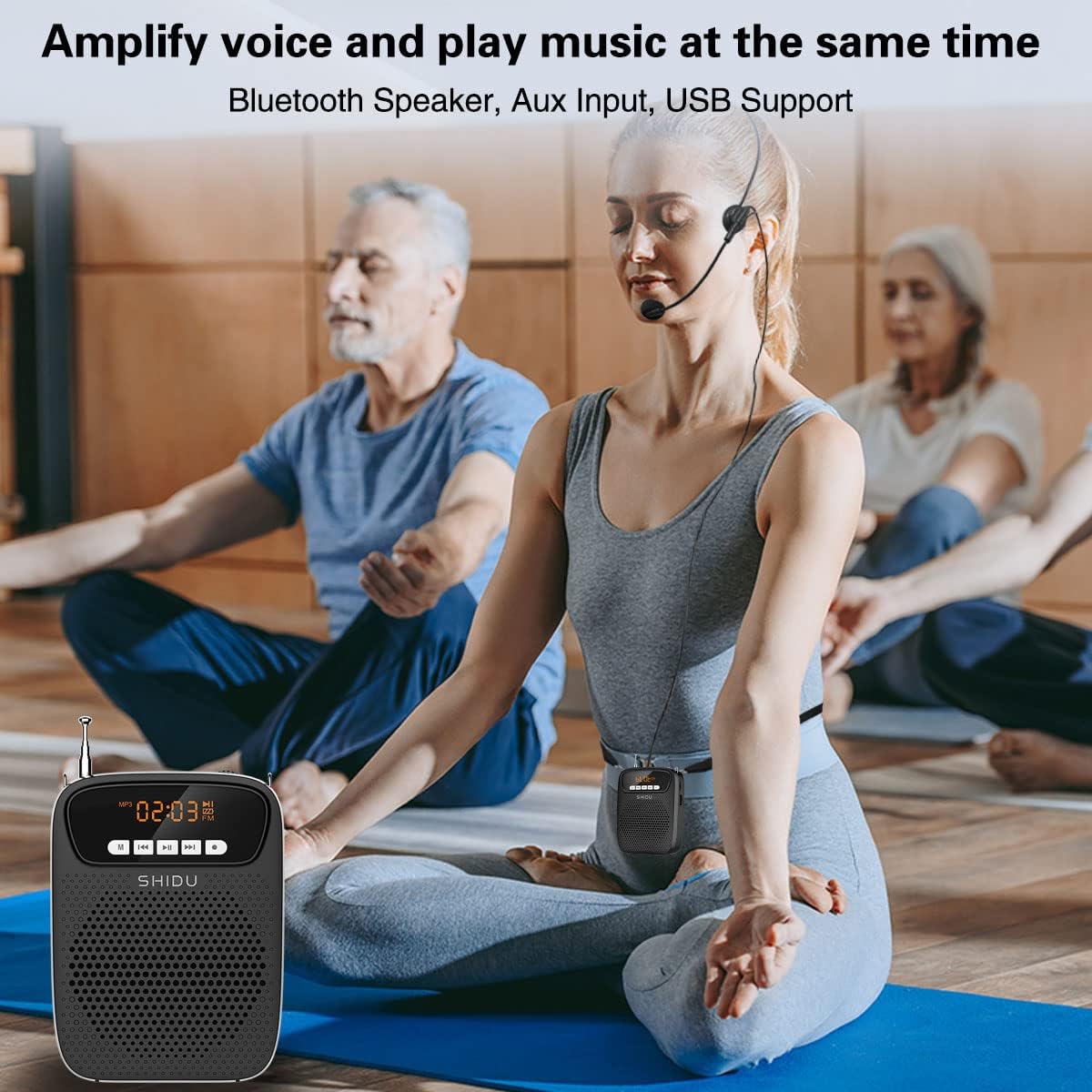
Figure 4.2: The S278 amplifier can amplify voice and play music concurrently, suitable for various activities.
5. Maintenance
5.1 Charging
The S278 features a built-in rechargeable Lithium Polymer battery. When the battery indicator is low, connect the USB charging cable to recharge. A full charge takes approximately 3-5 hours and provides up to 12 hours of continuous use.
5.2 Cleaning
Wipe the amplifier and headset with a soft, dry cloth. Do not use liquid cleaners or abrasive materials. Keep the device free from dust and moisture.
5.3 Storage
Store the amplifier in a cool, dry place away from direct sunlight and extreme temperatures. If storing for an extended period, charge the battery periodically to maintain its health.
6. Troubleshooting
| Problem | Possible Cause | Solution |
|---|---|---|
| No sound from speaker | Device is off; Volume is too low; Microphone not connected or faulty; Battery is drained. | Turn on the device; Increase volume; Ensure microphone is securely plugged in; Charge the battery. |
| Feedback/Squealing sound | Microphone too close to speaker; Volume too high; Microphone pointing directly at speaker. | Increase distance between microphone and speaker; Lower volume; Adjust microphone position away from speaker. |
| Bluetooth pairing failure | Device not in Bluetooth mode; Amplifier too far from pairing device; Bluetooth not enabled on pairing device. | Switch amplifier to Bluetooth mode; Move devices closer; Enable Bluetooth on your device. |
| FM radio static/poor reception | Antenna not extended; Weak signal in current location. | Fully extend the antenna; Try moving to a different location for better signal. |
7. Specifications
- Model: S278
- Output Wattage: 15 Watts
- Dimensions (L x W x H): 4.5 x 3.5 x 1.3 inches
- Weight: 0.44 lbs (7.04 ounces)
- Power Source: Battery Powered (1 Lithium Polymer battery, included)
- Battery Life: Up to 12 hours (voice amplification)
- Charging Time: 3-5 hours
- Connectivity: Bluetooth, AUX (3.5mm), USB, TF Card
- Audio Input: 3.5mm wired headset microphone
- Material: Acrylonitrile Butadiene Styrene (ABS)
- Color: Black
- Manufacturer: SHIDU
- Recommended Uses: Teaching, announcements, music playback, tour guiding, fitness instruction

Figure 7.1: The compact size and lightweight nature of the S278 amplifier.
8. Warranty and Support
HW HAOWORKS is committed to providing quality products and excellent service. This product comes with lifetime technical support. If you encounter any problems or have questions regarding your S278 Voice Amplifier, please contact HW HAOWORKS customer service for assistance.
For more information and support, you may visit the official HW HAOWORKS store: HW HAOWORKS Store
Ask a question about this manual
Ask about setup, troubleshooting, compatibility, parts, safety, or missing instructions. Manuals+ will review the question and use this page’s manual context to help answer it.