
Introduction
The Ingenuity SmartSize 2-in-1 Soothing Solution is a versatile infant product designed to provide comfort and entertainment for your baby. This unit functions as both a baby swing and a stationary rocker, offering multiple soothing features such as gentle motion, melodies, light projection, and smartphone connectivity for personalized content. Its compact design aims to save space while providing full functionality.
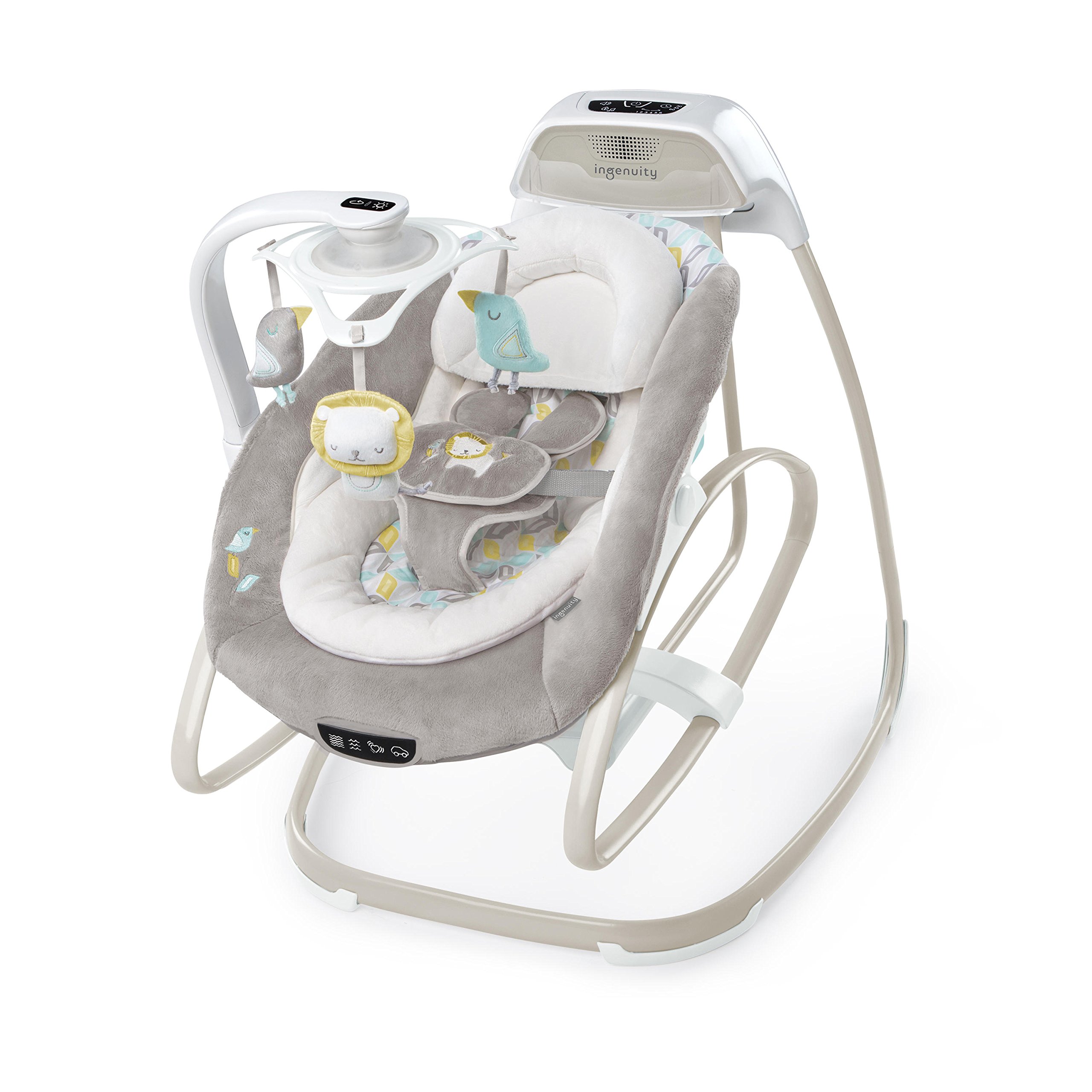
Image: The Ingenuity SmartSize 2-in-1 Soothing Solution in swing mode, with a baby comfortably seated and smiling. The unit features a plush grey seat, a mobile with hanging toys, and a control panel.
Safety Information
WARNING: Failure to follow these warnings and instructions could result in serious injury or death.
- Never leave child unattended.
- Always use the restraint system.
- This product is not intended for prolonged periods of sleep.
- Do not use this product once your child can sit up unaided or attempts to climb out.
- Maximum weight recommendation: 9.07 kg (20 lbs).
- Never use this product on an elevated surface (e.g., a table).
- Always ensure the product is placed on a flat, level surface.
- Keep children away from the product during assembly and disassembly.
- Do not use accessories or replacement parts other than those approved by the manufacturer.
- Regularly inspect the product for loose fasteners, damaged joints, or broken parts. Discontinue use if any damage is found.
- Keep the AC adapter cord away from the child to prevent strangulation hazards.
Package Contents
Please ensure all components are present before assembly. If any parts are missing or damaged, do not use the product and contact customer support.
- Main Swing Frame
- Seat Assembly (including plush seat pad, infant bolster, and headrest)
- Mobile Arm with hanging toys (lion, birds)
- Control Panel Unit
- AC Adapter
- Instruction Manual
Setup
Assembly requires careful attention to detail. Refer to the visual instructions provided in the manual for each step. A Phillips-head screwdriver is required (not included).
- Unpack Components: Carefully remove all parts from the packaging and lay them out on a clean, flat surface.
- Assemble Base Frame: Connect the various sections of the swing frame according to the visual diagrams. Ensure all connections click securely into place.
- Attach Seat Support: Secure the seat support structure to the assembled base frame.
- Install Seat Assembly: Place the seat onto the seat support. Ensure it locks into position for either swing or rocker mode.
- Attach Mobile Arm: Connect the mobile arm to the designated slot on the main frame. Ensure it is firmly attached and can rotate freely.
- Insert Batteries (Rocker Mode): For vibration and mobile functions in rocker mode, install 3 C batteries (not included) into the battery compartment located on the underside of the rocker seat.
- Connect AC Adapter: Plug the AC adapter into the designated port on the main control unit and then into a standard electrical outlet.
- Secure Fabric Components: Attach the plush seat pad, infant bolster, and headrest to the seat assembly using the integrated fasteners and straps.
- Adjust Harness: Ensure the 5-point harness is correctly threaded and adjusted for your child's size.

Image: The Ingenuity SmartSize 2-in-1 Soothing Solution frame, illustrating the structural components before the fabric seat is attached. This view helps in understanding the assembly process.
Operating Instructions
Powering the Unit
The swing functions primarily using the included AC adapter. For the rocker's vibration and mobile features when detached from the swing frame, 3 C batteries are required (not included).
Converting from Swing to Rocker
To convert the unit from a swing to a stationary rocker, locate the release mechanism on the side of the seat assembly. Press the buttons or pull the levers as indicated in the manual to detach the seat from the swing frame. The detached seat can then be used as a standalone rocker.

Image: The Ingenuity SmartSize 2-in-1 Soothing Solution configured as a standalone rocker, with a baby comfortably resting in the seat. The mobile arm is still attached, providing entertainment.
Adjusting Swing Direction and Recline
- Swing Direction: To change the swing motion from front-to-back to side-to-side, locate the rotation lock mechanism beneath the seat. Release the lock and rotate the seat to the desired orientation, then re-engage the lock.
- Recline Positions: The seat offers two recline positions. Use the recline adjustment lever, typically found on the back or sides of the seat, to select the desired angle.
Using the Control Panel (Swing Mode)

Image: A detailed view of the main control panel, showing buttons for power, swing speed (1-6), timer (30, 45, 60 minutes), volume, and music/sound selection.
- Power Button: Press to turn the swing on or off.
- Swing Speed: Select from 6 different swing speeds (1-6) to find the most soothing motion for your baby.
- Timer: Set the swing to operate for 30, 45, or 60 minutes. The swing will automatically turn off after the selected time.
- Volume Control: Adjust the audio output for melodies and nature sounds.
- Music/Sounds: Cycle through various pre-programmed melodies and nature sounds.
Using the Mobile

Image: A hand pressing the light button located on the underside of the mobile unit, which controls the light show projection and rotation of the hanging toys.
- Light Show: Press the light button on the mobile unit to activate the light projection feature. Press again to cycle through light modes or turn off.
- Rotation: The mobile toys may rotate automatically when the light show is active or can be manually adjusted.
Vibration Unit (Rocker Mode)

Image: A close-up of the control buttons on the rocker seat, showing icons for different vibration settings and sounds, allowing for personalized soothing options.
When the seat is in rocker mode, use the buttons on the side of the seat to activate and adjust the vibration settings. Ensure batteries are installed for this function.
ConnectMe Feature

Image: A smartphone placed in the ConnectMe dock on the swing's main unit, demonstrating the ability to play custom music or videos for the baby.
The ConnectMe feature allows you to connect your smartphone or device to play custom music, pictures, or videos. Place your device securely in the designated slot on the main control unit. Follow your device's instructions for audio output to ensure sound plays through the swing's speakers.
Maintenance
- Fabric Care: The seat pad, infant bolster, and headrest are typically machine washable. Refer to the care labels on each fabric component for specific washing instructions (e.g., cold water, gentle cycle, air dry).
- Frame Cleaning: Wipe the metal and plastic parts of the frame with a soft, damp cloth and mild soap. Do not use abrasive cleaners or solvents.
- Storage: When not in use, store the product in a clean, dry place away from direct sunlight and extreme temperatures.
Troubleshooting
| Problem | Possible Cause | Solution |
|---|---|---|
| Swing does not turn on or operate. |
|
|
| Vibration or mobile lights/rotation not working in rocker mode. |
|
|
| Swing motion is weak or inconsistent. |
|
|
| Smartphone audio not playing through speakers. |
|
|
Specifications
- Model Number: 10583-1-W11
- Product Dimensions: 16.5 x 12.5 x 31.5 inches
- Item Weight: 18.85 pounds
- Maximum Weight Recommendation: 9.07 Kilograms (20 lbs)
- Power Source: AC Adapter (included), 3 C Batteries (not included) for rocker vibration/mobile
- Batteries Required: Yes (3 C batteries for rocker features)
- Battery Life: Approximately 260 Hours (for C batteries)
- Target Gender: Unisex
- Portability: Yes
Warranty and Support
Ingenuity products are manufactured with high-quality materials and craftsmanship. For information regarding warranty coverage, please refer to the warranty card included with your purchase or visit the official Ingenuity website. For technical support, replacement parts, or any other inquiries, please contact Ingenuity customer service through their official website or the contact information provided in your product packaging.
Online Support: Visit Ingenuity Official Website


