
Ideal-Air 700829
Contents
Ideal-Air Dehumidifier 60 Pint - Instruction Manual
Model: 700829 | Brand: Ideal-Air
1. Introduction
Thank you for choosing the Ideal-Air 60 Pint Dehumidifier. This appliance is designed to efficiently remove excess moisture from the air, creating a more comfortable and healthier environment in your home or commercial space. It is particularly effective in damp, humid conditions, helping to prevent mold, mildew, and other moisture-related issues. This manual provides essential information for the safe and effective operation, maintenance, and troubleshooting of your dehumidifier.
2. Safety Information
Please read all instructions carefully before using the dehumidifier. Keep this manual for future reference.
- Always connect the unit to a properly grounded electrical outlet.
- Do not operate the dehumidifier with a damaged cord or plug.
- Ensure the unit is placed on a level, stable surface to prevent tipping.
- Do not block the air intake or exhaust vents. Maintain at least 8 inches of clearance around the unit.
- Unplug the dehumidifier before cleaning, moving, or performing any maintenance.
- Do not use the appliance near water or in excessively wet areas.
- Keep children and pets away from the unit during operation.
- This appliance is not intended for use by persons with reduced physical, sensory, or mental capabilities unless supervised.
3. Product Overview
The Ideal-Air 60 Pint Dehumidifier is designed for user convenience and effective moisture removal. Key features include:
- Removes up to 60 pints of moisture per day.
- Features an LED digital control panel for easy humidity settings.
- Includes continuous run switch, filter indicator switch, and humidity adjustment.
- Equipped with low temperature defrosting.
- Automatic shut-off when the 10 L reservoir tank is full.
- Option for continuous drainage (1/4" drain hose included).
- Accessible, removable, and washable air filter.
- Compact design with built-in handles and wheels for easy maneuvering.

Figure 3.1: Front view of the Ideal-Air 60 Pint Dehumidifier, showcasing its compact design.

Figure 3.2: The dehumidifier with its 10-liter water tank partially removed, demonstrating ease of access for emptying.
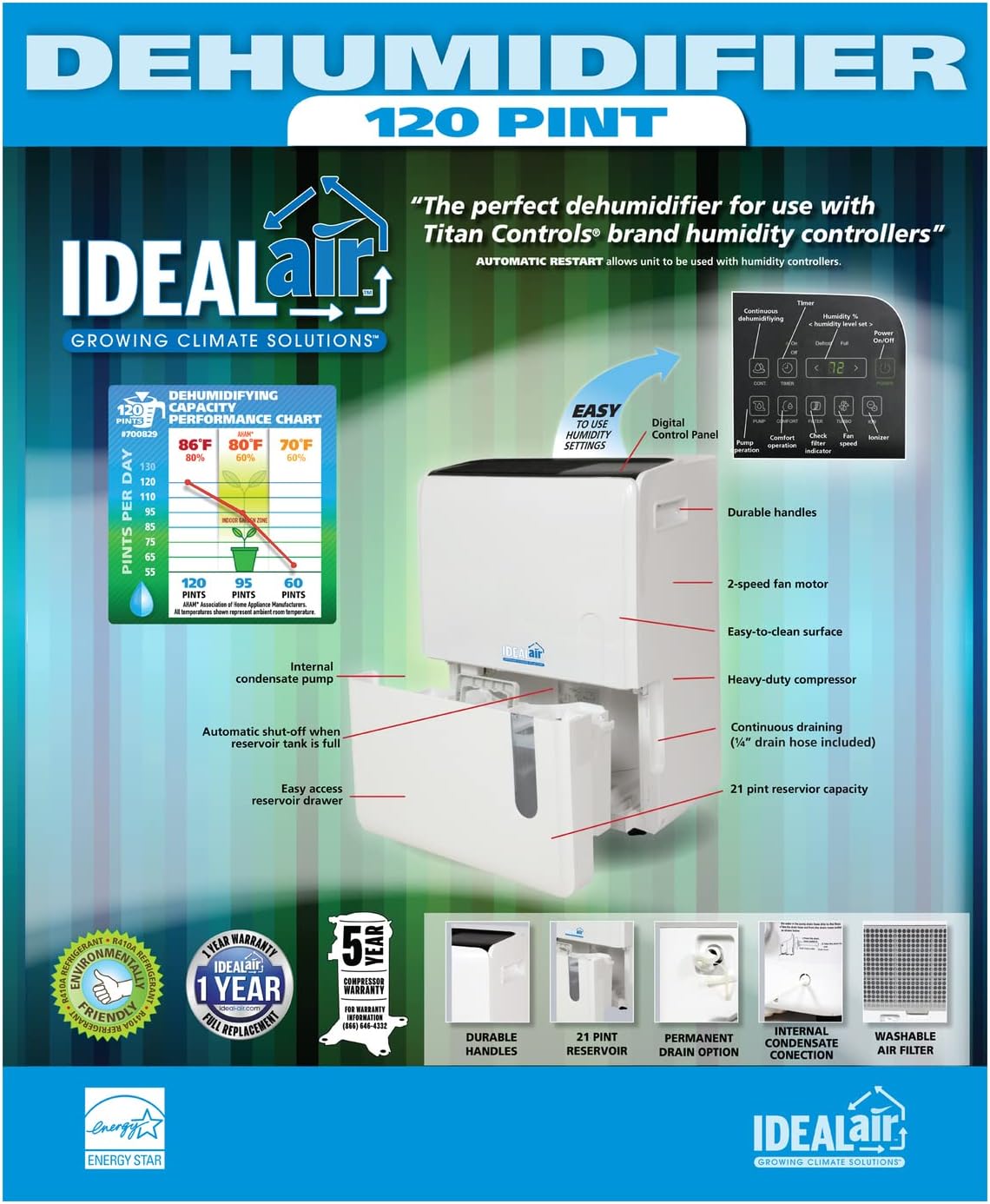
Figure 3.3: An illustrative diagram highlighting key features such as the digital control panel, durable handles, 2-speed fan motor, easy-to-clean surface, heavy-duty compressor, continuous draining option, and accessible reservoir drawer.

Figure 3.4: Rear view of the dehumidifier, showing the power cord and the included 1/4-inch drain hose for continuous drainage.

Figure 3.5: A performance chart illustrating the dehumidification capacity in pints per day at various temperatures and humidity levels, rated at AHAM standards.

Figure 3.6: The retail packaging for the Ideal-Air 60 Pint Dehumidifier, highlighting key product information and certifications.
4. Setup
Follow these steps to set up your dehumidifier:
- Unpacking: Carefully remove the dehumidifier from its packaging. Retain packaging materials for future storage or transport.
- Placement: Place the unit on a firm, level surface in the area where dehumidification is desired. Ensure there is at least 8 inches (20 cm) of space around all sides of the unit for proper air circulation. The compact design with built-in handles and wheels allows for easy maneuvering to the desired location.
- Power Connection: Plug the power cord into a grounded 115V, 60Hz electrical outlet.
- Drainage Option (Optional): For continuous operation without emptying the water tank, attach the included 1/4-inch drain hose to the continuous drain port at the back of the unit. Route the hose to a suitable drain location, ensuring it is sloped downwards for gravity drainage.
5. Operating Instructions
Your Ideal-Air Dehumidifier features an intuitive LED digital control panel for easy operation.
- Power On/Off: Press the Power button to turn the unit on or off.
- Setting Humidity Level: Use the "Reduce" or "Increase" humidity switches to set your desired relative humidity level. The unit will operate until the set humidity is reached, then cycle on and off to maintain it.
- Continuous Run: Activate the continuous run switch for non-stop operation, ideal for very damp conditions or when using continuous drainage.
- Fan Speed: Adjust the fan speed (if available) to control the rate of dehumidification and noise level.
- Automatic Shut-off: The unit will automatically shut off when the water reservoir is full. The "Full Tank" indicator light will illuminate. Empty the tank and reinsert it to resume operation.
- Low Temperature Defrost: The dehumidifier is equipped with an automatic defrost function that activates when coil temperatures are too low, preventing ice buildup and ensuring efficient operation in cooler environments.
6. Maintenance
Regular maintenance ensures optimal performance and longevity of your dehumidifier.
- Cleaning the Air Filter: The air filter indicator switch will alert you when the filter needs cleaning. Remove the filter from the back of the unit, wash it with warm, soapy water, rinse thoroughly, and allow it to air dry completely before reinserting. Clean the filter at least once every two weeks, or more often depending on air quality.
- Emptying the Water Tank: When the water tank is full, the unit will stop operating. Carefully pull out the water tank, empty the collected water, and slide it back into place until it clicks securely.
- Cleaning the Unit: Wipe the exterior of the dehumidifier with a soft, damp cloth. Do not use harsh chemicals or abrasive cleaners.
- Storage: If storing the unit for an extended period, ensure the water tank is empty and clean, and the filter is clean and dry. Store in a cool, dry place.
7. Troubleshooting
Refer to this section for common issues and their solutions.
| Problem | Possible Cause | Solution |
|---|---|---|
| Dehumidifier does not turn on. | No power; Power cord not plugged in; Water tank full or not properly seated. | Check power outlet; Ensure plug is firmly inserted; Empty and properly reinsert water tank. |
| Unit runs but does not dehumidify. | Air filter clogged; Room temperature too low; Unit size too small for area. | Clean air filter; Ensure room temperature is above 41°F (5°C); Consider a larger capacity unit if needed. |
| Water leaks from the unit. | Water tank not properly seated; Continuous drain hose is kinked or blocked. | Reinsert water tank correctly; Check drain hose for kinks or blockages and ensure proper slope. |
| Unit is noisy. | Unit not on a level surface; Air filter clogged. | Place unit on a level surface; Clean air filter. |
If the problem persists after trying these solutions, please contact customer support.
8. Specifications
| Specification | Detail |
|---|---|
| Brand | Ideal-Air |
| Model Name | 120 Pint (Note: This model is the 60 Pint version, but the general model name is listed as 120 Pint in specifications) |
| Item Model Number | 700829 |
| Dehumidification Capacity | 60 Pints per Day (AHAM Standard: 80°F, 60% RH) |
| Water Tank Capacity | 10 Liters |
| Power Supply | 115 V, 60 Hz |
| Amperage | 7.0 Amps |
| Wattage | 780 Watts |
| Product Dimensions (D x W x H) | 14.5"D x 14.5"W x 24"H |
| Item Weight | 66 Pounds |
| Color | White |
| Material | Plastic |
| Special Feature | Automatic Shutoff |
| Recommended Uses | Commercial, Residential |
| Air Flow Capacity | 271 Cubic Feet Per Minute |
| UPC | 675757033153, 849969017007 |
9. Warranty and Support
For warranty information, technical support, or service inquiries, please refer to the warranty card included with your product or visit the official Ideal-Air website. Keep your purchase receipt as proof of purchase for warranty claims.
Documents and downloads
Ask a question about this manual
Ask about setup, troubleshooting, compatibility, parts, safety, or missing instructions. Manuals+ will review the question and use this page’s manual context to help answer it.