1. Product Overview
The WISI OL 95 2200 (Model 74417) is a high-quality, pre-assembled single-mode fiber optic cable designed for outdoor applications. This dual fiber cable features a robust PE (Polyethylene) sheath, providing excellent durability and resistance to environmental factors. It comes equipped with FC/PC connectors on both ends, ensuring reliable and secure connections. With a length of 200 meters, it is suitable for various long-distance optical signal transmission needs.
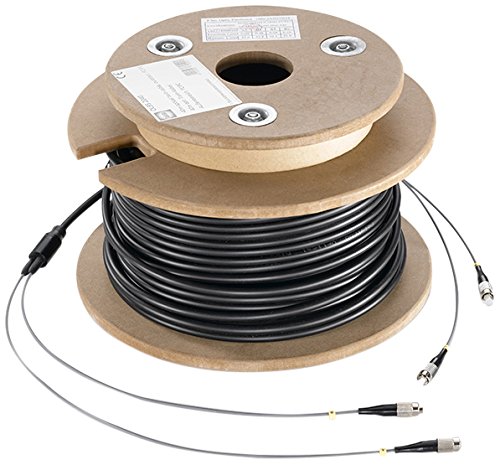
Figure 1: WISI OL 95 2200 Optical Dual Outdoor Cable. The image displays the 200-meter black fiber optic cable neatly coiled on a wooden spool. Two individual fiber leads, each terminated with an FC/PC connector, extend from the main cable.
2. Safety Information
- Always handle fiber optic cables with care. Avoid sharp bends or excessive pulling, which can damage the internal fibers.
- Do not look directly into the end of an active fiber optic cable, as invisible laser light can cause eye damage.
- Ensure proper grounding for all connected equipment to prevent galvanic isolation issues.
- When installing outdoors, protect the cable from physical damage and ensure it is routed away from potential hazards.
- Keep connectors clean. Dust and debris can significantly degrade optical performance. Use appropriate fiber optic cleaning tools.
3. Package Contents
The package contains the following item:
- 1x WISI OL 95 2200 Optical Dual Outdoor Cable (200m, black, with FC/PC connectors)
4. Product Features
- Highly Durable PE Sheath: Provides superior protection against environmental elements and physical wear.
- UV-Resistant: Designed to withstand prolonged exposure to sunlight without degradation, ideal for outdoor installations.
- Galvanic Isolation: Offers electrical isolation, preventing ground loops and electrical interference, which is crucial in outdoor and industrial environments.
- Single-Mode Fiber: Optimized for long-distance, high-bandwidth data transmission.
- Pre-assembled with FC/PC Connectors: Ensures quick and reliable plug-and-play installation.
5. Setup and Installation
- Unpacking: Carefully remove the cable from its packaging. Inspect the cable and connectors for any visible damage.
- Planning the Route: Before deployment, plan the cable route to avoid sharp corners, excessive tension, and potential crushing points. Ensure the cable's minimum bend radius is respected to prevent fiber damage.
- Cleaning Connectors: Before connecting, always clean the FC/PC connectors using a suitable fiber optic cleaning tool or lint-free wipes and isopropyl alcohol. This prevents signal loss due to dust or contaminants.
- Connecting: Gently insert the FC/PC connectors into the corresponding ports on your optical equipment (e.g., optical transceivers, media converters). Ensure the connectors are fully seated and secured.
- Securing the Cable: Use appropriate cable ties or clamps to secure the cable along its route, preventing accidental dislodgement or damage. Avoid overtightening.
- Testing: After installation, it is recommended to test the optical link using an optical power meter to verify signal integrity and ensure proper connection.
6. Operating Instructions
The WISI OL 95 2200 cable is a passive component designed to transmit optical signals. Once properly installed and connected to compatible active optical equipment, it operates without user intervention. Ensure that the connected devices are powered on and configured according to their respective manuals for signal transmission.
- Verify that all connected devices are compatible with single-mode fiber optic cables and FC/PC connectors.
- Monitor the status indicators on your optical equipment to confirm successful link establishment.
7. Maintenance
Minimal maintenance is required for the WISI OL 95 2200 cable, primarily focusing on ensuring the integrity of the cable and its connections.
- Regular Inspection: Periodically inspect the cable for any signs of physical damage, such as cuts, abrasions, or kinks, especially in outdoor exposed areas.
- Connector Cleaning: If signal degradation occurs or if connectors are disconnected and reconnected, clean the FC/PC connector end-faces using approved fiber optic cleaning kits.
- Environmental Protection: Ensure the cable remains protected from extreme weather conditions, pests, and mechanical stress.
8. Troubleshooting
If you experience issues with your optical link, consider the following troubleshooting steps:
- No Signal/Weak Signal:
- Verify that both ends of the cable are securely connected to the optical equipment.
- Clean the FC/PC connectors thoroughly. Dust and debris are common causes of signal loss.
- Check the optical equipment (transceivers, media converters) for proper operation and power.
- Inspect the cable for any visible damage or sharp bends that could impair light transmission.
- Ensure compatibility between the cable (single-mode) and the connected optical equipment.
- Intermittent Connection:
- Check for loose connections at the FC/PC ports.
- Ensure the cable is not subject to movement or vibration that could disrupt the connection.
If troubleshooting steps do not resolve the issue, contact WISI customer support or a qualified fiber optic technician.
9. Specifications
| Brand | WISI |
| Model Number | 74417 |
| Model Name | OL 95 2200 |
| Cable Type | Optical Dual Outdoor Cable (Single-mode fiber) |
| Number of Fibers | 2 |
| Sheath Material | PE (Polyethylene) |
| Connectors | FC/PC (on both sides) |
| Cable Length | 200 meters |
| Color | Black |
| Weight | 6.85 kg |
| UV Resistance | Yes |
| Galvanic Isolation | Yes |
10. Warranty and Support
For warranty information and technical support, please refer to the official WISI website or contact your local WISI distributor. Keep your purchase receipt as proof of purchase for any warranty claims.
Manufacturer: WISI
First Available Date: January 15, 2020
For further assistance, visit www.wisi.de (or relevant regional website).


