
1. Introduction
This manual provides comprehensive instructions for the JustFine Replacement Remote Control, designed for seamless operation with various Samsung television models. This remote is pre-programmed and requires no additional setup or coding.
Compatible Samsung TV Models:
- PN58A760T1FXZC
- UN55B6000
- PN58B550T2
- LN40A550P3F
- LN46A660A2FXZA
- PL50B530S2FXZX
Please ensure your TV model is listed above for optimal compatibility.
2. Setup
2.1 Battery Installation
The remote control requires two AAA batteries (not included). Follow these steps to install them:
- Locate the battery compartment cover on the back of the remote control.
- Press down on the tab and slide the cover downwards to open.
- Insert two AAA batteries, ensuring the positive (+) and negative (-) terminals align correctly with the markings inside the compartment.
- Slide the battery compartment cover back into place until it clicks securely.

Figure 1: Back of the remote control with the battery compartment.
2.2 Initial Use
This remote control is pre-programmed for the listed Samsung TV models. Once batteries are installed, it is ready for immediate use. No additional programming or code entry is required.
3. Operating Instructions
The remote control features standard buttons for navigating your Samsung TV. Refer to the image below for button layout and descriptions.
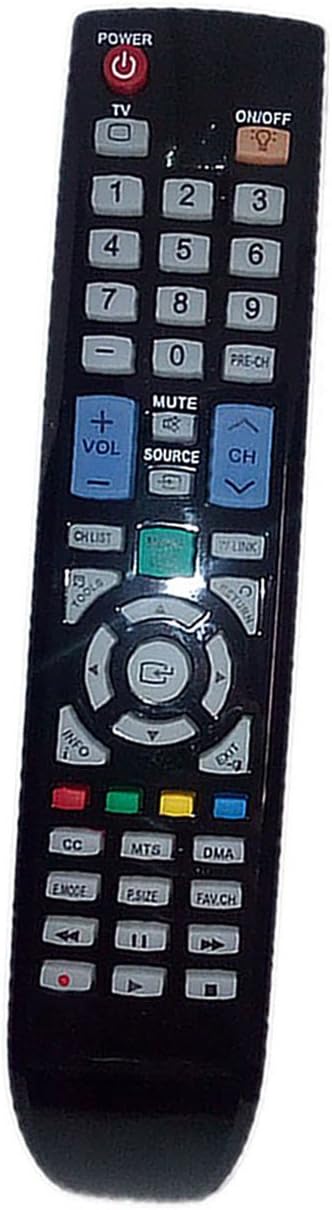
Figure 2: Front view of the remote control with button layout.
3.1 Button Functions
- POWER (Red Button): Turns the TV on or off.
- ON/OFF (Orange Button): May function as an alternative power button or for specific device control if applicable.
- Number Buttons (0-9): Directly select channels.
- VOL +/-: Adjusts the volume level.
- CH +/-: Changes the channel up or down.
- MUTE: Silences or restores the TV audio.
- SOURCE: Selects input sources (e.g., HDMI, AV, Component).
- Navigation Pad (Up, Down, Left, Right, Enter): Navigates menus and confirms selections.
- MENU: Opens the TV's main menu.
- EXIT: Exits the current menu or function.
- INFO: Displays information about the current program or input.
- Colored Buttons (Red, Green, Yellow, Blue): Functionality varies by TV model and application, often used for teletext or smart TV features.
- Playback Controls (Play, Pause, Stop, Rewind, Fast Forward): Controls media playback on compatible devices or TV functions.
4. Maintenance
4.1 Cleaning
To clean the remote control, gently wipe it with a soft, dry cloth. Do not use liquid cleaners, abrasive materials, or chemical solvents, as these may damage the remote's surface or internal components.
4.2 Battery Care
- Replace batteries when the remote's performance diminishes.
- Remove batteries if the remote will not be used for an extended period to prevent leakage.
- Dispose of used batteries according to local regulations.
5. Troubleshooting
- Remote not responding:
- Ensure batteries are correctly installed with the correct polarity.
- Replace old batteries with new ones.
- Check for any obstructions between the remote control and the TV's infrared sensor.
- Ensure you are within the effective range and pointing the remote directly at the TV.
- Specific buttons not working:
- This remote is pre-programmed and cannot be reprogrammed. If specific buttons are unresponsive after checking batteries and line of sight, the remote may be faulty.
6. Specifications
| Feature | Detail |
|---|---|
| Model Number | 8541714250 |
| Product Dimensions | 4.53 x 1.57 x 1.38 inches |
| Item Weight | 2.72 ounces |
| Compatible Devices | Television (Samsung models listed in Introduction) |
| Connectivity Technology | Infrared |
| Max Number of Supported Devices | 1 |
7. Warranty and Support
This JustFine Replacement Remote Control comes with a 30-day quality warranty and a money-back guarantee. If you encounter any issues or have questions regarding your remote control, please contact the seller directly.
For support, please email the seller. Contact information can typically be found on your purchase receipt or the seller's page on the platform where the item was purchased.
Seller: JustFine
For further assistance, you may visit the JustFine Seller Page on Amazon.