
1. Introduction
The Chicco Mama Lullaby Sheep is designed to provide a soothing environment for infants, aiding in sleep with gentle lights, sounds, and a voice recording function. This manual provides instructions for safe use, setup, operation, and maintenance of your Lullaby Sheep.

Image 1.1: The Chicco Mama Lullaby Sheep, a soft plush toy designed to comfort infants.
2. Safety Information
- Always supervise infants when using this product.
- Keep the product away from heat sources and direct sunlight.
- Do not immerse the electronic components in water. Refer to the cleaning section for proper maintenance.
- Ensure battery compartment is securely closed to prevent access by children.
- Use only the specified battery type (3 x AA 1.5V).
- Remove batteries if the product is not used for an extended period.
3. Package Contents
The package contains the Chicco Mama Lullaby Sheep plush toy with integrated electronic module. Please ensure all components are present and undamaged upon unboxing.

Image 3.1: The Lullaby Sheep as it appears in its original packaging.
4. Setup
4.1 Battery Installation
- Locate the battery compartment on the back or bottom of the electronic module within the sheep.
- Unzip the plush toy to access the electronic module.
- Using a screwdriver, open the battery compartment cover.
- Insert 3 x AA 1.5V batteries, ensuring correct polarity (+/-).
- Replace the battery compartment cover and secure it with the screw.
- Zip up the plush toy.
4.2 Initial Use
After battery installation, the product is ready for use. Press the main power button, usually located on the electronic module, to activate the toy.
5. Operating Instructions
The Chicco Mama Lullaby Sheep features multiple functions to soothe your baby.
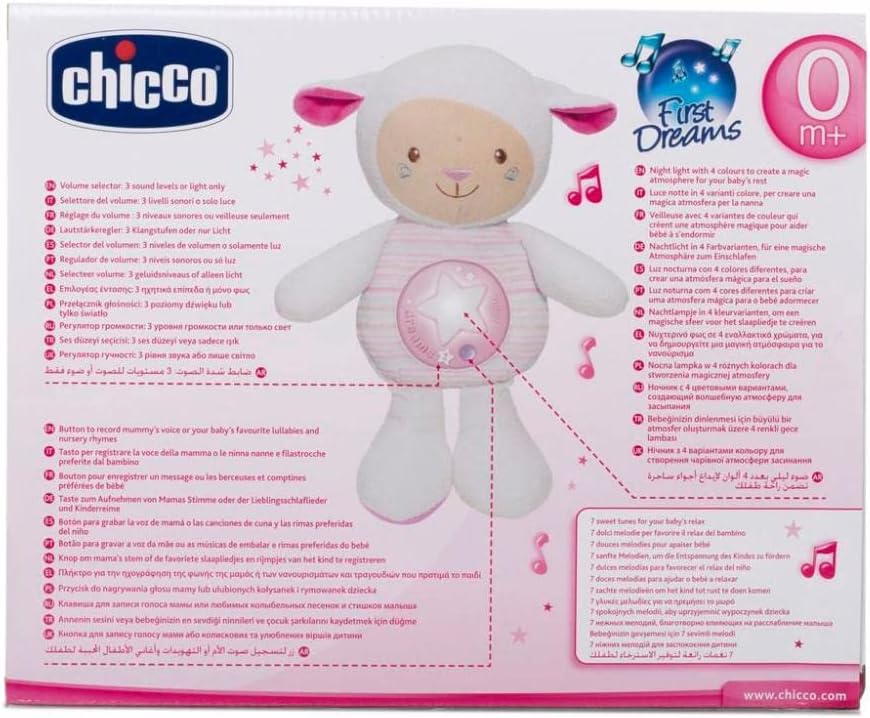
Image 5.1: Overview of the Lullaby Sheep's features as depicted on its packaging.
5.1 Light Function
The sheep includes a gentle night light with an automatic color change function. Press the light button (often integrated into the sheep's belly) to activate the soft glow. The colors will cycle automatically, creating a calming visual effect.
5.2 Sound Function
Activate the sound function by pressing the music button. The toy offers 30 minutes of soothing nature sounds and white noise. There are typically volume controls to adjust the sound level to your preference.
5.3 Voice Recorder
The Lullaby Sheep is equipped with a voice recorder. To record a message (e.g., a lullaby or comforting words):
- Locate the record button (refer to the product's specific button layout).
- Press and hold the record button.
- Speak clearly into the microphone.
- Release the button to stop recording.
Your recorded message can then be played back to your baby.
5.4 Sound Sensor Activation
The special sound sensor automatically activates the toy when it detects certain sounds, such as your baby crying. When activated, it can replay your recorded voice or soothing sounds to help reassure your baby without immediate intervention.
6. Maintenance
6.1 Cleaning
The plush toy is machine washable. Before washing, ensure you remove the electronic compartment completely. Follow the washing instructions on the product label, typically a gentle cycle with mild detergent. Allow the plush to air dry completely before reinserting the electronic module.
6.2 Battery Replacement
When the sounds or lights become dim or stop functioning, it is time to replace the batteries. Follow the battery installation steps outlined in Section 4.1. Always replace all three AA batteries at the same time with new ones.
7. Troubleshooting
- No Power/Functionality: Check if batteries are correctly installed and not depleted. Replace with new batteries if necessary.
- Sound/Light Not Working: Ensure the electronic module is properly connected inside the plush. Verify that the specific function button has been pressed.
- Voice Recording Issues: Ensure you are holding the record button for the duration of your message and speaking clearly into the microphone.
- Sound Sensor Not Activating: Check the sensitivity settings if available, or ensure there are no obstructions blocking the microphone.
8. Specifications
| Feature | Detail |
|---|---|
| Model Number | 9090100000 |
| Target Gender | Unisex |
| Material Type | Plush |
| Additional Features | Colour Changing Light, Voice Recorder, Sound Sensor |
| Batteries Required | Yes (3 x AA) |
| Product Dimensions | 19 x 12 x 30 cm |
| Product Weight | 550 g |
| Manufacturer Minimum Age | 12 Months |
9. Warranty and Support
For warranty information or technical support, please refer to the documentation included with your purchase or contact Chicco customer service directly. Contact details can typically be found on the manufacturer's official website or product packaging.