
MENGQI-CONTROL 2door-ControlPanel-1
MENGQI-CONTROL 2-Door IP Access Control Panel
User Manual
1. Introduction and Product Overview
The MENGQI-CONTROL 2-Door IP Based Wiegand Access Control Board Panel is a professional network access controller designed for secure and efficient management of two doors. This system allows for comprehensive control over who can enter which door at specific times, providing detailed entry records and advanced management features.
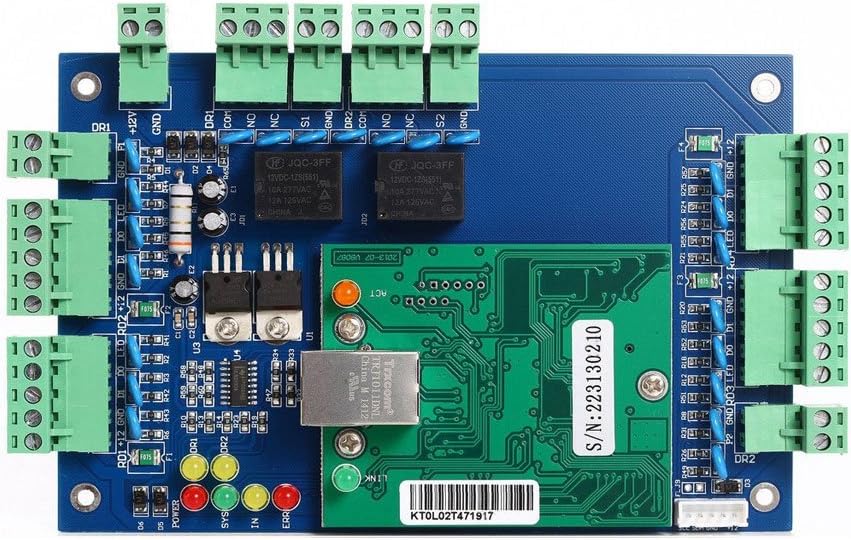
Figure 1: MENGQI-CONTROL 2-Door IP Access Control Board Panel (Top View)
This image displays the main access control board, highlighting its compact design and the various connection points for power, door locks, and Wiegand readers. The integrated network module is visible, enabling IP-based communication.

Figure 2: MENGQI-CONTROL 2-Door IP Access Control Board Panel (Angled View)
An angled perspective of the control panel, emphasizing the Ethernet port for network connectivity and the status indicator LEDs (Power, SYS, IN, ERR) which provide visual feedback on the system's operational status.
Key Features:
- Controls 2 doors, allowing entry by card swipe and exit by exit button or card swipe.
- Capable of storing, downloading, and checking detailed entry records.
- User Capacity: 20,000 users; Record Capacity: 100,000 events.
- Supports automatic door opening during specified office hours.
- Allows for authorized access control, defining who can enter which door at certain times.
- Features powerful and professional management software with extensive control capabilities.
- Network communication via TCP/IP.
- Software supports Access & SQL Server databases and is compatible with Windows 7/8/10/11 (32 & 64 bit).
2. Specifications
| Specification | Value |
|---|---|
| Manufacturer | SecureControl |
| Part Number | 2door-ControlPanel-1 |
| Item Weight | 11.3 ounces (0.32 Kilograms) |
| Package Dimensions | 9.88 x 6.02 x 1.65 inches |
| Item Model Number | 2door-ControlPanel-1 |
| Style | 2 Door |
| Power Source | DC |
| Voltage | 12 Volts |
| Item Package Quantity | 1 |
| Communication | TCP/IP |
| Software Compatibility | Windows 7/8/10/11 (32 & 64 bit), Access & SQL Server |
3. Setup and Installation
Setting up your MENGQI-CONTROL access control system involves hardware wiring and software configuration. A detailed wire diagram and video guide are provided with the product to assist with the installation process.
3.1 Hardware Connections
Ensure all power is disconnected before making any wiring connections. Connect the access control panel to your door locks, card readers (Wiegand 26-bit/34-bit), and exit buttons according to the provided detailed wire diagram. Pay close attention to polarity and specific wiring requirements for your chosen card readers (e.g., reversing green and white wires as noted in some reader documentation).
3.2 Software Installation and Initial Setup
The system requires a Windows-based computer or laptop for programming and management. Mac operating systems are not supported. Install the provided management software on your Windows computer. Connect the access control panel to your network via TCP/IP.
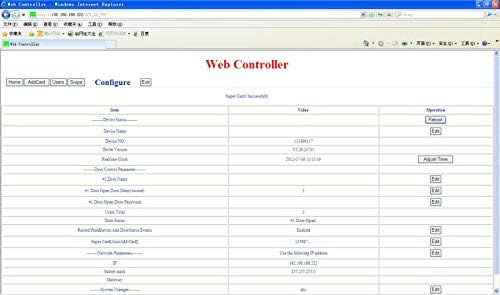
Figure 3: Web Controller Configuration Interface
This image shows the web-based configuration interface, which allows for initial setup and parameter adjustments of the access control panel. Ensure your network settings are correctly configured to access this interface.
Video 1: Access Control Software Security Entrance Control Overview
This video provides a quick overview of the system's features and capabilities, including basic functions like card swipe to open doors, checking history records, and advanced access control settings. It also highlights the importance of using a Windows computer for programming.
4. Operating Instructions
4.1 User and Access Management
The management software allows for comprehensive user and access privilege configuration. You can easily add, delete, activate, or deactivate users who can open doors. Access can be granted based on specific doors and time schedules.
- Adding Users: Use the software interface to add new users and assign them unique card IDs or key fobs.
- Setting Access Times: Configure specific time periods during which users or groups can access certain doors. For example, an entrance door can be set to auto-open from 09:00 AM to 18:00 PM, Monday to Friday.
- Expiration Dates: Set an expiry date/time for user access privileges. Once expired, the user will automatically lose access.
- Lost Card/Key Fob Management: Easily process lost cards or key fobs to prevent unauthorized access.
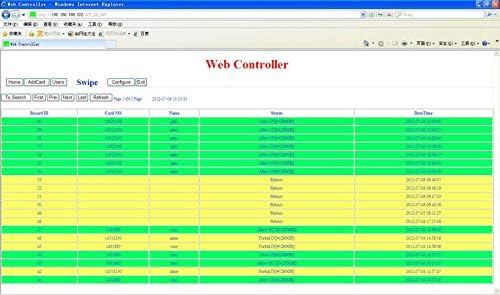
Figure 4: Mobile App Interface for Access Control Settings
This image shows the mobile application interface, which allows for remote management and control of the access system, including changing passwords and managing door settings.

Figure 5: Access Privileges Assignment Interface
This screenshot from the management software demonstrates how access privileges are assigned, allowing administrators to link users to specific doors and define their access rights.
4.2 Monitoring and Reporting
The software provides robust monitoring and reporting features to track all access events.
- Real-time Monitoring: View live access events as they occur.
- History Records: Access and export detailed history entry records, including who opened which door and at what time.
- Reporting: Generate reports on access patterns, user activity, and security incidents.
5. Maintenance
To ensure the longevity and optimal performance of your MENGQI-CONTROL access control system, regular maintenance is recommended:
- Software Updates: Periodically check for and install software updates to ensure compatibility, security, and access to new features.
- Data Backup: Regularly back up your access control database to prevent data loss.
- Hardware Inspection: Inspect wiring and connections periodically for any signs of wear or damage. Ensure all terminals are securely fastened.
- Cleaning: Keep the control board and associated components clean and free from dust and debris. Use a soft, dry cloth for cleaning.
6. Troubleshooting
If you encounter issues with your access control system, consider the following troubleshooting steps:
- No Power:
- Verify the 12V DC power supply is connected and functioning correctly.
- Check power indicator LEDs on the board.
- Door Not Opening/Closing:
- Ensure the card reader is properly wired and receiving power. Some readers may require specific wire reversals (e.g., green and white wires).
- Check the status of the door lock mechanism.
- Verify user access privileges and time schedules in the software.
- Software Connectivity Issues:
- Confirm the network cable is securely connected to the control panel and your network.
- Check IP address settings and ensure there are no conflicts on the network.
- Ensure your Windows firewall is not blocking the software's communication.
- Lost Card/Key Fob:
- Immediately deactivate the lost credential through the management software to prevent unauthorized use.
For more complex issues, refer to the detailed video guides and wire diagrams provided with your product, or contact customer support.
7. Warranty and Support
MENGQI-CONTROL is committed to providing quality products and excellent service support. We have over 20 years of experience in security systems.
- Technical Support: Comprehensive technical support is available. Many users have reported prompt and helpful responses from our support team.
- Resources: Detailed video guides and wire diagrams are provided to assist with system setup and operation.
- Product Suitability: This is a heavy-duty kit designed for robust applications. Please double-check if it meets your specific requirements before purchase to avoid unnecessary returns.
For any inquiries or assistance, please reach out to our customer service team.
Related Documents - 2door-ControlPanel-1
 |
ZKTeco C3-Series IP-based Door Access Control Panels: Features, Specifications, and Installation Guide Comprehensive overview of ZKTeco's C3-series IP-based door access control panels, including models C3-100, C3-200, and C3-400. Details features like reader compatibility, advanced access control functions, communication capabilities, system capacity, and software development kit availability. Includes optional accessories, typical installation diagram description, package contents, detailed specifications, and company contact information. |
 |
LiftMaster CAP2D Smart Access 2-Door Controller Product Guide Comprehensive product guide for the LiftMaster CAP2D Smart Access 2-Door Controller, detailing its features for managing resident and community amenity access, compatibility, system integration, and technical specifications for secure, cloud-based access control. |
 |
Napco Access Series NA-2 2-Door Access Controller | Product Overview Explore the Napco Access Series NA-2, a high-capacity 2-door access control panel for professional security systems. Features include 25,000 cardholder storage, Wiegand/OSDP support, Ethernet connectivity, and integration with MVP Access and MVP EZ platforms. Learn about its robust features, ordering information, and capabilities. |
 |
SecureEntry-AC100 RFID Card Access Control System User Manual Comprehensive user manual for the HDWR SecureEntry-AC100 RFID Card Access Control System. Covers specifications, features, device description, setup, programming functions (password management, card registration, tamper alarm, relay time), and wiring instructions for secure access control. |
 |
Standalone All-in-One Access Control Device User Manual V1.2 Detailed user manual for the IC12 Standalone All-in-One Access Control Device (V1.2). Learn about its functions, technical specifications, installation, wiring, programming modes, security features, and daily operation for effective access management. |
 |
VISIONIS VIS-AXESS-4ETL Commercial Access Control System User Guide User guide for the VISIONIS VIS-AXESS-4ETL commercial access control system, detailing device parameters, basic functions, wiring, software setup with TITAN VSAxess, and important installation notices. |
Ask a question about this manual
Ask about setup, troubleshooting, compatibility, parts, safety, or missing instructions. Manuals+ will review the question and use this page’s manual context to help answer it.