
Introduction
This manual provides comprehensive instructions for the installation, operation, and maintenance of your Arregui PL100 Key Cabinet. Please read this manual carefully before use to ensure proper functionality and longevity of the product. Keep this manual for future reference.
Safety Information
- Ensure the cabinet is securely mounted to a stable wall to prevent accidental falls.
- Keep keys for the cabinet in a secure location, separate from the keys stored inside.
- Do not overload the hooks beyond their intended capacity.
- Keep the product away from excessive moisture or corrosive substances.
Package Contents
Verify that all components are present before beginning installation:
- 1 x Arregui PL100 Key Cabinet
- 2 x Cabinet Keys
- 100 x Plastic Key Tags with Labels
- Numbered Strips for Hooks
- 1 x Document Pouch
- 4 x Wall Mounting Screws and Wall Plugs
Setup
1. Wall Mounting
- Choose a suitable, stable wall location for installation.
- Open the cabinet door. Locate the four pre-drilled mounting holes on the back panel.
- Mark the positions of the four holes on the wall using a pencil.
- Drill holes at the marked positions using an appropriate drill bit for your wall type.
- Insert the provided wall plugs into the drilled holes.
- Align the cabinet with the wall plugs and secure it using the provided screws. Ensure the cabinet is level and firmly attached.
2. Preparing Key Tags and Hooks
- Attach the numbered strips to the corresponding hook rails inside the cabinet.
- Write identification information on the labels provided with the plastic key tags. Insert the labels into the key tags.
- Attach your keys to the key tags.

Image: The Arregui PL100 Key Cabinet with its door open, revealing 100 numbered hooks arranged in rows. Each hook is equipped with a colorful plastic key tag, demonstrating the cabinet's organizational capacity.

Image: A close-up view of blue key tags hanging on numbered hooks inside the cabinet, illustrating the labeling system and adjustable hook design.
Operating
1. Locking and Unlocking
- To unlock: Insert one of the provided cabinet keys into the lock on the front door and turn it.
- To lock: Close the cabinet door firmly. Insert the key and turn it to engage the locking mechanism. Remove the key and store it securely.

Image: The Arregui PL100 Key Cabinet in its closed position, showing the front door with the key lock and two keys for operation.
2. Organizing Keys
- The key hooks are adjustable in height. To reposition a hook, gently slide it up or down the rail to the desired slot.
- Use the numbered strips and key tags to maintain an organized system for your keys.
- The included document pouch can be used to store important papers or a key log.
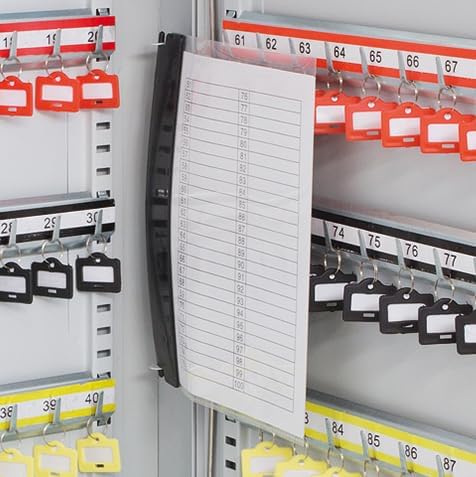
Image: A close-up of the transparent document pouch attached to the inside of the cabinet door, designed for storing key lists or other relevant documents.
Maintenance
- Clean the exterior and interior of the cabinet periodically with a soft, damp cloth. Avoid abrasive cleaners.
- Ensure the lock mechanism remains free of dust and debris. Do not lubricate the lock with oil-based products unless specifically recommended by the manufacturer.
- Regularly check the wall mounting screws for tightness to ensure the cabinet remains securely fixed.
Troubleshooting
- Cabinet door does not close properly: Check for any obstructions inside the cabinet or ensure the cabinet is not warped. Verify that the wall mounting is even.
- Key is difficult to turn in the lock: Ensure the key is fully inserted. Do not force the key. If the issue persists, contact customer support.
- Lost cabinet keys: If both original keys are lost, you will need to contact Arregui customer support for assistance with lock replacement or alternative access methods.
Specifications
| Feature | Detail |
|---|---|
| Model | PL100 |
| Capacity | 100 Keys |
| Material | Alloy Steel |
| Color | Light Grey |
| Dimensions (H x W x D) | 55 x 38 x 8 cm |
| Weight | 5.4 kg |
| Lock Type | Key Lock |
| Installation Method | Wall Mount (Screws included) |
Warranty and Support
For warranty information or technical support, please refer to the warranty card included with your purchase or visit the official Arregui website. Keep your proof of purchase for any warranty claims.
