
1. Introduction
The Beurer BF520 Body Analyzer Scale is designed to provide comprehensive body analysis, helping you monitor various health metrics. This scale measures body weight, body fat percentage, body water percentage, muscle percentage, bone mass, Basal Metabolic Rate (BMR), Active Metabolic Rate (AMR), and Body Mass Index (BMI). It features an extra-wide platform, an illuminated LCD display, and supports up to 10 user profiles for multi-user management.

Image 1: The Beurer BF520 Body Analyzer Scale, showcasing its clear glass platform, stainless steel electrodes, and illuminated digital display. The display shows various body composition metrics.
2. Safety Information
- This scale is not suitable for individuals with medical implants (e.g., pacemakers).
- Do not use during pregnancy.
- Place the scale on a hard, flat surface to ensure accurate measurements. Avoid carpets or uneven flooring.
- Step onto the scale with bare, dry feet for body composition analysis.
- Clean the scale with a damp cloth; do not use abrasive cleaning agents or immerse in water.
- Keep out of reach of children.
- Maximum weight capacity is 440 lbs (200 kg). Do not exceed this limit.
3. Package Contents
Verify that all items are present and undamaged upon unpacking.
- Beurer BF520 Body Analyzer Scale
- Batteries (pre-installed or included separately)
- Instruction Manual (this document)

Image 2: The Beurer BF520 Body Analyzer Scale shown alongside its retail box, indicating the product and its packaging.
4. Product Features
The Beurer BF520 Body Analyzer Scale offers a range of features for comprehensive health monitoring:
- Body Analysis: Measures body weight, body fat, body water, muscle percentage, bone mass, BMR, AMR, and BMI.
- XXL Design: Extra-wide glass platform (15.4" x 11.8") for comfortable use.
- High Capacity: Supports up to 440 lbs (200 kg) with 0.2 lb (100g) increments.
- Illuminated LCD Display: Large, easy-to-read digits (1.1" / 28mm) with blue illumination.
- User Memory: Stores data for up to 10 individual users.
- Activity Levels: 5 selectable activity levels for personalized calorie requirement calculation.
- Automatic Functions: Auto-zero, auto-calibration, and automatic switch-off.
- Unit Conversion: Easily switch between kilograms (kg), pounds (lb), and stones (st).
- Brushed Stainless Steel Electrodes: Ensures accurate body composition measurements.

Image 3: An illustration highlighting the various metrics measured by the Beurer BF520 scale, including weight, water, body fat, bone muscle, and muscle percentage.
5. Setup
5.1 Battery Installation
If batteries are not pre-installed or need replacement:
- Open the battery compartment on the underside of the scale.
- Insert the included batteries, ensuring correct polarity (+/-).
- Close the battery compartment securely.
5.2 Placing the Scale
For accurate measurements, place the scale on a hard, level surface. Avoid soft surfaces like carpets, rugs, or uneven floors, as these can affect accuracy.
5.3 Initial Unit Selection
After battery installation, the scale may prompt you to select your preferred unit of measurement (kg, lb, or st). Use the "SET" button or arrow buttons (if available) to cycle through options and confirm your selection. This can usually be changed later via the settings menu.
6. Operating Instructions
6.1 Creating a User Profile
The BF520 scale can store data for up to 10 users. To utilize the body analysis functions, each user must create a profile:
- Step onto the scale briefly to turn it on.
- Press the "SET" button to enter user profile setup mode.
- Use the arrow buttons (up/down) to select an empty user slot (P1-P10). Press "SET" to confirm.
- Enter your personal data using the arrow buttons and "SET" to confirm each entry:
- Gender: Male or Female
- Height: In cm or inches
- Age: In years
- Activity Level: Choose from 1 to 5 (1 = low activity, 5 = high activity/athlete).
- Once all data is entered, the profile is saved.
6.2 Taking a Measurement
For accurate body analysis, follow these steps:
- Ensure your feet are bare, clean, and dry.
- Gently step onto the scale, placing your bare feet on the stainless steel electrodes. Stand still.
- The scale will automatically recognize your user profile based on your weight. If multiple users have similar weights, you may need to select your profile using the arrow buttons.
- The display will show your weight first, followed by other body composition metrics (body fat, body water, muscle percentage, bone mass, BMR, AMR, BMI) in sequence.
- Step off the scale once all measurements are displayed. The scale will automatically switch off.
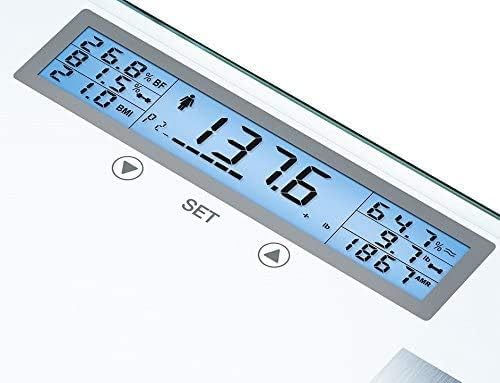
Image 4: A close-up view of the Beurer BF520's illuminated LCD display, clearly showing various body composition readings such as weight, BMI, body fat percentage, and muscle percentage.
6.3 Interpreting Results
The scale provides the following metrics:
- Body Weight: Your total weight.
- Body Fat Percentage (% BF): The proportion of fat in your body.
- Body Water Percentage (% BW): The proportion of water in your body.
- Muscle Percentage (% Muscle): The proportion of muscle mass in your body.
- Bone Mass: The weight of your bones.
- BMI (Body Mass Index): A measure relating your weight to your height.
- BMR (Basal Metabolic Rate): The minimum calories required to maintain basic bodily functions at rest.
- AMR (Active Metabolic Rate): The total calories required daily, considering your activity level.
Consult a healthcare professional for personalized interpretation of your body composition results.
7. Maintenance and Care
- Cleaning: Wipe the scale surface with a slightly damp cloth. Do not use harsh chemicals, abrasive cleaners, or immerse the scale in water.
- Storage: Store the scale in a dry place, away from extreme temperatures and direct sunlight.
- Battery Replacement: Replace batteries when the low battery indicator appears on the display. Dispose of used batteries according to local regulations.
- Calibration: The scale features auto-calibration. If you move the scale, it is recommended to perform an initial weight measurement to allow it to recalibrate.
8. Troubleshooting
| Problem | Possible Cause | Solution |
|---|---|---|
| Scale does not turn on. | Batteries are dead or incorrectly inserted. | Check battery polarity or replace batteries. |
| Inaccurate weight readings. | Scale is on an uneven or soft surface; scale needs recalibration; user is not standing still. | Place on a hard, flat surface. Step on and off once to recalibrate. Stand still during measurement. |
| Body analysis data (fat, water, muscle) not displayed. | Feet are not bare or dry; user profile not set up; user not recognized. | Ensure bare, dry feet are on electrodes. Set up a user profile. Select your profile if prompted. |
| "Err" or "OL" (Overload) message. | Weight exceeds maximum capacity (440 lbs / 200 kg). | Do not exceed the maximum weight capacity. |
9. Specifications
- Weight Capacity: 440 lbs (200 kg)
- Weight Increments: 0.2 lb (100 g)
- User Memory Slots: 10
- Activity Levels: 5
- Display Type: Illuminated LCD
- Digit Size: 1.1 inches (28 mm)
- Units: kg / lb / st
- Dimensions: Approximately 15.4" x 11.8" (39.12 cm x 29.97 cm)
- Material: Glass platform with stainless steel electrodes
- Automatic Functions: Switch-on, switch-off, user recognition

Image 5: A diagram illustrating the dimensions of the Beurer BF520 scale, showing its width and depth measurements.
10. Warranty and Support
For warranty information, please refer to the documentation included with your purchase. For technical support or assistance with your Beurer BF520 Body Analyzer Scale, please contact Beurer customer service.
Customer Service (USA): +1 (800) 536-0366
Our customer service team is available to assist you with any questions or support you may need.