
VILTROX VL 40T
Viltrox VL-40T Professional Ultra-Thin LED Light User Manual
Model: VL 40T | Brand: VILTROX
Introduction
Welcome to the user manual for your Viltrox VL-40T Professional Ultra-Thin LED Light. This manual provides essential information for the safe and effective operation, setup, and maintenance of your new lighting equipment. The VL-40T is designed for professional photographers and videographers, offering high brightness, adjustable color temperature, and a portable design. Please read this manual thoroughly before use to ensure optimal performance and longevity of your device.
Product Overview
Key Features
- Superior Brightness Control: Easily adjust light intensity from 20% to 100% with the built-in dimmer.
- Exceptional Color Accuracy: High CRI of 95 ensures true-to-life colors.
- Versatile Color Temperature: Seamlessly switch between 3300K and 5600K.
- Portable and Lightweight Design: Ultra-thin profile, weighing only 2.65 lbs, ideal for on-location shoots.
- Dual Power Options: Can be powered by AC/DC adapter (included) or two NP mount rechargeable batteries (not included).
- Wireless Remote Control: FSK 2.4GHz system allows wireless adjustment of brightness and group control.
- Durable Construction: Crafted with a robust metal body for superior heat dissipation and longevity.
Components
The Viltrox VL-40T LED light includes the main light panel, barn doors, a mounting bracket, and a wireless remote control. The back panel features an LCD display, control knobs, and power input ports.

Figure 1: Front and back view of the VL-40T LED light with its wireless remote control.
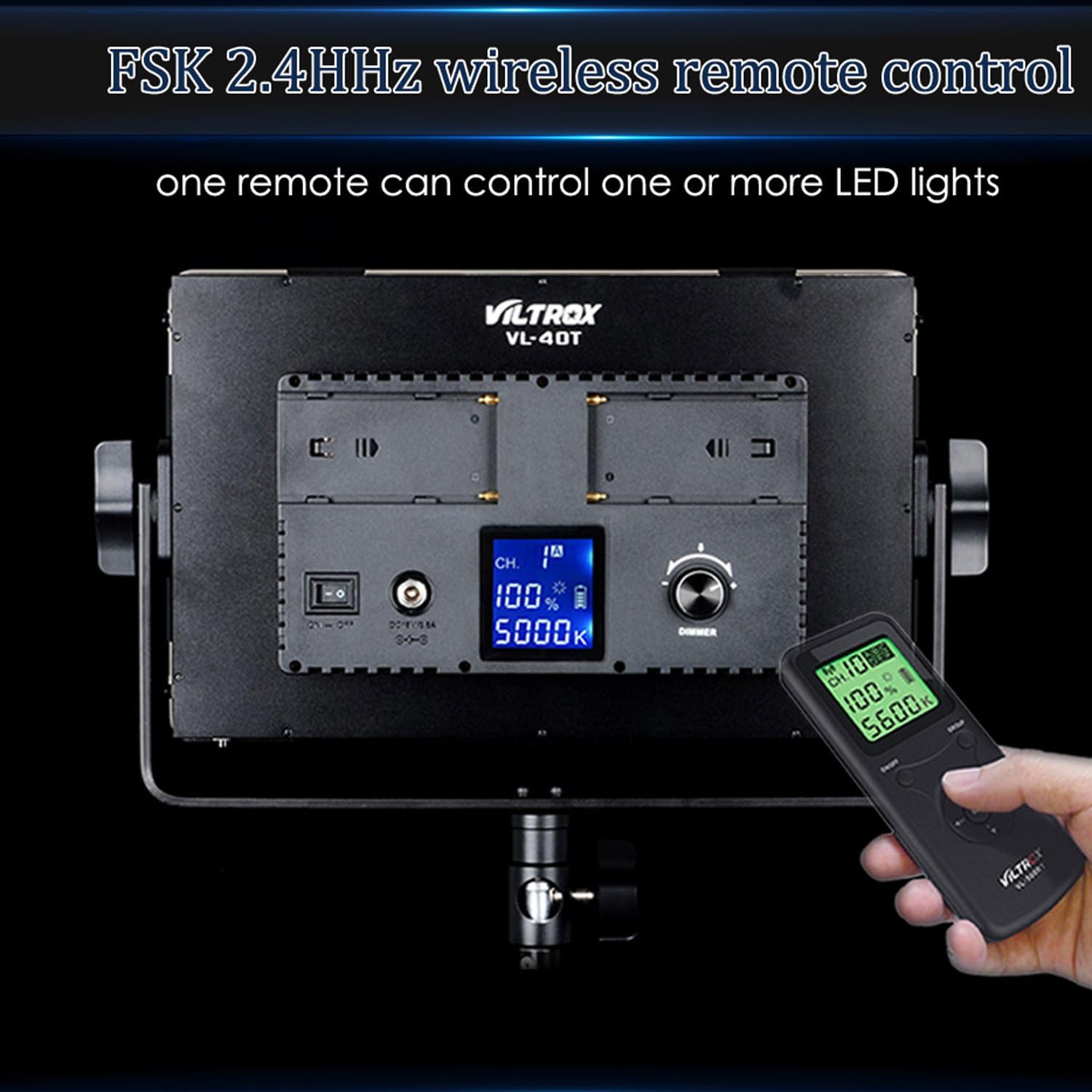
Figure 2: Detailed view of the 540 high-quality LED beads on the VL-40T panel.

Figure 3: The rear control panel of the VL-40T, featuring battery mounts, power switch, LCD display, and dimmer knob.
Setup
- Mounting the Light: Attach the VL-40T to a light stand using the integrated mounting bracket. Ensure it is securely fastened to prevent accidental falls.
- Powering the Device:
- AC Power: Connect the included AC/DC adapter to the DC IN port on the back of the light and plug it into a wall outlet.
- Battery Power: For portable use, insert two compatible NP mount rechargeable batteries (not included) into the battery slots on the back panel. Ensure correct polarity.
Figure 4: The VL-40T light securely mounted on a standard light stand.
Operating Instructions
Power On/Off
Locate the power switch on the back panel of the light. Flip the switch to the 'ON' position to power on the device. The LCD display will illuminate. Flip to 'OFF' to power down.
Brightness Adjustment
The VL-40T allows for stepless brightness adjustment from 20% to 100%. Use the 'DIMMER' knob on the back panel to increase or decrease the light intensity. The current brightness percentage will be displayed on the LCD screen.

Figure 5: Adjusting the brightness using the dimmer knob on the VL-40T's control panel.
Color Temperature Adjustment
The color temperature can be adjusted from 3300K (warm) to 5600K (cool). Rotate the 'COLOR TEMP' knob (often integrated with the dimmer or a separate knob) to select the desired color temperature. The selected Kelvin value will be shown on the LCD display.

Figure 6: Visual representation of the VL-40T's adjustable color temperature range, from warm to cool tones.
Wireless Remote Control
The VL-40T comes with an FSK 2.4GHz wireless remote control, allowing you to adjust settings from a distance. The remote can control brightness, color temperature, and manage multiple groups of lights. Ensure the remote's channel matches the light's channel for proper communication.
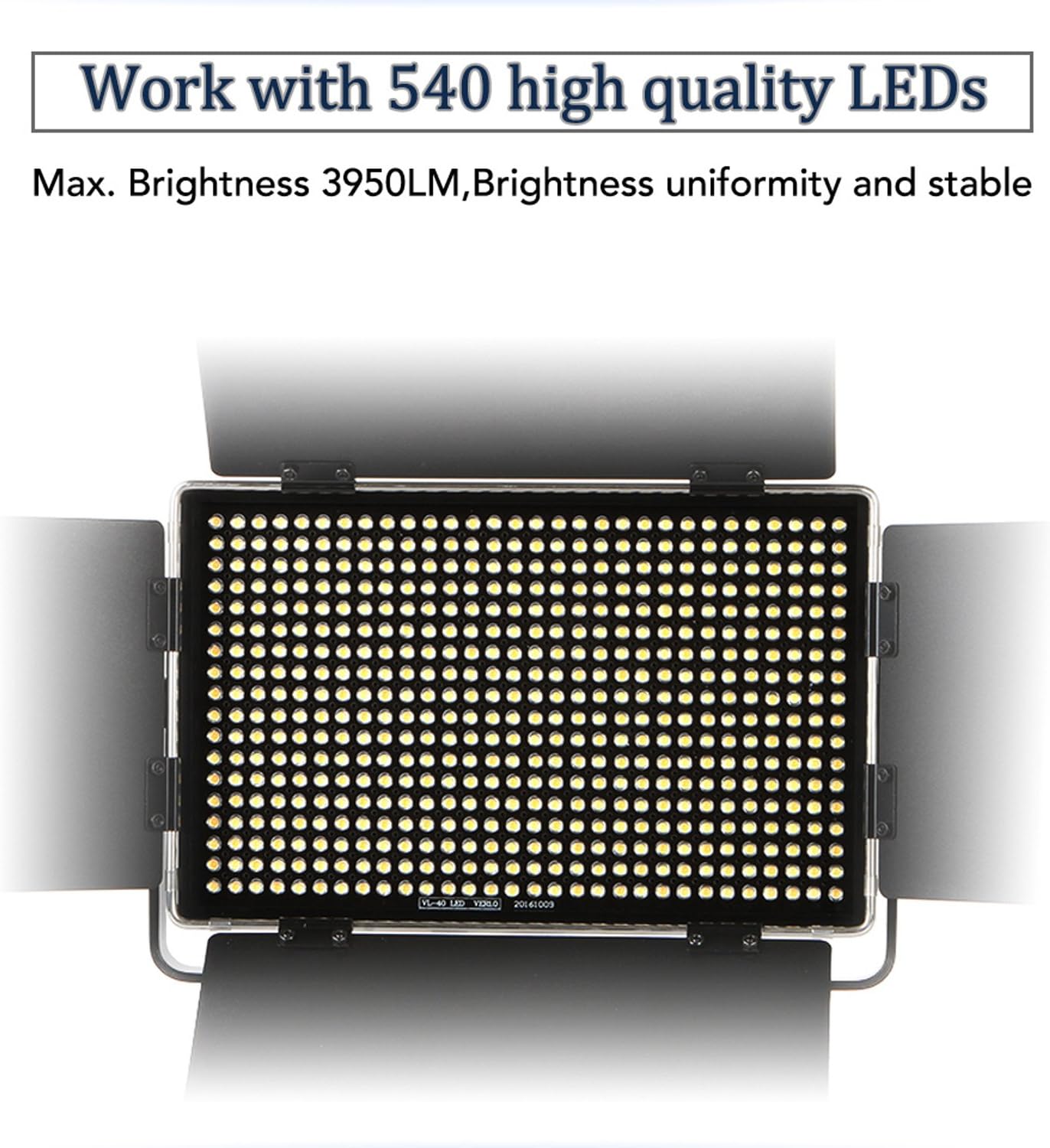
Figure 7: The wireless remote control for convenient adjustment of the VL-40T's settings.
Maintenance
- Cleaning: Use a soft, dry cloth to clean the light panel and body. Do not use abrasive cleaners or solvents. For stubborn dirt, a slightly damp cloth can be used, ensuring no moisture enters the internal components.
- Storage: When not in use, store the VL-40T in a cool, dry place, away from direct sunlight and extreme temperatures. It is recommended to store it in its original packaging or a protective case.
- Battery Care: If using batteries, remove them if the light will not be used for an extended period to prevent leakage. Recharge batteries regularly to maintain their lifespan.
Troubleshooting
| Problem | Possible Cause | Solution |
|---|---|---|
| Light does not turn on. | No power supply; batteries depleted or incorrectly inserted; power switch off. | Check AC adapter connection or battery charge/insertion. Ensure power switch is ON. |
| Remote control not working. | Remote batteries depleted; incorrect channel setting; obstruction between remote and light. | Replace remote batteries. Verify remote and light are on the same channel. Remove obstructions. |
| Brightness or color temperature cannot be adjusted. | Control knob malfunction; light in a locked mode. | Try adjusting directly on the light. If using remote, ensure it's paired correctly. Restart the light. |
Specifications

Figure 8: Dimensions of the Viltrox VL-40T LED light.
| Feature | Detail |
|---|---|
| Model Number | VL 40T |
| Product Dimensions | 12.48 x 1.89 x 9.8 inches |
| Item Weight | 2.2 pounds |
| LED Lamp Beads | 540 |
| Color Temperature Range | 3300K - 5600K |
| Color Rendering Index (CRI) | 95+ |
| Brightness Adjustment | 20% - 100% (Stepless) |
| Connectivity Technology | 2.4GHz Wireless (Remote Control) |
| Power Options | AC/DC Adapter, NP Mount Batteries (not included) |
| Manufacturer | Viltrox |
Warranty and Support
Viltrox products are manufactured to high-quality standards. For information regarding warranty coverage, technical support, or service, please refer to the warranty card included with your product or visit the official Viltrox website.
Official Website: www.viltrox.com

Figure 9: The product packaging, displaying the Viltrox brand and website for support.
Related documentsVL 40T

Ask a question about this manual
Ask about setup, troubleshooting, compatibility, parts, safety, or missing instructions. Manuals+ will review the question and use this page’s manual context to help answer it.