
1. Important Safety Information
Please read all instructions carefully before using the appliance. Failure to follow these instructions may result in electric shock, fire, or serious injury.
- Always ensure the lid is securely locked before operating under pressure.
- Do not touch hot surfaces. Use handles or knobs.
- Exercise extreme caution when releasing steam. Use the gentle steam release switch to prevent scalding.
- Do not immerse the appliance body, cord, or plug in water or other liquids.
- This appliance is equipped with multiple safety features, including overheat protection. If the appliance overheats, it will automatically shut off.
- Keep out of reach of children. Close supervision is necessary when any appliance is used by or near children.
- Only use accessories recommended by the manufacturer.
2. Product Overview
The Aigostar Panda Multicooker is a versatile kitchen appliance designed to simplify your cooking process with its multiple functions and user-friendly interface.

Figure 2.1: Front view of the Aigostar Panda Multicooker, showing its sleek design and intuitive control panel.

Figure 2.2: The multicooker's various functionalities, including rice cooker, steamer, slow cooker, pressure cooker, wok, insulation pot, and soup pot.
Components:
- Main Unit: Houses the heating element and control panel.
- Inner Pot: Non-stick coated, food-grade stainless steel pot with a three-ply bottom for even cooking.
- Lid: Features a secure locking mechanism and a steam release valve.
- Control Panel: LED display with touch controls for program selection, time, and pressure adjustments.

Figure 2.3: The removable non-stick inner pot, featuring clear measurement markings for convenience.
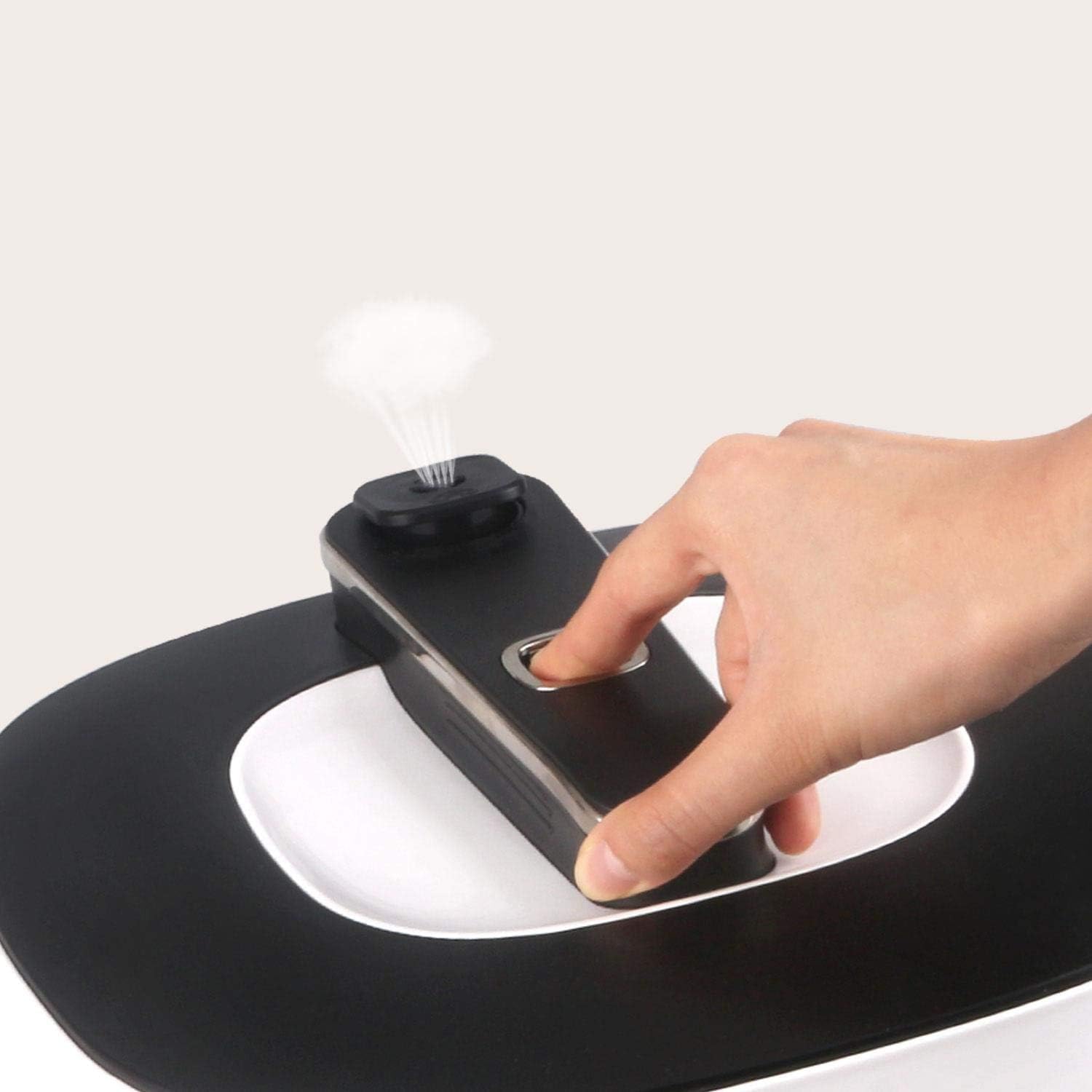
Figure 2.4: Detail of the steam release button on the lid, designed for safe and controlled pressure release.
3. Setup and First Use
- Unpacking: Carefully remove all packaging materials and dispose of them responsibly.
- Initial Cleaning: Before first use, wash the inner pot, lid, and sealing ring with warm, soapy water. Rinse thoroughly and dry all parts completely. Wipe the exterior of the main unit with a damp cloth.
- Placement: Place the multicooker on a stable, level, heat-resistant surface, away from heat sources and direct sunlight. Ensure adequate ventilation around the appliance.
- Insert Inner Pot: Place the cleaned inner pot into the main unit. Ensure it sits correctly and is not tilted.
- Close Lid: Align the lid with the main unit, ensuring the arrow on the lid aligns with the unlock symbol on the unit. Rotate the lid clockwise until it locks into place, aligning with the lock symbol.
- Power Connection: Plug the power cord into a grounded electrical outlet. The LED display will illuminate.
4. Operating Instructions
The Aigostar Panda Multicooker offers 14 intelligent preset functions and 3 taste menu options for diverse cooking needs.

Figure 4.1: The control panel with various cooking functions and settings.
Basic Operation:
- Add Ingredients: Place your ingredients into the inner pot. Ensure the liquid level does not exceed the MAX fill line for pressure cooking.
- Close and Lock Lid: Securely close and lock the lid as described in the Setup section. Ensure the steam release valve is in the sealing position for pressure cooking.
- Select Program: Use the 'Menu' button to cycle through the 14 preset cooking programs (e.g., Pressure Cook, Slow Cook, Sauté, Rice, Steam, Yogurt, Cake, Sterilize, Keep Warm). The selected program will be highlighted on the LED display.
- Adjust Settings (Optional):
- Time: Use the '+' and '-' buttons to adjust the cooking time for the selected program.
- Pressure/Temperature: For certain programs, you can adjust pressure levels or temperature using dedicated buttons if available.
- Texture: Select from 3 taste menu options (e.g., Less, Normal, More) to adjust the texture of your food.
- Start Cooking: Press the 'Start' button to begin the cooking cycle. The appliance will preheat, build pressure (if applicable), and then begin the countdown.
- 24-Hour Timer: To use the delay start function, select your program and settings, then activate the timer function and set the desired delay time before pressing 'Start'.
- Pressure Release: Once cooking is complete, the appliance will beep. For pressure cooking, allow natural pressure release or use the gentle steam release switch to manually release pressure. Always ensure the pressure indicator has dropped before attempting to open the lid.
- Open Lid: Once pressure is fully released, rotate the lid counter-clockwise to unlock and open.
Key Functions:
- Pressure Cooking: Cooks food up to 70% faster than traditional methods, ideal for stews, meats, and beans.
- Slow Cooking: Perfect for tenderizing meats and developing rich flavors over extended periods.
- Sauté: Allows you to brown ingredients directly in the inner pot before pressure cooking or slow cooking.
- Rice: Optimized settings for various types of rice, ensuring perfect texture every time.
- Steam: Ideal for healthy cooking of vegetables, fish, and dumplings.
- Yogurt: Ferments milk to create homemade yogurt.
- Cake: Bakes cakes and other desserts directly in the pot.
- Keep Warm: Automatically activates after cooking to keep food warm until serving.
5. Maintenance and Cleaning
Regular cleaning ensures the longevity and optimal performance of your Aigostar Panda Multicooker.
- Unplug and Cool: Always unplug the appliance from the power outlet and allow it to cool completely before cleaning.
- Inner Pot: The non-stick inner pot is dishwasher-safe. For hand washing, use warm, soapy water and a non-abrasive sponge. Avoid metal utensils that can scratch the non-stick coating.
- Lid: The lid is dishwasher-safe. For hand washing, remove the sealing ring and steam release valve. Wash all parts with warm, soapy water. Ensure the sealing ring is properly reinstalled before next use.
- Main Unit: Wipe the fingerprint-resistant exterior of the main unit with a damp cloth. Do not immerse the main unit in water. Clean the 0.5-inch widened pot gap to prevent food residue buildup.
- Accessories: Any included accessories (e.g., steam rack, measuring cup) are typically dishwasher-safe or can be hand-washed with warm, soapy water.
- Storage: Ensure all parts are completely dry before storing the multicooker in a cool, dry place.
6. Troubleshooting
If you encounter any issues with your Aigostar Panda Multicooker, refer to the following common troubleshooting steps:
| Problem | Possible Cause | Solution |
|---|---|---|
| Appliance does not power on. | Power cord not properly plugged in; no power from outlet. | Ensure the power cord is securely plugged into both the appliance and a working electrical outlet. Check the circuit breaker. |
| Pressure not building. | Lid not properly sealed; steam release valve in 'venting' position; insufficient liquid. | Ensure the lid is fully locked. Turn the steam release valve to the 'sealing' position. Add at least 1 cup of liquid to the inner pot. Check the sealing ring for proper placement and damage. |
| Steam leaking from lid. | Sealing ring not properly installed or damaged; food debris on sealing ring or rim. | Remove and re-install the sealing ring, ensuring it is seated correctly. Clean the sealing ring and the rim of the inner pot and lid. Replace the sealing ring if damaged. |
| Food is undercooked/overcooked. | Incorrect cooking time/pressure setting; insufficient preheating time. | Adjust cooking time or pressure settings as needed for your recipe. Allow the appliance to fully preheat before adding ingredients for certain functions like Sauté. |
7. Specifications
| Feature | Specification |
|---|---|
| Manufacturer | Aigostar |
| Item Number | AIG-8433325504014 |
| Product Dimensions | 35 x 35 x 36.5 cm |
| Model Number | panda |
| Capacity | 5.5 Liters |
| Color | Black |
| Material | Stainless Steel |
| Voltage | 240 Volts |
| Wattage | 1000 Watts |
| Number of Packages | 1 |
| Number of Parts | 1 |
| Special Features | Responsive digital control panel, 14 cooking menus, Three texture and six function options, Smart 24-hour reservation, Free colorful recipes |
| Batteries Included | No |
| Batteries Required | No |
| Item Weight | 5.69 Kilograms |
| Control Method | Touch |
| Controller Type | Touch Control |
8. Warranty and Support
For warranty information and customer support, please refer to the documentation included with your purchase or visit the official Aigostar website. Keep your proof of purchase for warranty claims.


