
1. Introduction
Thank you for choosing the UGREEN Micro USB Fast Charging Nylon Cable. This cable is designed to provide efficient charging and high-speed data synchronization for a wide range of Micro USB-enabled devices. Its durable nylon braided construction and advanced technology ensure reliable performance and extended lifespan.

Image 1.1: UGREEN Micro USB Fast Charging Nylon Cable.
2. Setup
The UGREEN Micro USB cable is designed for simple plug-and-play functionality. No special software or drivers are required for basic operation.
2.1 Identifying the Connectors
- USB-A Connector: This is the standard rectangular connector that plugs into a power adapter, computer USB port, or power bank.
- Micro USB Connector: This is the smaller, trapezoidal connector that plugs into your Micro USB-enabled device.

Image 2.1: The cable features a Micro USB connector, ensuring compatibility with devices specifically designed for this port type. It is not compatible with USB-C or Lightning ports.
2.2 Connecting the Cable
- Insert the USB-A connector into a compatible USB power source (e.g., wall charger, computer, power bank).
- Insert the Micro USB connector into the charging/data port of your device. Ensure the connector is inserted correctly to avoid damage.

Image 2.2: Close-up view of the gold-plated Micro USB connector, designed for secure and corrosion-resistant connection.
3. Operating Instructions
3.1 Fast Charging
This UGREEN Micro USB cable supports fast charging technologies, including Quick Charge (QC) 2.0 and 3.0, and Samsung Adaptive Fast Charging (AFC). When connected to a compatible fast charger and device, it can deliver up to 18W (12V/1.5A, 9V/2A, 5V/2.4A) of power, significantly reducing charging times compared to standard cables.
- Ensure your device and power adapter both support fast charging for optimal results.
- The cable will automatically adjust to the maximum charging speed supported by your connected devices.

Image 3.1: Illustration of 18W fast charging capability, showing faster charging compared to original cables.
3.2 Data Synchronization
The cable supports data transfer speeds of up to 480 Mbps (USB 2.0 standard), allowing for quick synchronization of photos, music, documents, and other files between your device and a computer.
- Connect the USB-A end to your computer's USB port and the Micro USB end to your device.
- Your device may prompt you to select a connection mode (e.g., "File Transfer," "MTP," "PTP"). Choose the appropriate mode for data transfer.
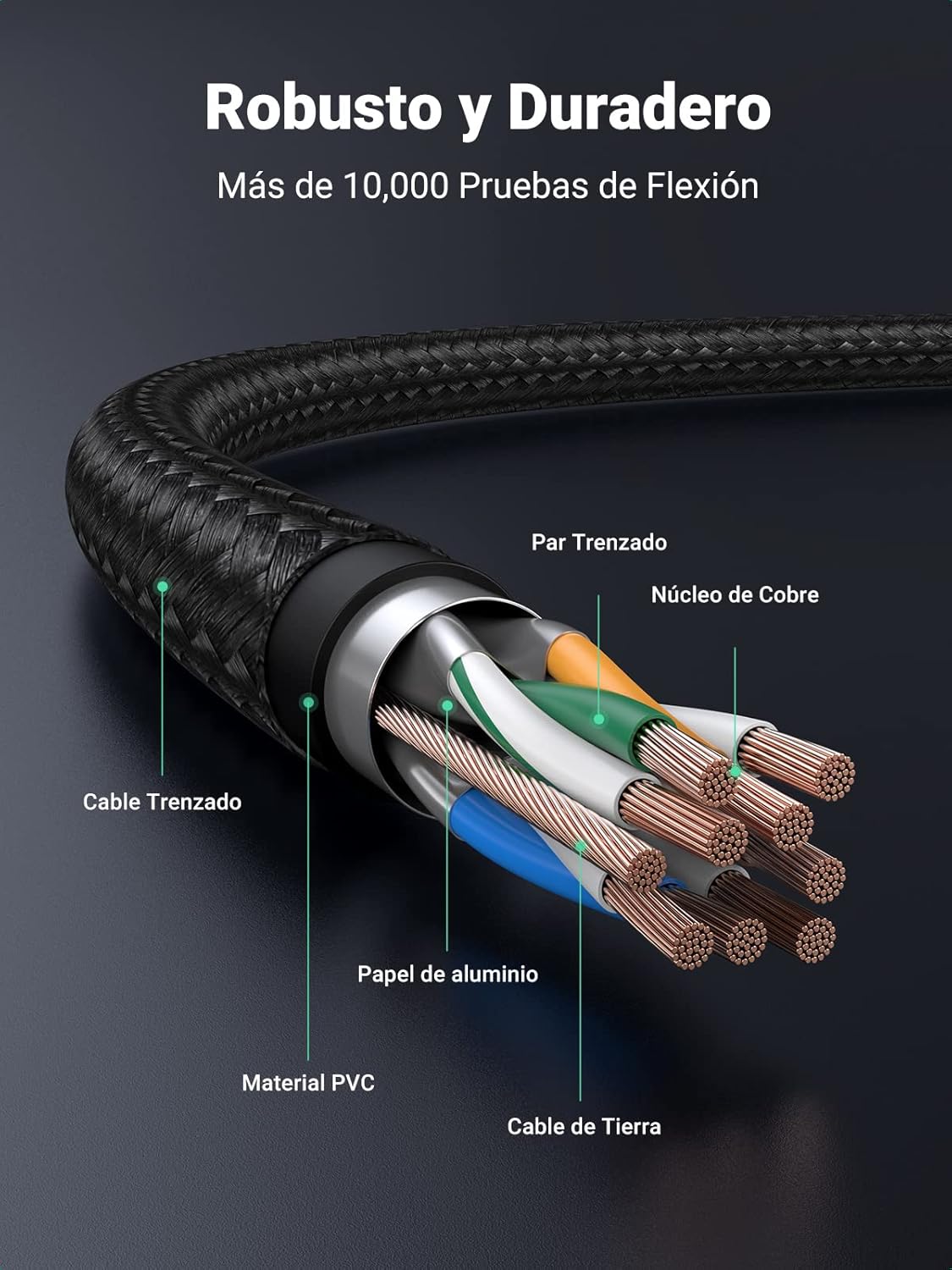
Image 3.2: Visual representation of fast data synchronization, indicating 1GB transfer in approximately 25 seconds at 480 Mbps.
4. Maintenance
Proper care and maintenance will extend the life of your UGREEN Micro USB cable.
- Avoid Bending: Do not excessively bend or crimp the cable, especially near the connectors. The nylon braiding provides durability, but extreme stress can still cause internal damage.
- Clean Connectors: Periodically inspect the connectors for dust or debris. Use a soft, dry cloth or a small brush to gently clean them if necessary.
- Store Properly: When not in use, coil the cable loosely and store it in a clean, dry place away from direct sunlight or extreme temperatures.
- Handle with Care: Always pull from the connector head, not the cable itself, when disconnecting from a device or power source.

Image 4.1: Diagram illustrating the robust construction of the cable, including braided nylon, aluminum foil shielding, PVC material, copper core, and reinforced joints for enhanced durability.
5. Troubleshooting
If you encounter issues with your UGREEN Micro USB cable, try the following troubleshooting steps:
- Device Not Charging:
- Ensure both ends of the cable are securely connected.
- Try a different power adapter or USB port.
- Test the cable with another Micro USB device to rule out a device-specific issue.
- Check if the charging port on your device is clean and free of debris.
- Slow Charging:
- Verify that your power adapter supports fast charging (e.g., QC 2.0/3.0, AFC).
- Ensure your device also supports fast charging.
- Avoid using the device heavily while charging, as this can slow down the process.
- Data Transfer Issues:
- Confirm that your device is set to "File Transfer" or "MTP" mode when connected to a computer.
- Try connecting to a different USB port on your computer.
- Restart both your device and computer.
- Intermittent Connection:
- Check for any visible damage to the cable or connectors.
- Ensure the connectors are fully inserted and not loose.
- Avoid putting strain on the cable while in use.
6. Specifications
| Model Number | 30649 |
| Connector Type | Micro USB (Male to Female) |
| Cable Type | USB 2.0 |
| Data Transfer Speed | Up to 480 Mbps |
| Max Current | 2.4 Amperes |
| Max Power | 18 Watts |
| Max Voltage | 20 Volts |
| Exterior Material | Nylon Braided |
| Dimensions (0.5m variant) | 14.5 x 8 x 0.2 cm; 20 g |
| Certifications | ANSI, CE, RoHS, USB-IF |
6.1 Universal Compatibility
This cable is compatible with a wide range of Micro USB devices, including but not limited to:
- Smartphones: Samsung Galaxy S7/S6/S5/S4/S3, Note 5/4/3/2, J-series, A-series (older models); Xiaomi Redmi Note series, Redmi series, Mi A2 Lite; Huawei P-series Lite, Y-series, Mate series (older models); Honor series; Sony Xperia series; HTC Desire/One/Butterfly; Wiko Lenny/Rainbow/U Feel/Fever/Sunny/Highway/Tommy; Motorola Moto G/E series; LG Q/K series; Nokia C/Lumia series.
- Tablets: Samsung Galaxy Tab A/E/S2/3/4.
- Other Devices: PS4/Xbox One controllers, MP3 players, digital cameras, power banks, Bluetooth speakers, and other Micro USB-enabled peripherals.

Image 6.1: Visual guide to the universal compatibility of the UGREEN Micro USB cable with various mobile phones, tablets, and other devices.
7. Warranty and Support
UGREEN products are designed for reliability and performance. For warranty information, technical support, or any inquiries regarding your product, please refer to the official UGREEN website or contact their customer service directly.
Please retain your proof of purchase for warranty claims.