
1. Introduction and Overview
The SOLEM BL-IP is a battery-powered, waterproof (IP68 rated) Bluetooth irrigation controller designed for garden use. It can be installed directly into a valve box, offering a discreet and protected solution for managing your irrigation system. Available in 2, 4, and 6-zone versions, the BL-IP allows remote programming and control via a smartphone or tablet (iOS or Android) using Bluetooth technology. This cable-free irrigation system supports multiple BL-IP modules in a single garden, each capable of managing its own set of irrigation zones.
2. Product Features
- Wireless Control: Manage your irrigation system via Bluetooth from your smartphone or tablet (iOS/Android).
- Waterproof Design: IP68 rated for complete protection against dust and water immersion, suitable for installation in valve boxes.
- Battery Powered: Operates on a 9V battery (not included), eliminating the need for external power wiring.
- Multi-Zone Capability: Available in versions supporting 2, 4, or 6 irrigation zones.
- Flexible Programming: Create custom watering schedules for each zone.
- Scalable System: Multiple BL-IP modules can be used within the same garden.
3. Safety Information
- Always ensure the battery compartment is securely sealed to maintain the IP68 waterproof rating.
- Do not attempt to open or repair the device yourself. Refer to qualified personnel for service.
- Use only the specified 9V battery type. Incorrect battery usage may damage the device.
- Keep the device out of reach of children.
- Disconnect the battery before performing any maintenance or wiring changes.
4. Package Contents
- SOLEM BL-IP Bluetooth Irrigation Controller Module
- User Manual (this document)
Note: A 9V battery is required for operation and is not included in the package.
5. Setup and Installation
5.1 Battery Installation
- Unscrew the battery compartment cover on the BL-IP module.
- Insert a new 9V alkaline battery, ensuring correct polarity.
- Securely re-attach the battery compartment cover, ensuring the seal is tight to maintain waterproofing.
5.2 Wiring to Solenoid Valves
The BL-IP module connects to standard 9V latching solenoid valves. Each colored wire corresponds to a specific zone.

Image 1: The SOLEM BL-IP controller showing its multi-colored wiring harness, indicating connections for up to six irrigation zones. The main body of the controller is light grey with 'BL-IP' visible on its surface.
- Identify the common wire from your solenoid valves (usually white or black). Connect this common wire to the common terminal on the BL-IP module (often marked 'C' or with a specific color like black).
- Connect each individual solenoid valve wire to its corresponding zone wire on the BL-IP module (e.g., Zone 1 to the first colored wire, Zone 2 to the second, and so on).
- Ensure all connections are secure and waterproof, especially if installing in a damp environment.
5.3 Physical Installation
The BL-IP module is designed to be installed directly inside a standard irrigation valve box. Its compact size and waterproof rating make it ideal for this purpose.
- Place the module in the valve box, ensuring it is not submerged in water and that wires are not pinched.
- Close the valve box lid securely.
6. Operating Instructions
6.1 Downloading the SOLEM App
- Search for the 'SOLEM' irrigation app on the Apple App Store (for iOS devices) or Google Play Store (for Android devices).
- Download and install the application on your smartphone or tablet.
6.2 Connecting to the BL-IP Module
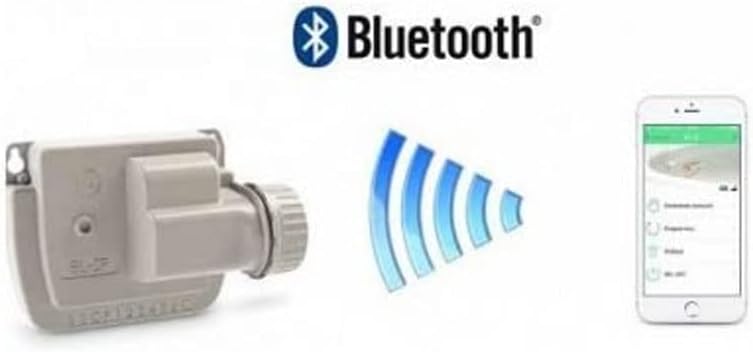
Image 2: This image illustrates the SOLEM BL-IP controller's wireless capability, showing the module itself, a prominent Bluetooth logo, and a smartphone displaying the SOLEM app interface for irrigation control.
- Ensure Bluetooth is enabled on your smartphone or tablet.
- Open the SOLEM application. The app will automatically scan for nearby BL-IP modules.
- Select your BL-IP module from the list of discovered devices. If prompted, follow the on-screen instructions to pair the device.
6.3 Programming Irrigation Schedules
Once connected, you can use the SOLEM app to:
- Set Watering Start Times: Define when each irrigation cycle should begin.
- Adjust Watering Duration: Specify how long each zone should water.
- Select Watering Days: Choose specific days of the week for irrigation.
- Manual Operation: Manually start or stop watering for individual zones or all zones.
- Seasonal Adjust: Easily increase or decrease watering times across all programs by a percentage.
Refer to the in-app help section for detailed instructions on advanced programming features.
7. Maintenance
7.1 Battery Replacement
The BL-IP module operates on a 9V battery. Battery life varies depending on usage and environmental conditions. Replace the battery when the app indicates a low battery level or if the controller becomes unresponsive.
- Follow the steps in Section 5.1 for battery installation.
- Always use a fresh, high-quality 9V alkaline battery.
7.2 Cleaning
Periodically inspect the module for dirt or debris, especially around the battery compartment seal. Clean with a damp cloth. Do not use harsh chemicals or abrasive cleaners.
8. Troubleshooting
- Controller not responding: Check the 9V battery. Replace if necessary. Ensure the battery compartment is sealed correctly.
- Cannot connect via Bluetooth: Ensure Bluetooth is enabled on your device. Make sure you are within range of the BL-IP module. Restart the SOLEM app.
- Zones not watering: Verify that the solenoid valves are functioning correctly. Check wiring connections between the BL-IP module and the valves. Ensure the battery has sufficient power.
- App issues: Ensure your SOLEM app is updated to the latest version. Try restarting your smartphone/tablet.
9. Specifications
| Brand | SOLEM |
| Model Number | 700207 |
| Dimensions (L x W x H) | 15 x 12 x 4 cm |
| Weight | 380 g |
| Material | Metal |
| Waterproof Rating | IP68 |
| Connectivity | Bluetooth |
| Power Source | 9V Battery (not included) |
| Number of Zones | 1 to 6 (depending on model variant) |
10. Warranty and Support
Specific warranty information for the SOLEM BL-IP Bluetooth Irrigation Controller is not provided in this document. Please refer to the retailer or manufacturer's official website for detailed warranty terms and conditions.
For technical support, product inquiries, or assistance with troubleshooting, please contact SOLEM customer service or your authorized dealer.


