
Introduction
This manual provides essential information for the safe and effective use of your Arrowmax AMCM9008-1600-D Ni-MH battery pack. This battery is designed as a replacement for Motorola HNN9011, HNN9012, HNN9009, and HNN9008 batteries, compatible with various Motorola two-way radio models including HT750, HT1225, HT1250, GP328, and GP338. Please read this manual thoroughly before initial use and retain it for future reference.
Important Safety Information
Observe the following safety precautions to prevent damage to the battery, radio, or personal injury:
- Disposal: Never dispose of batteries in a fire, as they may explode. Always follow local regulations for proper battery recycling and disposal. Recycling facilities may not be available in all areas.
- Do Not Open: Do not attempt to open the battery pack. There are no user-serviceable parts inside.
- Temperature: Do not expose the battery to temperatures above 60°C (140°F). High temperatures can damage the battery and pose a fire risk.
- Short Circuit: Do not short-circuit the battery terminals. This can cause severe damage to the battery and potentially lead to fire or burns.
- Compatibility: Use this battery only with specified and compatible radio models and chargers. Using incompatible accessories may cause damage.
Initial Charge: Upon delivery, the battery is not fully charged. It is important to recharge the battery overnight (approximately 12-16 hours) before its first use to ensure optimal performance and battery life.

Figure 1: Front view of the Arrowmax AMCM9008-1600-D Ni-MH battery pack, showing the product label and safety warnings.
Product Overview
The Arrowmax AMCM9008-1600-D is a high-quality Ni-MH (Nickel-Metal Hydride) battery pack designed for reliable power to your compatible Motorola two-way radios. It features a robust construction and includes a heavy-duty spring belt clip for convenient carrying.
Key Features:
- Voltage: 7.2 Volts
- Capacity: 2500 mAh (Milliampere-hour)
- Chemistry: Ni-MH (Nickel-Metal Hydride)
- Construction: Densely constructed with a thick shell casing for durability.
- Included Accessory: Heavy-duty spring belt clip.
Compatibility:
This battery pack is compatible with the following Motorola two-way radio models and replaces the following OEM battery part numbers:
- Motorola Radio Models: HT750, HT1225, HT1250, GP328, GP338, and other models with similar battery sockets.
- Replaces OEM Part Numbers: HNN9011, HNN9012, HNN9009, HNN9008.
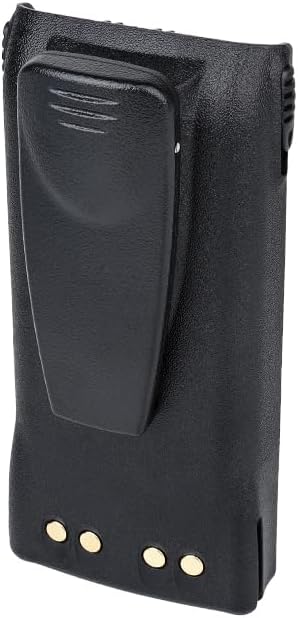
Figure 2: Rear view of the Arrowmax battery pack, illustrating the integrated heavy-duty spring belt clip.
Setup and Installation
- Unpack: Carefully remove the battery pack from its packaging.
- Initial Charge: Before first use, place the battery in a compatible charger and charge it overnight (12-16 hours). Refer to the "Charging the Battery" section for details.
- Attach to Radio: Align the battery pack with the battery compartment on the back of your Motorola two-way radio. Slide the battery into place until it clicks securely. Ensure the battery is fully seated to maintain proper contact.
- Remove from Radio: To remove the battery, locate the battery release latch (usually at the bottom or side of the battery compartment on the radio). Press the latch and slide the battery pack downwards or outwards to detach it from the radio.
- Belt Clip Attachment (if separate): If the belt clip is not pre-attached, align the clip with the designated slots on the back of the battery and slide it into place until it locks. To remove, follow the reverse procedure, often involving a small tab or release mechanism on the clip itself.
Operating Instructions
Charging the Battery:
Use only a charger specifically designed for Ni-MH batteries and compatible with your Motorola radio battery type. Incompatible chargers can damage the battery or pose a safety risk.
- Connect Charger: Plug the charger's power adapter into an appropriate electrical outlet.
- Insert Battery: Place the battery pack into the charging slot of the charger. Ensure the battery contacts align correctly with the charger terminals.
- Observe Indicator: The charger typically has an LED indicator that shows the charging status (e.g., red for charging, green for fully charged). Refer to your charger's manual for specific indicator meanings.
- Charging Time: For initial use, charge the battery overnight (12-16 hours). Subsequent charges typically take 8-12 hours for a full charge, depending on the charger and battery depletion level.
- Remove Battery: Once fully charged, remove the battery from the charger. Avoid leaving batteries on charge indefinitely after they are full, as this can reduce battery life over time.

Figure 3: An Arrowmax battery pack placed in a compatible charging dock, indicating the charging process.
Using the Battery with Your Radio:
Once the battery is installed and fully charged, your radio is ready for use. Refer to your radio's instruction manual for specific operating procedures.
Maintenance and Storage
- Cleaning: Clean the battery contacts periodically with a clean, dry cloth to ensure good electrical connection. Do not use harsh chemicals or abrasive materials.
- Storage: If storing the battery for an extended period, charge it to approximately 50% capacity. Store in a cool, dry place away from direct sunlight and extreme temperatures. Avoid storing fully charged or fully discharged batteries for long periods.
- Cycle Life: Ni-MH batteries benefit from occasional full discharge/recharge cycles to maintain capacity. However, modern chargers often manage this automatically.
- Avoid Impact: Protect the battery from physical impact or dropping, which can damage internal components.
Troubleshooting
| Problem | Possible Cause | Solution |
|---|---|---|
| Battery does not charge. |
|
|
| Short operating time after full charge. |
|
|
| Battery does not fit radio. |
|
|
Specifications
| Model Number | AMCM9008-1600-D |
| Battery Chemistry | Ni-MH (Nickel-Metal Hydride) |
| Voltage | 7.2 V |
| Capacity | 2500 mAh |
| Compatible Radios | Motorola HT750, HT1225, HT1250, GP328, GP338 |
| Replaces OEM | HNN9011, HNN9012, HNN9009, HNN9008 |
| Approx. Weight (per battery) | ~0.51 lbs (based on 2.05 lbs for 4-pack) |
| Manufacturer | Arrowmax |
Warranty and Support
For warranty information or technical support regarding your Arrowmax battery pack, please refer to the seller's policies or contact Arrowmax Communications, INC directly. Contact details are typically available on the product packaging or the seller's website.
Online Resources: For additional information or to view other products, visit the Arrowmax Store on Amazon.