USR-N510 Industrial Serial Ethernet Converter
Model: USR-N510
Brand: USR
Instruction Manual
1. Introduction
The USR-N510 is an industrial-grade serial to Ethernet converter designed to enable transparent data transmission between serial devices (RS232, RS485, RS422) and an Ethernet network. It supports various working modes, including TCP Client, TCP Server, UDP, and HTTPD Client, facilitating seamless integration of serial equipment into IP-based networks. This device is equipped with high-level serial port protection and a hardware watchdog for reliable, continuous operation in industrial environments.
2. Key Features
- Serial Port Compatibility: Supports RS232, RS485, and RS422 interfaces.
- Ethernet Connectivity: 10/100Mbps auto-negotiation Ethernet port.
- Industrial Grade Protection: Features EMC protection, ESD, and EFT protection for robust performance.
- Hardware Watchdog: Integrated hardware watchdog circuit ensures continuous operation and automatic recovery from system failures.
- Modbus Gateway: Supports Modbus RTU to Modbus TCP conversion.
- Virtual Serial Port: Allows for virtual serial port mapping on a PC.
- Configuration: Configurable via web browser, setup software, or serial commands.
3. Package Contents

Figure 3.1: USR-N510 Package Contents
Please verify that all items are present in the package:
- USR-N510 Serial Ethernet Converter Unit
- Power Adapter
- RS232 Serial Cable
- Terminal Block (for RS485/RS422 connection)
4. Device Overview

Figure 4.1: USR-N510 Front View
The USR-N510 features a robust industrial design. The front panel includes the serial port, indicator LEDs, and DIP switches for serial mode selection. The rear panel typically houses the Ethernet port and power input.
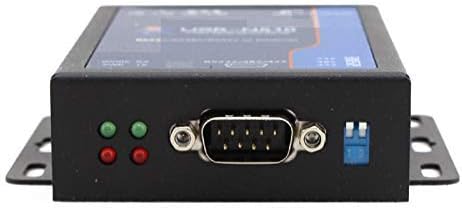
Figure 4.2: Serial Port and Indicators
4.1 Indicator LEDs
- PWR (Power): Indicates power supply status.
- WORK (Working Status): Indicates device operational status.
- RX (Receive Data): Flashes when data is received on the serial port.
- TX (Transmit Data): Flashes when data is transmitted from the serial port.
4.2 Serial Port
The device features a DB9 male connector for RS232 and a terminal block for RS485/RS422 connections. The serial mode is selected using the DIP switches.
5. Setup
5.1 Power Connection
Connect the provided power adapter to the DC input port of the USR-N510. Ensure the power source matches the specified voltage range (DC 5-36V). The PWR LED should illuminate once power is supplied.
5.2 Network Connection
Connect an Ethernet cable from your network switch or router to the Ethernet port on the USR-N510. The Ethernet link/activity LEDs on the port should indicate a successful connection.
5.3 Serial Port Configuration and Connection
The USR-N510 supports RS232, RS485, and RS422. The serial mode is selected using the DIP switches located on the device. Refer to the diagram below for proper switch settings and wiring.

Figure 5.1: Serial Port Wiring and DIP Switch Settings
5.3.1 RS232 Connection
- DIP Switch Setting: Ensure all DIP switches are in the 'down' position.
- Wiring: Connect your RS232 device to the DB9 male connector. Standard pinouts apply (TXD, RXD, GND).
5.3.2 RS485 Connection
- DIP Switch Setting: Ensure all DIP switches are in the 'up' position.
- Wiring: Connect your RS485 device to the A+, B-, GND terminals on the terminal block.
5.3.3 RS422 Connection
- DIP Switch Setting: Set the left DIP switch 'up' and the right DIP switch 'down'.
- Wiring: Connect your RS422 device to the RX+, RX-, TX+, TX-, GND terminals on the terminal block.
5.4 Initial Software Configuration
The USR-N510 can be configured via a web browser or dedicated setup software. Typically, the device obtains an IP address via DHCP by default. If DHCP is not available, it will use a default static IP address (refer to the product's specific documentation for the default IP).
- Connect your PC to the same network as the USR-N510.
- Open a web browser and enter the device's IP address.
- Log in using the default username and password (refer to the product's specific documentation).
- Configure serial port parameters (baud rate, data bits, stop bits, parity) and network parameters (working mode, remote IP/port) as required for your application.
6. Operating Instructions
6.1 Basic Data Transmission
Once configured, the USR-N510 operates as a transparent data channel. Data sent to the serial port will be encapsulated and transmitted over Ethernet, and vice-versa. The specific behavior depends on the configured working mode (e.g., TCP Client, TCP Server, UDP).
6.2 Modbus RTU to TCP Gateway
In Modbus RTU to TCP mode, the converter acts as a gateway, translating Modbus RTU commands received on the serial port into Modbus TCP packets for the Ethernet network, and vice-versa. This allows Modbus TCP masters to communicate with Modbus RTU slave devices.
6.3 Watchdog Functionality

Figure 6.1: Watchdog and Core Processor
The USR-N510 incorporates a hardware watchdog circuit. This feature continuously monitors the device's operation. In the event of a system crash or unresponsiveness, the watchdog automatically triggers a reset, ensuring the device recovers and resumes normal operation without manual intervention. This is crucial for maintaining uptime in critical industrial applications.
7. Maintenance
- Cleaning: Keep the device clean and free from dust. Use a soft, dry cloth for cleaning. Do not use liquid cleaners.
- Firmware Updates: Periodically check the manufacturer's website for firmware updates. Firmware updates can provide new features, performance improvements, and bug fixes. Follow the provided instructions carefully when performing updates.
- Environmental Conditions: Ensure the device operates within its specified temperature and humidity ranges to prevent damage.
8. Troubleshooting
- No Power: If the PWR LED is off, check the power adapter connection and the power source.
- No Network Link: If the Ethernet link LED is off, check the Ethernet cable connection and the network switch/router status.
- No Serial Data: Verify serial port wiring, DIP switch settings for the correct mode (RS232/485/422), and serial parameters (baud rate, data bits, parity, stop bits) in the device configuration.
- Cannot Access Web Interface: Ensure your PC is on the same subnet as the USR-N510. Check the device's IP address. Try resetting the device to factory defaults if the IP is unknown (refer to specific reset procedure in full manual).
- Intermittent Connection: Check for electromagnetic interference, cable quality, and ensure proper grounding in industrial environments.
9. Specifications
| Feature | Value |
|---|---|
| Model Number | USR-N510 |
| Serial Port Type | RS232, RS485, RS422 |
| Ethernet Interface | 10/100Mbps Auto-MDI/MDIX |
| Input Voltage | DC 5-36V |
| Item Weight | 2.2 pounds (approx. 1 kg) |
| Package Dimensions | 8.27 x 6.3 x 1.97 inches |
| Operating Temperature | Industrial Grade (specific range not provided, refer to full datasheet) |
| Protection | EMC, ESD, EFT |
| Manufacturer | USR |
| Date First Available | December 9, 2016 |
10. Warranty and Support
For warranty information, technical support, and detailed documentation, please refer to the official USR website or contact your local distributor. Keep your purchase receipt for warranty claims.


