
1. Introduction
The PeakMeter PM8908B is a professional, pen-style non-contact AC voltage detector designed for safe and easy voltage testing. This device can detect AC voltage ranging from 12V to 1000V, offering adjustable sensitivity for various applications. It features sound and light alarms, automatic power-off, and a built-in flashlight for convenience in dimly lit environments. Its compact design ensures portability and ease of use.
This manual provides essential information for the safe and effective operation, maintenance, and troubleshooting of your PM8908B voltage detector. Please read it thoroughly before using the device.
2. Safety Information
Always adhere to safety precautions when working with electrical systems. This device is designed to enhance safety, but it does not replace proper electrical safety practices.
- This device is designed according to safety requirements EN61010-1-2-030, EN61010-2-033, and CAT.III1000V.
- Do not use the device if it appears damaged or is not operating correctly.
- Always test the detector on a known live circuit before and after use to confirm proper operation.
- Do not attempt to measure voltages exceeding the specified range (1000V AC).
- Keep hands and fingers away from the tip of the detector during operation.
- Replace batteries promptly when the low battery indicator appears to ensure accurate readings.
3. Product Overview
The PeakMeter PM8908B is a compact, pen-style device with intuitive controls and indicators.

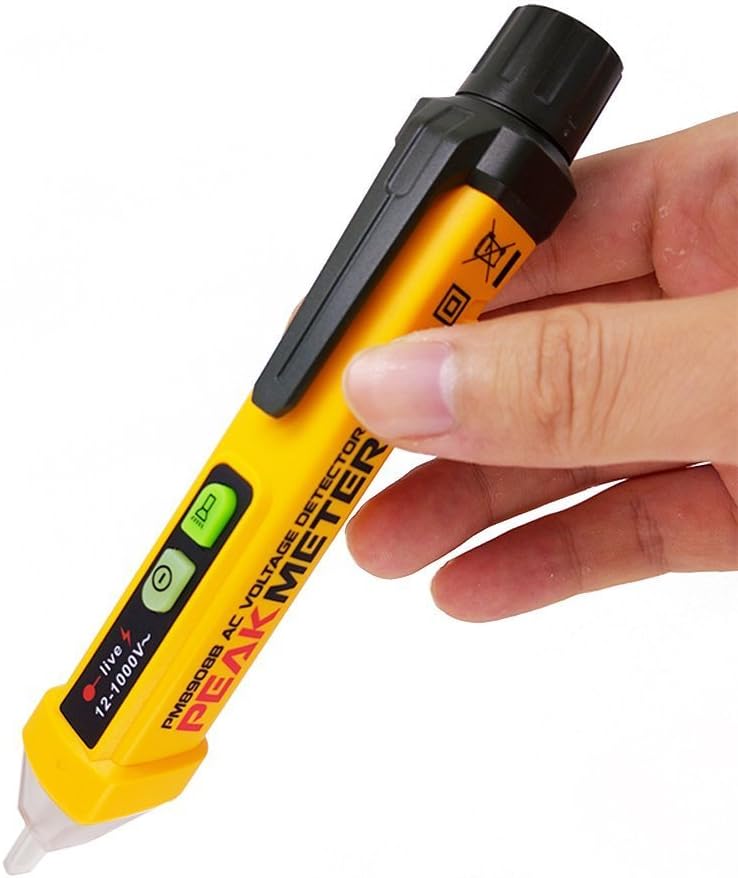
Key Components:
- Detection Tip: Non-contact probe for sensing AC voltage.
- Flashlight: White LED light for illuminating dark areas.
- Power Button: Turns the device on/off.
- Alarm/Sensitivity Button: Adjusts sensitivity and controls the alarm.
- LED Indicators: Red LED for live wire detection, green LED for power/flashlight.
- Rotatable Battery Cover: For easy battery replacement.
4. Setup
4.1 Battery Installation
The PM8908B requires two (2) 1.5V AAA batteries for operation.
- Locate the rotatable battery cover at the top end of the detector.
- Rotate the cover counter-clockwise to open it.
- Insert two 1.5V AAA batteries, ensuring correct polarity (+/-) as indicated inside the compartment.
- Replace the battery cover by rotating it clockwise until it is securely closed.
The device will automatically power on after battery installation or when the power button is pressed.
5. Operating Instructions
5.1 Power On/Off
- Press the power button (usually marked with “⑉”) to turn the detector on. The green LED will illuminate.
- To turn off, press and hold the power button for approximately 2 seconds. The device also features an auto power-off function to conserve battery life after a period of inactivity.
5.2 Non-Contact AC Voltage Detection
The PM8908B detects AC voltage without direct contact with the conductor.
- Turn on the detector.
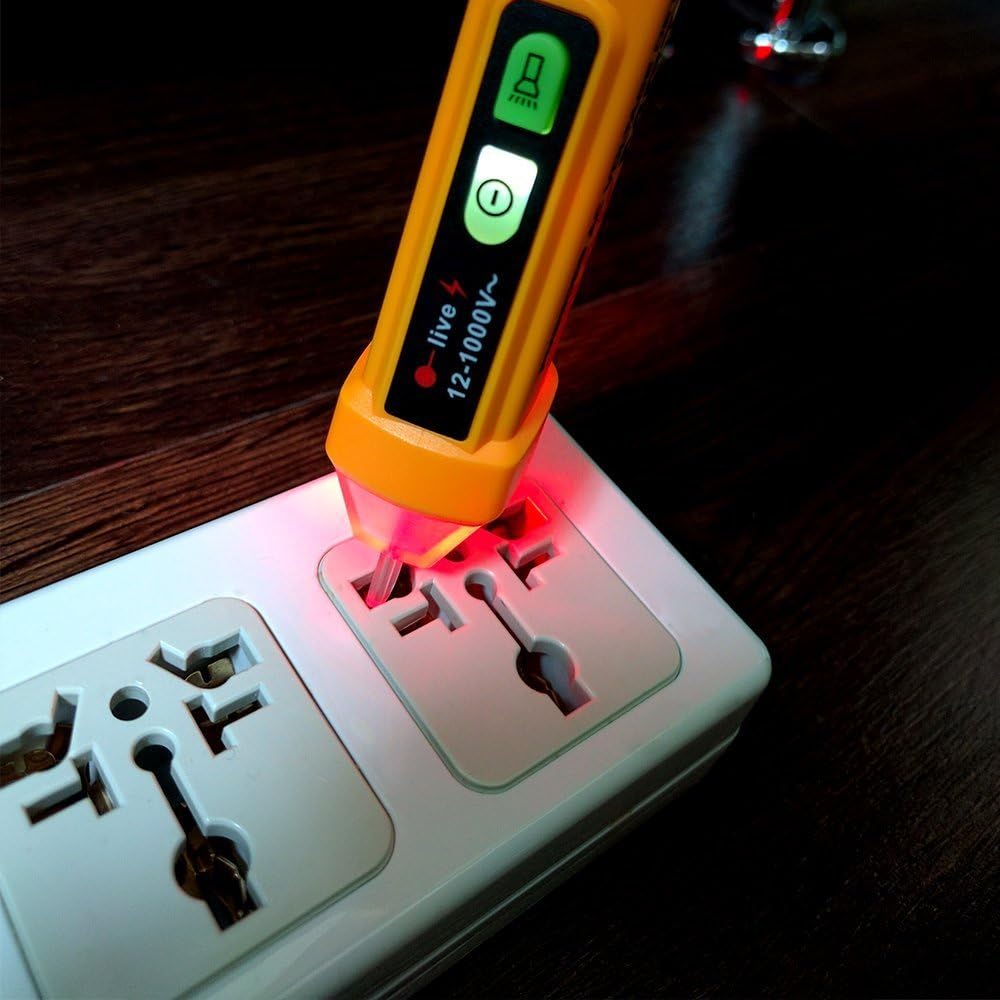
- Bring the detection tip close to the wire, outlet, or electrical component you wish to test.
- If AC voltage is detected, the red LED indicator will flash, and an audible alarm will sound. The frequency of the flashing and beeping increases with higher voltage or closer proximity to the source.
5.3 Sensitivity Adjustment
The detector offers three levels of sensitivity (High, Medium, Low) for different detection scenarios.
- Press the alarm/sensitivity button (usually marked with a bell icon) to cycle through the sensitivity modes.
- The device will indicate the current sensitivity level through a combination of beeps or LED flashes.
- Use high sensitivity for detecting voltage from a greater distance or through insulation. Use low sensitivity for more precise localization of voltage sources.
5.4 Zero Line and Fire Line Distinction
The PM8908B can automatically distinguish between the Zero (Neutral) Line and the Fire (Live) Line.
- When testing an AC outlet or cable, the detector will provide a stronger and more consistent alarm (faster flashing red LED and quicker beeps) when near the live wire.
- The neutral wire will typically result in no alarm or a significantly weaker/intermittent alarm, depending on the sensitivity setting and environmental factors.
5.5 Flashlight Function
The built-in white LED flashlight assists in working in dark areas.
- Press the flashlight button (often integrated with the power button or a separate button) to turn the flashlight on or off.

6. Maintenance
6.1 Battery Replacement
When the low battery indicator appears, replace the batteries as soon as possible to ensure accurate operation. Refer to Section 4.1 for battery installation instructions.
6.2 Cleaning
Wipe the device with a dry, clean cloth. Do not use abrasive cleaners or solvents. Ensure the device is powered off before cleaning.
6.3 Storage
Store the detector in a cool, dry place, away from direct sunlight and extreme temperatures. If storing for an extended period, remove the batteries to prevent leakage.
7. Troubleshooting
| Problem | Possible Cause | Solution |
|---|---|---|
| Device does not power on. | Dead or incorrectly installed batteries. | Check battery polarity or replace with new 1.5V AAA batteries. |
| No detection or weak signal. | Low battery, incorrect sensitivity setting, or no AC voltage present. | Replace batteries. Adjust sensitivity to 'High'. Test on a known live circuit. |
| False positives (detects voltage where none is expected). | High sensitivity setting, static electricity, or induced voltage. | Reduce sensitivity. Ensure proper grounding of the circuit being tested. |
| Flashlight does not work. | Low battery or flashlight function not activated. | Replace batteries. Press the flashlight button to activate. |
8. Specifications
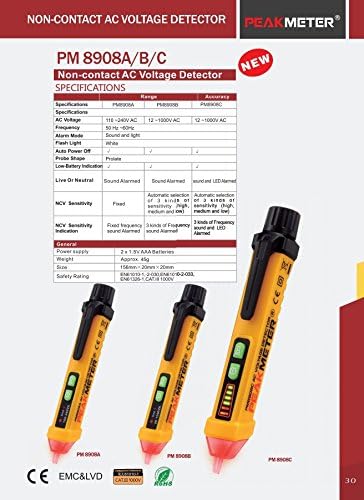
The following table outlines the technical specifications for the PeakMeter PM8908B Non-Contact AC Voltage Detector.
| Parameter | Specification |
|---|---|
| Model | PM8908B |
| Voltage Sensitivity | 12V to 1000V AC |
| Frequency | 50-60Hz |
| Alarm Mode | Sound and Light |
| Flash Light | White LED |
| Auto Power Off | Yes |
| Operating Temperature | 32 to 122℉ (0 to 50℃) |
| Storage Temperature | -4 to 140℉ (-20 to 60℃) |
| Humidity | Less than 85% RH |
| Battery | 2 x 1.5V AAA Batteries |
| Item Dimensions | 16 x 2 x 2 cm |
| Item Weight | 50g |
| Safety Rating | EN61010-1-2-030, EN61010-2-033, CAT.III1000V |
9. Warranty and Support
Specific warranty information for the PeakMeter PM8908B is not provided in the product details. For warranty claims or technical support, please refer to the retailer or manufacturer's official website where the product was purchased.

