1. Introduction
This user manual provides essential information for the setup, operation, maintenance, and troubleshooting of your Nintendo DS Lite Console Handheld System. The Nintendo DS Lite is a portable dual-screen gaming console known for its innovative touchscreen capabilities and extensive game library. This particular unit has been professionally restored to ensure excellent working condition and a like-new appearance.
2. Package Contents
Please verify that all the following items are included in your package:
- 1 x Black DS Lite Handheld System
- 1 x AC Power Adapter (New)
- 1 x Stylus (New)
- 1 x Battery (New)
3. Product Overview
The Nintendo DS Lite features a sleek, foldable design with two LCD screens, one of which is a touchscreen. It includes a D-pad, A/B/X/Y buttons, Start, Select, and Power buttons, along with a volume slider and slots for both Nintendo DS Game Cards and Game Boy Advance Game Paks.

Figure 1: Nintendo DS Lite Console (Closed) with Stylus. This image shows the compact, closed form factor of the black Nintendo DS Lite, with its included stylus resting beside it.
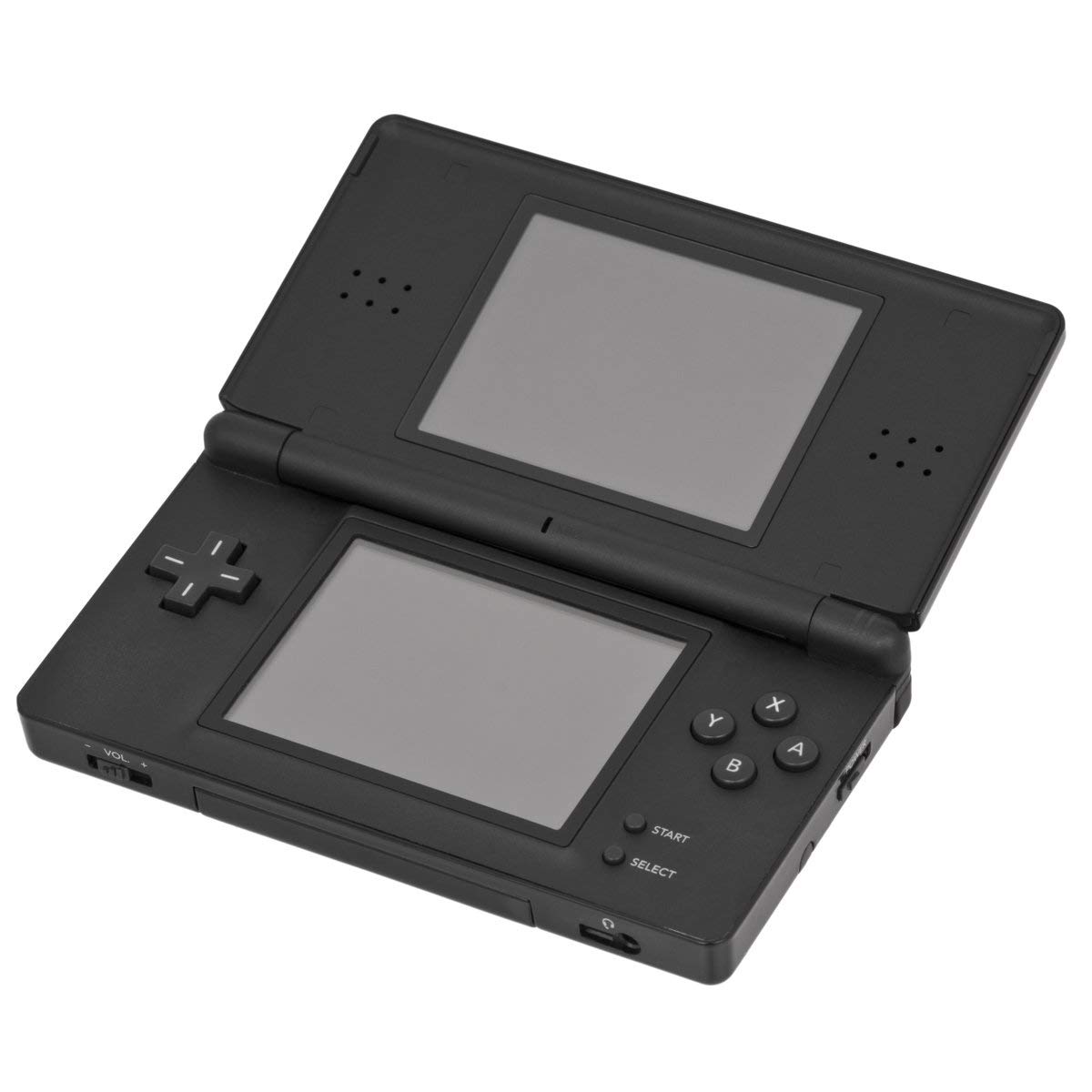
Figure 2: Nintendo DS Lite Console (Open). This image provides a top-down view of the open Nintendo DS Lite, showcasing its dual screens and button layout.

Figure 3: Nintendo DS Lite Console (Open) with Stylus. This image displays the open console with the stylus positioned next to the bottom touchscreen, ready for use.
4. Setup
4.1. Charging the Battery
Before first use, fully charge the console's battery. Connect the provided AC Power Adapter to the charging port on the back of the console and plug the adapter into a standard wall outlet. The charge indicator light will illuminate during charging and turn off when complete.
4.2. Inserting Game Cards
- Nintendo DS Game Card: Insert the Nintendo DS Game Card into the slot located on the back of the console until it clicks into place.
- Game Boy Advance Game Pak: Insert the Game Boy Advance Game Pak into the slot located on the front of the console until it is fully seated.
4.3. Powering On/Off
To power on the console, slide the Power switch located on the right side of the console upwards until the power indicator light turns green. To power off, slide the Power switch downwards and hold it until the power indicator light turns off.
5. Operating the Console
5.1. Using the Dual Screens
The Nintendo DS Lite features two screens. The top screen typically displays primary gameplay or information, while the bottom screen is a touchscreen used for interaction, inventory management, or secondary displays.
5.2. Touchscreen Functionality
Use the included stylus to interact with the bottom touchscreen. Gently tap or drag the stylus across the screen as required by the game or system menu. Avoid using excessive force or sharp objects to prevent damage to the screen.
5.3. Playing Games
Once a game card is inserted and the console is powered on, the game will typically appear on the main menu. Select the game using the D-pad and A button, or by tapping the game icon on the touchscreen. The DS Lite system is region-free, allowing it to play all Nintendo DS Lite games and Game Boy Advance games.
5.4. Adjusting Volume
Adjust the audio volume using the volume slider located on the left side of the console. Slide it up to increase volume and down to decrease it.
6. Maintenance
6.1. Cleaning the Console
To clean the screens, use a soft, lint-free cloth. For the console casing, a slightly damp cloth can be used. Avoid using harsh chemicals or abrasive materials, as these can damage the finish.
6.2. Battery Care
To prolong battery life, avoid exposing the console to extreme temperatures. If storing the console for an extended period, ensure the battery is partially charged (around 50%) and recharge it every few months.
6.3. Storage
Store the Nintendo DS Lite in a cool, dry place away from direct sunlight and excessive dust. When not in use, keep the console closed to protect the screens.
7. Troubleshooting
7.1. Common Issues and Solutions
- Console does not power on: Ensure the battery is charged. Connect the AC Power Adapter and try again.
- Game does not load: Remove the game card and reinsert it firmly. Ensure the game card contacts are clean.
- Touchscreen is unresponsive: Gently clean the touchscreen with a soft cloth. If the issue persists, try restarting the console.
- Battery not charging: Verify the AC Power Adapter is securely connected to both the console and the power outlet. Try a different outlet if available.
If you encounter issues not listed here or if the problem persists, please refer to the Warranty and Support section for further assistance.
8. Specifications
| Feature | Detail |
|---|---|
| Model | DS Lite |
| Dimensions (L x W x H) | 9.25 x 6.61 x 3.23 inches |
| Weight | 13.4 ounces |
| Screens | Dual LCD, one touchscreen |
| Game Compatibility | Nintendo DS Lite games, Game Boy Advance games (Region-Free) |
| Included Accessories | AC Power Adapter, Stylus, Battery |
| First Available Date | October 30, 2016 |
9. Warranty and Support
As an Amazon Renewed product, this Nintendo DS Lite Console is backed by the Amazon Renewed Guarantee. This provides a replacement or refund within 90 days of receipt if the product does not work as expected. For any issues or support inquiries, please contact the seller directly through your Amazon order history.
For additional information or general inquiries about Nintendo products, you may visit the official Nintendo website: www.nintendo.com


