
Introduction
Thank you for choosing the havit HV-MS55GT Wireless Ergonomic Vertical Mouse. This manual provides essential information for setting up, operating, maintaining, and troubleshooting your new device. Please read these instructions carefully before use to ensure optimal performance and longevity of your mouse.
Product Overview
The havit HV-MS55GT is a 2.4GHz wireless optical vertical mouse designed for ergonomic comfort. It features 6 buttons and 3 adjustable DPI settings (800/1200/1600) to suit various tasks and user preferences. Its unique vertical design aims to reduce wrist strain during extended use.
Key Features:
- Ergonomic Vertical Design: Promotes a natural handshake grip to minimize wrist and forearm strain.
- 2.4GHz Wireless Technology: Provides a stable connection up to 10 meters.
- Adjustable DPI: Easily switch between 800, 1200, and 1600 DPI for precise control.
- 6 Buttons: Includes Left, Right, Scroll Wheel, DPI, Forward, and Back buttons.
- Plug and Play: No drivers required for most operating systems.
Package Contents
- 1 x havit HV-MS55GT Wireless Ergonomic Vertical Mouse
- 1 x USB Nano Receiver
- 1 x User Manual
Setup Instructions
1. Battery Installation
- Locate the battery compartment on the underside of the mouse.
- Open the battery compartment cover.
- Insert two AAA batteries (not included) into the compartment, ensuring correct polarity (+/-).
- Close the battery compartment cover securely.

The underside of the mouse reveals the compartment for two AAA batteries (not included) and a convenient storage slot for the USB Nano receiver, ensuring it is not lost when transporting the mouse.
2. Connect the USB Nano Receiver
- Remove the USB Nano receiver from its storage slot on the underside of the mouse.
- Plug the USB Nano receiver into an available USB port on your computer.
- Your computer should automatically detect and install the necessary drivers. No additional software installation is typically required.

This image demonstrates the simple plug-and-play setup: insert the USB Nano receiver into your computer's USB port to establish a 2.4GHz wireless connection with a range of up to 10 meters.
3. Power On the Mouse
Locate the ON/OFF switch on the underside of the mouse and slide it to the 'ON' position. The mouse is now ready for use.
Operating Instructions
Ergonomic Grip
Hold the mouse with your hand in a natural handshake position. The vertical design aligns your wrist and forearm in a more neutral posture, reducing pronation and potential strain.

This image illustrates the ergonomic design of the havit HV-MS55GT mouse, comparing the natural, handshake-like grip it promotes with the pronated wrist position required by traditional mice. The vertical design helps reduce wrist strain.

This image shows a user's hand resting naturally on the havit HV-MS55GT ergonomic vertical mouse, illustrating how its contoured shape supports the palm and promotes a comfortable, strain-reducing grip.
Button Functions
| Button | Function |
|---|---|
| Left Click | Primary click function. |
| Right Click | Secondary click function (context menu). |
| Scroll Wheel | Scroll up/down, middle click. |
| DPI Button | Cycles through DPI settings (800/1200/1600). |
| Forward Button | Navigates forward in web browsers or file explorers. |
| Back Button | Navigates backward in web browsers or file explorers. |
Adjusting DPI
Press the DPI button located near the scroll wheel to cycle through the three available sensitivity settings: 800 DPI, 1200 DPI, and 1600 DPI. Select the DPI that best suits your task for optimal cursor speed and precision.
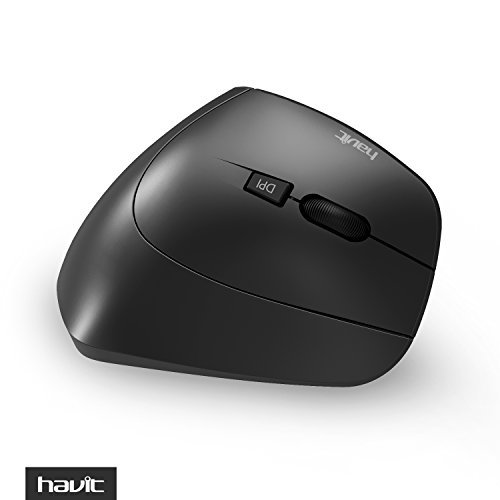
This image provides a top-down view of the havit HV-MS55GT mouse, clearly displaying the scroll wheel and the DPI adjustment button, which allows users to switch between 800, 1200, and 1600 DPI settings.
Maintenance
Cleaning
To maintain the mouse's appearance and functionality, regularly clean its surface. Use a soft, damp cloth to wipe away dust and smudges. Avoid using harsh chemicals or abrasive cleaners, as these can damage the matte finish. Periodic cleaning helps prevent the buildup of oils and dirt.
Battery Replacement
When the mouse's performance degrades (e.g., slow response, stuttering cursor), it is likely time to replace the AAA batteries. Follow the battery installation steps outlined in the Setup section.
Troubleshooting
- Mouse not responding:
- Ensure the mouse is powered ON using the switch on its underside.
- Check if the batteries are correctly installed and have sufficient charge. Replace if necessary.
- Verify that the USB Nano receiver is securely plugged into a working USB port on your computer. Try a different USB port.
- Move the mouse closer to the USB receiver to ensure it is within the 10-meter wireless range.
- Cursor is slow or erratic:
- Replace the batteries with fresh ones.
- Ensure the mouse is on a clean, non-reflective surface.
- Check for potential wireless interference from other 2.4GHz devices.
- DPI setting not changing:
- Ensure you are pressing the dedicated DPI button. Press it repeatedly to cycle through the settings.
- Forward/Back buttons not working on Mac:
- Some operating systems, particularly macOS, may require third-party software or system preference adjustments to enable full functionality of the forward/back buttons.
Specifications
| Feature | Detail |
|---|---|
| Model | HV-MS55GT |
| Brand | havit |
| Wireless Technology | 2.4GHz |
| Wireless Distance | Up to 10 meters |
| DPI Resolution | 800 / 1200 / 1600 DPI |
| Number of Buttons | 6 |
| Operating Cycles | 1,000,000 cycles |
| Battery Type | 2 x AAA (not included) |
| Material | ABS + Matte Oil Finish |
| Dimensions (LxWxH) | 12.37 x 6.16 x 6.78 cm |
| Weight | 99.8 g |
| Hand Orientation | Right-handed |
| Compatible OS | Windows 2000/ME/XP/Vista/7/8/10, MAC, Linux |

This diagram provides the key dimensions of the havit HV-MS55GT mouse, including its height, length, and width, which are approximately 61.58mm, 123.69mm, and 67.91mm respectively.
Warranty Information
havit products are manufactured to high-quality standards. This product is covered by a 1-year manufacturer's warranty from the date of purchase. This warranty covers defects in materials and workmanship under normal use. It does not cover damage caused by misuse, accidents, unauthorized modifications, or normal wear and tear. Please retain your proof of purchase for warranty claims.
Customer Support
If you encounter any issues or have questions regarding your havit HV-MS55GT Wireless Ergonomic Vertical Mouse that are not addressed in this manual, please contact havit customer support for assistance. Refer to the product packaging or the official havit website for contact details.