Introduction
This manual provides essential information for the installation, operation, and maintenance of the Lovato Electric LPCR1196 Mechanical Reset Button. Please read this manual thoroughly before using the product to ensure safe and efficient operation.
Product Overview
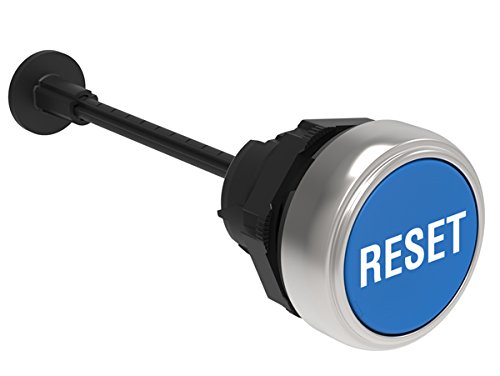
The Lovato Electric LPCR1196 is a high-quality 22mm mechanical reset button designed for industrial applications. It features a flush-mounted blue button with a clear "RESET" caption, a spring return mechanism, and an adjustable shaft for versatile installation. This complete unit is part of the Platinum Series, ensuring reliability and durability.
Key Features:
- Mechanical reset button functionality.
- Flush mounting design for a sleek panel appearance.
- Complete unit with shaft for straightforward installation.
- Spring return mechanism for immediate reset.
- Distinctive blue button with "RESET" caption for clear identification.
- Adjustable length (0-150mm/5.9in) for flexible application.
Specifications
| Model Number | LPCR1196 |
| Button Type | Mechanical Reset, Flush |
| Button Color | Blue with "RESET" caption |
| Mounting Diameter | 22mm |
| Return Type | Spring Return |
| Adjustable Length | 0-150mm / 5.9 inches |
| Manufacturer | Lovato Electric Inc |
| Package Dimensions | 7.48 x 2.72 x 1.85 inches |
| Weight | 6 Pounds (approx.) |
Setup and Installation
Proper installation is crucial for the reliable operation of the LPCR1196 button. It is recommended that installation be performed by qualified personnel in accordance with local electrical codes and safety regulations.
- Panel Preparation: Ensure the mounting panel has a clean, correctly sized 22mm diameter hole.
- Mounting: Insert the button assembly through the panel hole from the front.
- Securing: Secure the button from the rear using the provided locking nut. Tighten firmly but do not overtighten to avoid damage.
- Adjustable Length: Adjust the shaft length as required for your specific application, ensuring proper engagement with the contact block (not included).
- Wiring: Connect the appropriate contact block (e.g., normally open or normally closed) to the rear of the button assembly. Ensure all electrical connections are secure and insulated. Refer to the contact block's specific wiring diagram.
- Testing: Before full operation, perform a functional test to ensure the button actuates correctly and the associated circuit responds as expected.
Note: This product is an actuator. Contact blocks and other electrical components are sold separately and must be selected based on your specific circuit requirements.
Operating Instructions
The LPCR1196 Mechanical Reset Button is designed for simple and reliable operation.
- Actuation: To activate the reset function, firmly press the blue button.
- Spring Return: Upon release, the button will automatically return to its original flush position due to its spring return mechanism.
- Function: The button's action will trigger the connected electrical contact block, initiating the reset sequence in your system.
Ensure that the button is pressed with sufficient force to fully actuate the internal mechanism and connected contact block.
Maintenance
The Lovato Electric LPCR1196 button requires minimal maintenance to ensure long-term performance.
- Cleaning: Periodically clean the surface of the button and surrounding panel area with a soft, damp cloth. Avoid using abrasive cleaners or solvents that could damage the plastic or metal finish.
- Inspection: Regularly inspect the button for any signs of physical damage, wear, or loose connections. Ensure the button moves freely without sticking.
- Environmental Conditions: Ensure the operating environment remains within the specified temperature and humidity ranges to prevent premature wear or malfunction.
Always disconnect power to the circuit before performing any maintenance or inspection.
Troubleshooting
If you encounter issues with your LPCR1196 Mechanical Reset Button, consider the following common troubleshooting steps:
- Button Not Actuating:
- Check for any obstructions around the button.
- Ensure the button is fully pressed and the internal mechanism is engaging the contact block.
- Verify the adjustable shaft length is correctly set for the attached contact block.
- Circuit Not Responding:
- Confirm that the contact block is securely attached to the button actuator.
- Inspect all wiring connections for looseness or damage.
- Test the contact block independently to ensure it is functioning correctly.
- Verify power supply to the circuit.
- Button Sticking:
- Clean the button and surrounding panel area to remove any dirt or debris.
- Check for physical damage or deformation of the button or panel hole.
If problems persist after following these steps, contact Lovato Electric technical support or a qualified electrician.
Warranty and Support
Lovato Electric products are manufactured to high standards and typically come with a manufacturer's warranty. For specific warranty terms and conditions, please refer to the documentation provided with your purchase or visit the official Lovato Electric website.
For technical support, product inquiries, or service, please contact Lovato Electric directly through their official channels:
- Official Website: www.lovatoelectric.com
- Customer Service: Refer to the contact information available on their website for your region.
When contacting support, please have your product model number (LPCR1196) and any relevant purchase information ready.


