1. Product Overview
The 10Gtek Gigabit Ethernet Media Converter is designed to provide a reliable and cost-effective solution for extending network distances by converting 10/100/1000BASE-Tx copper signals to SFP fiber media, or vice versa. This device is engineered for stable data transmission and strong anti-interference capabilities, making it suitable for various networking environments.

Image: Front view of the 10Gtek Gigabit Ethernet Media Converter, showing the SFP slot, RJ45 port, and LED indicators.
2. Package Contents
Verify that all items are present and in good condition upon opening the package:
- 1x SFP Gigabit Ethernet Media Converter
- 1x DC Power Adapter
- 1x User's Manual

Image: Diagram illustrating the media converter, power cable, and user manual included in the package.
3. Product Features and Components
The 10Gtek Gigabit Ethernet Media Converter is designed with key features for optimal performance:
- Fiber Port: 1x Open SFP fiber Optical Port, 1.25Gbps, supports Gigabit Ethernet. (SFP Transceiver Module not included)
- RJ45 Port: 1x RJ45 Port, supporting 10M/100M/1000M speeds with Full/Half Duplex auto-negotiation and MDI/MDIX auto-crossover.
- Chipset: Equipped with RTL8213B chip for stability and ultra-low time-delay data transmission.
- Compliance: Complies with IEEE 802.3/802.3u/802.3z/802.3ab standards.
- Jumbo Frame: Supports jumbo frame size up to 9K bytes.
- LED Indicators: TX, FX LINK/ACT, POWER, FDX LEDs provide dynamic feedback on link connection status and fault detection.
- Design: Compact design with super cooling vents and a sturdy metal casing.

Image: The media converter highlighting its dimensions (3.7in x 2.8in x 1in) and key features such as SFP ports, GB Standard RJ45 ports, visualized LED indicators, 5V DC 2A power supply, super cooling vents, and sturdy metal casing.

Image: Front view of the media converter, emphasizing the open SFP slot and illustrating various compatible Gigabit SFP modules with different cable types, interfaces, and maximum cable distances.
4. Setup Instructions
The 10Gtek Gigabit Ethernet Media Converter is designed for plug-and-play operation, requiring minimal configuration.
- Install SFP Module: Insert a compatible Gigabit SFP transceiver module (not included) into the SFP slot of the media converter. Ensure it is securely seated.
- Connect Fiber Optic Cable: Connect the appropriate fiber optic cable (e.g., LC-to-LC UPC fiber patch cord for single-mode or multi-mode, depending on your SFP module) to the SFP module.
- Connect Ethernet Cable: Connect a standard RJ45 Ethernet cable from your network device (e.g., switch, router, computer) to the RJ45 port on the media converter.
- Connect Power: Plug the DC Power Adapter into the media converter's power input and then into a power outlet.
- Verify Connections: Observe the LED indicators on the media converter. The PWR LED should be on, and the LINK/ACT LEDs for both the SFP (FX) and RJ45 (TX) ports should light up, indicating an active connection.
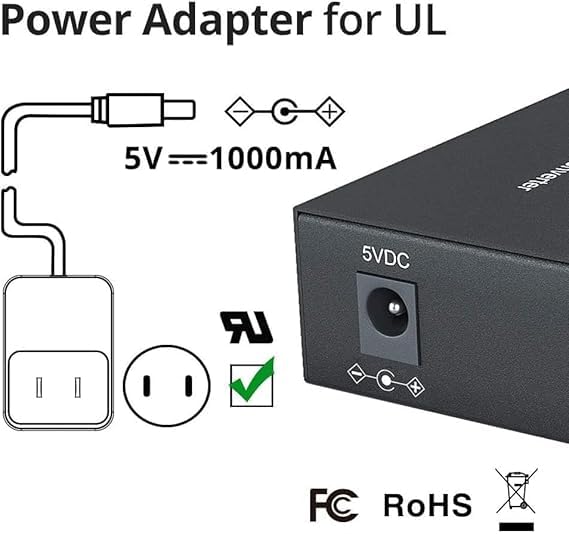
Image: Power adapter specifications, showing 5V === 1000mA output and UL certification.
Setup Demonstration Video
Video: A demonstration of connecting the 10Gtek Gigabit Ethernet Media Converter, including SFP module insertion, fiber optic cable connection, and Ethernet cable connection. This video illustrates the plug-and-play setup process.
General Media Converter Setup Example
Video: An example showing the general setup of a Gigabit Ethernet Media Converter, including power connection, SFP module insertion, fiber optic cable connection, and Ethernet cable connection. This video provides a visual guide to the installation process.
5. Operating Instructions
Once the media converter is properly set up and powered on, it operates automatically. The device will auto-negotiate the speed and duplex mode with connected Ethernet devices (10/100/1000Mbps, Full/Half Duplex).
- Power (PWR) LED: Illuminates when the device is receiving power.
- Fiber Link/Act (FX LINK/ACT) LED: Illuminates when a valid fiber link is established and blinks to indicate data activity.
- Ethernet Link/Act (TX LINK/ACT) LED: Illuminates when a valid Ethernet link is established and blinks to indicate data activity.
- Full Duplex (FDX) LED: Illuminates when the Ethernet port is operating in full-duplex mode.
No further user intervention is typically required for basic operation. The media converter transparently bridges the Ethernet and fiber segments of your network.
6. Maintenance
To ensure the longevity and optimal performance of your 10Gtek Gigabit Ethernet Media Converter, follow these maintenance guidelines:
- Cleaning: Keep the device clean and free from dust. Use a soft, dry cloth for cleaning. Avoid liquid cleaners.
- Environment: Operate the device within the specified operating temperature range (0°C to 60°C). Ensure adequate ventilation to prevent overheating.
- Cable Management: Ensure all cables (fiber, Ethernet, power) are securely connected and not under undue stress. Avoid sharp bends in fiber optic cables.
- Fiber Port Care: Always keep the SFP module and fiber optic cable connectors clean. Use appropriate fiber cleaning tools to prevent signal degradation.
7. Troubleshooting
If you encounter issues with your media converter, refer to the following troubleshooting tips:
- No Power (PWR LED off):
- Check if the power adapter is securely connected to both the device and the power outlet.
- Verify the power outlet is functional.
- No Link (LINK/ACT LEDs off):
- Ensure all cables (fiber and Ethernet) are correctly and securely connected.
- Verify that the SFP module is properly inserted into the media converter.
- Check the integrity of the fiber optic cable and Ethernet cable. Try swapping with known good cables.
- Confirm that the connected network devices are powered on and functioning correctly.
- For fiber connections, ensure the TX (transmit) port of one device is connected to the RX (receive) port of the other, and vice versa.
- Slow Speed/Intermittent Connection:
- Check for excessive cable length or poor quality cables.
- Inspect fiber optic connectors for dirt or damage. Clean if necessary.
- Ensure the SFP module is compatible with the fiber type and distance.
8. Specifications
| Feature | Specification |
|---|---|
| Model Number | SFP Port Power Outside X1 |
| Fiber Port | 1x Open SFP Slot (1.25Gbps) |
| Ethernet Port | 1x RJ45 (10/100/1000Base-TX) |
| Auto-Negotiation | Full/Half Duplex, MDI/MDIX |
| Jumbo Frame Size | Up to 9K bytes |
| Operating Voltage | 5 Volts |
| Current Rating | 1 Amps |
| Operating Temperature | 0°C to 60°C |
| Dimensions | 6.38 x 4.49 x 1.73 inches |
| Weight | 2.2 Pounds |
| Material | Copper (Contact Material) |
9. Warranty and Support
The 10Gtek Gigabit Ethernet Media Converter comes with a 1-Year warranty. For any technical assistance or support, please contact 10Gtek customer service. Lifetime technical support is provided for this product.


