
Introduction
The AcuRite Iris (5-in-1) Weather Station provides comprehensive, hyperlocal weather monitoring directly from your backyard. This advanced system tracks indoor and outdoor temperature, humidity, wind speed, wind direction, rainfall, and includes lightning detection capabilities. Designed for accuracy and ease of use, it features a high-definition display and robust outdoor sensors.
Key features include:
- Real-Time Weather Monitoring: Receive hyperlocal temperature, humidity, wind speed, wind direction, rainfall, and barometric pressure readings.
- Hyperlocal Weather Forecast Technology: Self-calibrating technology generates a personalized 12-hour forecast based on your current conditions.
- Lightning Detection: Be aware of approaching storms with distance-to-storm estimates and track strikes within a 25-mile radius.
- High-Definition Display: Easy-to-read, auto-dimming TFT display for outdoor weather, indoor conditions, and daily records.
- Multipurpose Weather Clock: Automatically updates for daylight saving time and includes an integrated alarm clock.
What's in the Box
Your AcuRite Iris (5-in-1) Weather Station package includes the following components:
- High-Definition Display Unit
- 5-in-1 Outdoor Sensor
- Lightning Sensor
- Mounting Hardware
- Power Adapter
Setup
Follow these steps for proper installation and setup of your weather station:
- Install Batteries: The outdoor 5-in-1 sensor and lightning sensor require 8 AA batteries (not included). Ensure fresh, high-quality batteries are used for optimal performance, especially in cold climates.
- Assemble Outdoor Sensor: Attach the wind cups and wind vane to the 5-in-1 sensor. The sensor is designed for easy assembly.
- Mount Outdoor Sensors: Use the included mounting brackets and hardware to securely install the 5-in-1 sensor and lightning sensor. For best results, mount the 5-in-1 sensor in an open area, at least 5 feet off the ground, away from obstructions that could affect wind or rain readings. The lightning sensor should also be placed outdoors in an open area.
- Power the Display Unit: Plug the included power adapter into the HD Display Unit and a wall outlet. The display will automatically begin searching for the outdoor sensors.
- Synchronize Sensors: Ensure all sensors are within the wireless range of up to 100 meters (330 feet) from the display unit. The display will automatically connect to the sensors once powered on.

Image: AcuRite 5-in-1 Outdoor Sensor mounted on a pole in a backyard. This sensor measures temperature, humidity, wind speed, wind direction, and rainfall.

Image: AcuRite Lightning Sensor attached to a tree trunk. This sensor detects lightning strikes within a 25-mile radius.
Operating Instructions
The HD Display Unit provides a clear and comprehensive overview of your local weather conditions:
- Display Layout: The high-resolution screen shows outdoor temperature, humidity, wind speed, wind direction, rainfall data, and lightning strike information. Indoor temperature and humidity are also displayed.
- Adjusting Brightness: The display features adjustable brightness and a 'sleep mode' that dims the dashboard at your desired time, displaying only essential information.
- Weather Forecast: The self-calibrating technology generates a personalized 12-hour forecast based on your specific location's barometric pressure and elevation data.
- Lightning Alerts: When lightning is detected within 25 miles, an audible alarm will sound on both the display and the outdoor lightning sensor. The display will also show the distance to the storm.
- Daily Records: The display collects and shows weekly and monthly highs and lows for various weather parameters.
- Weather Clock: The digital clock automatically updates for daylight saving time and includes an alarm function.

Image: AcuRite HD Display Unit showing outdoor temperature, humidity, wind speed, rainfall, and lightning detection data.
Maintenance
To ensure the longevity and accuracy of your AcuRite Iris Weather Station, regular maintenance is recommended:
- Battery Replacement: Periodically check and replace batteries in the outdoor 5-in-1 sensor and lightning sensor. Lithium batteries are recommended for cold weather conditions.
- Clean Rain Gauge: The 5-in-1 sensor features an automatic, self-draining rain gauge. However, it is advisable to periodically check the rain collector funnel for debris (leaves, insects) and clean it to prevent blockages and ensure accurate rainfall measurements.
- Sensor Placement: Ensure the outdoor sensors remain in their optimal positions, free from new obstructions that might affect readings.
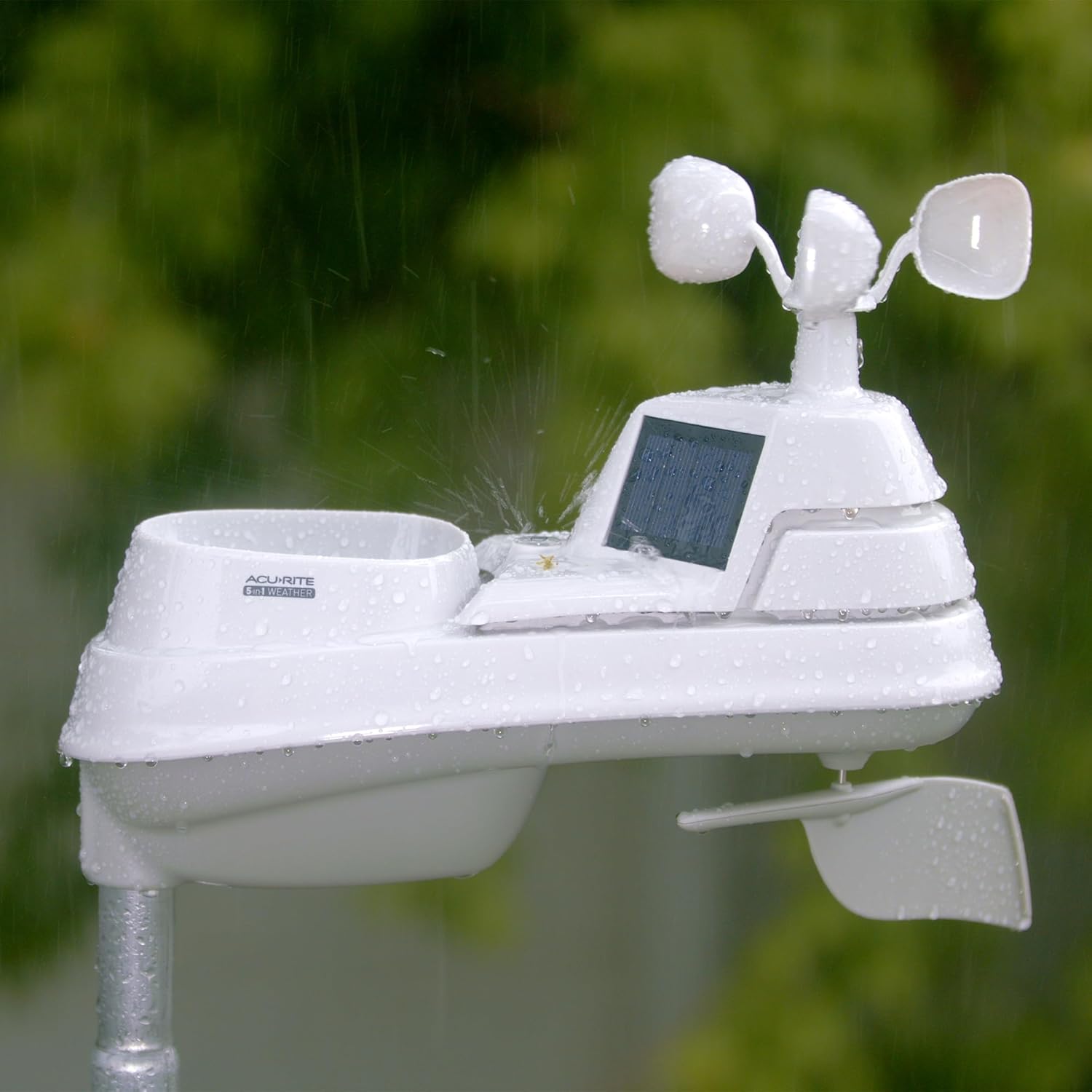
Image: AcuRite 5-in-1 Outdoor Sensor with water droplets, highlighting the self-draining rain gauge for easy maintenance.
Troubleshooting
If you encounter issues with your AcuRite Iris Weather Station, consider the following common solutions:
- No Data on Display: Ensure both the display unit and outdoor sensors have fresh batteries and are within the specified wireless range. Check for any physical obstructions between the sensors and the display.
- Inaccurate Readings: Verify that the outdoor 5-in-1 sensor is mounted in an open area, away from heat sources (e.g., walls, pavement) or direct sunlight for temperature accuracy. Ensure the wind cups and vane spin freely.
- Lightning Detector Issues: If the lightning detector shows false positives, ensure it is mounted in an area free from strong electromagnetic interference.
- Loss of Historical Data: The display unit may lose historical data if power is interrupted without backup batteries. Ensure backup batteries are installed if continuous data logging is critical.
Specifications
| Feature | Detail |
|---|---|
| Brand | AcuRite |
| Model Number | 01024M |
| Power Source | Solar Powered (sensors), Power Adapter (display) |
| Number of Batteries | 8 AA batteries required (for sensors) |
| Connectivity Technology | 433 MHz wireless |
| Temperature Accuracy | +/- 2 degrees Fahrenheit |
| Upper Temperature Rating | 122 Degrees Fahrenheit |
| Lightning Detection Range | Within 25 miles (40 km) |
| Product Dimensions | 0.6"D x 7.6"W x 5.5"H (Display) |
| Material | Plastic |
Warranty & Support
The AcuRite Iris (5-in-1) Weather Station comes with a one-year limited warranty.
For further support, product registration, or to view additional AcuRite products, please visit the AcuRite Store.