1. Introduction
This manual provides detailed instructions for the safe and effective use of your Welironly Stanley FMHT77407 Fatmax 300 Stud Sensor. This device is designed to detect studs (wood and metal), pipes, and live AC wires behind walls, floors, and ceilings. Please read this manual thoroughly before operating the device and keep it for future reference.
Safety Information
- Always ensure the device is clean and free from debris before use.
- Do not expose the device to extreme temperatures or moisture.
- This device is intended for indoor use only.
- Do not attempt to open or modify the device. Refer all servicing to qualified personnel.
- Always exercise caution when drilling or cutting into walls, even after using the stud sensor, as unforeseen obstacles may exist.
2. Product Overview
Familiarize yourself with the components of your Stanley Fatmax 300 Stud Sensor.
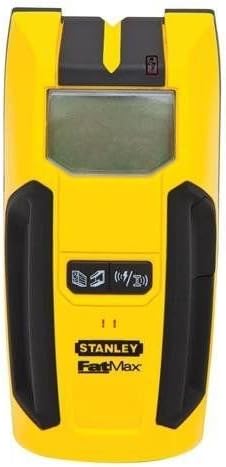
Figure 1: Front view of the Stanley Fatmax 300 Stud Sensor. This image displays the device's bright yellow body with black rubberized grips on the sides. A large, rectangular LCD screen is centrally located, above which is a small red indicator light. Below the screen are two black control buttons: one for mode selection (depicted with a stud icon) and another for signal detection (depicted with a wireless signal icon). The "STANLEY FatMax" logo is visible towards the bottom.
Key Components:
- LCD Display: Shows detection mode, signal strength, and battery status.
- Mode Selection Button: Toggles between stud scan, metal scan, and AC wire scan modes.
- Scan Button: Activates the scanning function.
- Sensor Area: Located on the back of the device, this area must be flush against the surface being scanned.
- Marking Notch: Top center notch for precise marking of detected objects.
3. Setup
Battery Installation:
- Locate the battery compartment cover on the back of the device.
- Slide the cover open.
- Insert a new 9V alkaline battery, ensuring correct polarity (+/-).
- Close the battery compartment cover securely.
Initial Calibration:
The device typically self-calibrates upon startup. For optimal performance, calibrate on a wall section known to be free of studs or wires.
- Place the device flat against the wall where you intend to scan.
- Press and hold the Scan button. The device will emit a beep and the display will show a calibration indicator.
- Keep the device still until calibration is complete (usually a few seconds).
- Release the Scan button. The device is now ready for use.
4. Operating Instructions
Selecting a Mode:
Press the Mode Selection button to cycle through the available detection modes:
- Stud Scan: Detects wood and metal studs up to 1.5 inches (38 mm) deep.
- Metal Scan: Detects metal objects (e.g., pipes, rebar) up to 3 inches (76 mm) deep.
- AC Wire Scan: Detects live unshielded AC wires up to 2 inches (51 mm) deep.
Scanning for Objects:
- Select the desired scanning mode.
- Place the device flat against the wall surface. Ensure your hand is not covering the sensor area.
- Press and hold the Scan button.
- Slowly slide the device horizontally across the surface. Keep it flat and do not lift it from the wall.
- As the device approaches a stud or object, the display will show increasing signal strength indicators. An audible alert may also sound.
- When the device is directly over the center of a stud, the display will indicate "CENTER" and emit a continuous tone. Mark this location using the top marking notch.
- Continue scanning past the object to confirm its edges.
- Release the Scan button when finished scanning.
Note: For AC wire detection, the device will indicate the presence of live wires. Always exercise extreme caution when working near electrical wiring.
5. Maintenance
Cleaning:
Wipe the device with a soft, damp cloth. Do not use abrasive cleaners or solvents. Ensure the device is completely dry before storage.
Storage:
Store the device in a dry, cool place, away from direct sunlight and extreme temperatures. Remove the battery if the device will not be used for an extended period to prevent leakage.
Battery Replacement:
Replace the 9V battery when the low battery indicator appears on the LCD display. Follow the battery installation steps in the "Setup" section.
6. Troubleshooting
| Problem | Possible Cause | Solution |
|---|---|---|
| Device does not turn on. | Dead or incorrectly installed battery. | Replace the 9V battery, ensuring correct polarity. |
| Inaccurate readings or false positives. | Improper calibration; moisture in wall; presence of other materials (e.g., plaster, insulation). | Recalibrate the device on a clear section of the wall. Ensure the wall surface is dry. Scan slowly and consistently. |
| Device beeps constantly or shows erratic readings. | Device lifted from wall during scan; scanning over highly dense material. | Ensure the device remains flat against the wall throughout the scan. Try scanning in a different area. |
7. Specifications
- Model: FMHT77407
- Brand: Welironly (Stanley Fatmax)
- Detection Depth (Wood/Metal Studs): Up to 1.5 inches (38 mm)
- Detection Depth (Metal): Up to 3 inches (76 mm)
- Detection Depth (AC Wires): Up to 2 inches (51 mm)
- Power Source: 9V Battery (not included)
- UPC: 043994099919
- Manufacturer Reference: 37281875621554
8. Warranty Information
This product is covered by a limited warranty against defects in materials and workmanship. For specific warranty terms and conditions, please refer to the warranty card included with your purchase or contact the manufacturer directly. Keep your proof of purchase for warranty claims.
9. Customer Support
For technical assistance, troubleshooting, or to inquire about replacement parts, please contact Welironly customer support. Visit the official Welironly website for contact details and additional resources.
