
havit HV-MS991GT
Havit HV-MS991GT Wireless Mouse
User Manual
Introduction
Thank you for purchasing the Havit HV-MS991GT Wireless Mouse. This manual provides essential information for setting up, operating, maintaining, and troubleshooting your device. Please read it carefully before use to ensure optimal performance and longevity of your mouse.
Setup Instructions
- Unpack the Mouse: Carefully remove the mouse and the USB receiver from the packaging.
- Install Batteries:
Locate the battery compartment on the underside of the mouse. Open the cover and insert one AA battery (not included), ensuring correct polarity (+/-). Close the battery compartment cover.
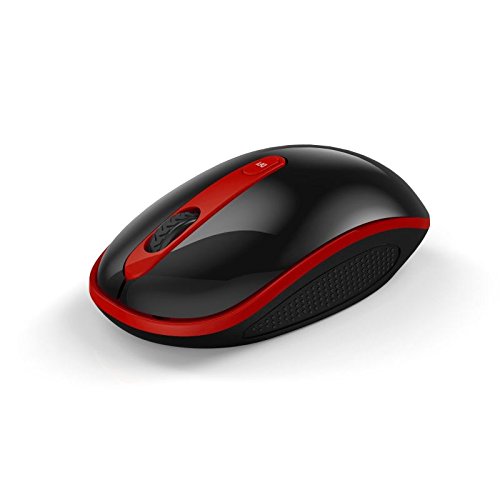
Image: The Havit HV-MS991GT Wireless Mouse, featuring a black body with red accents and a scroll wheel. This image illustrates the overall design of the mouse.
- Connect the USB Receiver: Plug the mini USB receiver into an available USB port on your computer. The system will automatically detect and install the necessary drivers.
- Power On the Mouse: Locate the power switch on the underside of the mouse and slide it to the "ON" position. The mouse is now ready for use.
Operating Instructions
The Havit HV-MS991GT Wireless Mouse is designed for intuitive use with standard mouse functions.
- Basic Functions:
- Left Click: Primary selection and activation.
- Right Click: Accesses contextual menus.
- Scroll Wheel: Scrolls documents and web pages vertically. The scroll wheel also functions as a middle click button.
- DPI Adjustment: This mouse features adjustable DPI settings (1000-1600 DPI) for varying cursor speeds and precision. A dedicated DPI button, usually located near the scroll wheel, allows you to cycle through these settings. Press the button to switch between DPI levels.
- Wireless Range: The advanced 2.4GHz wireless technology provides an effective working distance of up to 15 meters (approximately 49 feet) from the USB receiver.
- System Compatibility: This mouse is compatible with Windows 2000, Windows XP, Windows Vista, Windows 7, and Windows 8 operating systems.
Maintenance
- Cleaning: To clean the mouse, gently wipe its surface with a soft, dry cloth. For stubborn dirt, slightly dampen the cloth with water. Avoid using harsh chemicals or abrasive cleaners, as these can damage the mouse's finish.
- Battery Replacement: When the mouse performance degrades or it stops responding, it is likely time to replace the battery. Follow the battery installation steps in the "Setup Instructions" section.
- Auto Sleep Function: The mouse features a built-in auto sleep function to conserve battery life. If the mouse is inactive for a period, it will enter a low-power sleep mode. To wake it up, simply move the mouse or click any button.
- Receiver Storage: The mini USB receiver can be stored inside the mouse's battery compartment when not in use, making it convenient for travel and preventing loss.
Troubleshooting
| Problem | Solution |
|---|---|
| Mouse is not responding. |
|
| Cursor movement is erratic or slow. |
|
| Wireless connection is unstable. |
|
Specifications
| Feature | Detail |
|---|---|
| Brand | Havit |
| Model Number | HV-MS991GT |
| Connectivity Technology | 2.4GHz Wireless |
| DPI Settings | 1000-1600 DPI |
| Number of Buttons | 4 |
| Key Life | 1,000,000 times |
| Wireless Range | Up to 15 meters |
| Operating System Support | Windows 2000/XP/Vista/7/8 |
| Average Battery Life | 12 Months |
| Batteries Included | No (Requires 1x AA battery) |
| Item Weight | 120 g |
| Package Dimensions | 16.2 x 10.8 x 6 cm |
Warranty and Support
Specific warranty information for the Havit HV-MS991GT Wireless Mouse is not provided in this manual. Please refer to the product packaging or the manufacturer's official website for details regarding warranty coverage and customer support contact information.
Related documentsHV-MS991GT


Ask a question about this manual
Ask about setup, troubleshooting, compatibility, parts, safety, or missing instructions. Manuals+ will review the question and use this page’s manual context to help answer it.