
1. Product Overview
This manual provides instructions for the ICE-WATCH Ice Time Black Silver watch, model 013053. This analog watch features a classic design with a black leather strap and a silver-colored dial, suitable for everyday wear.
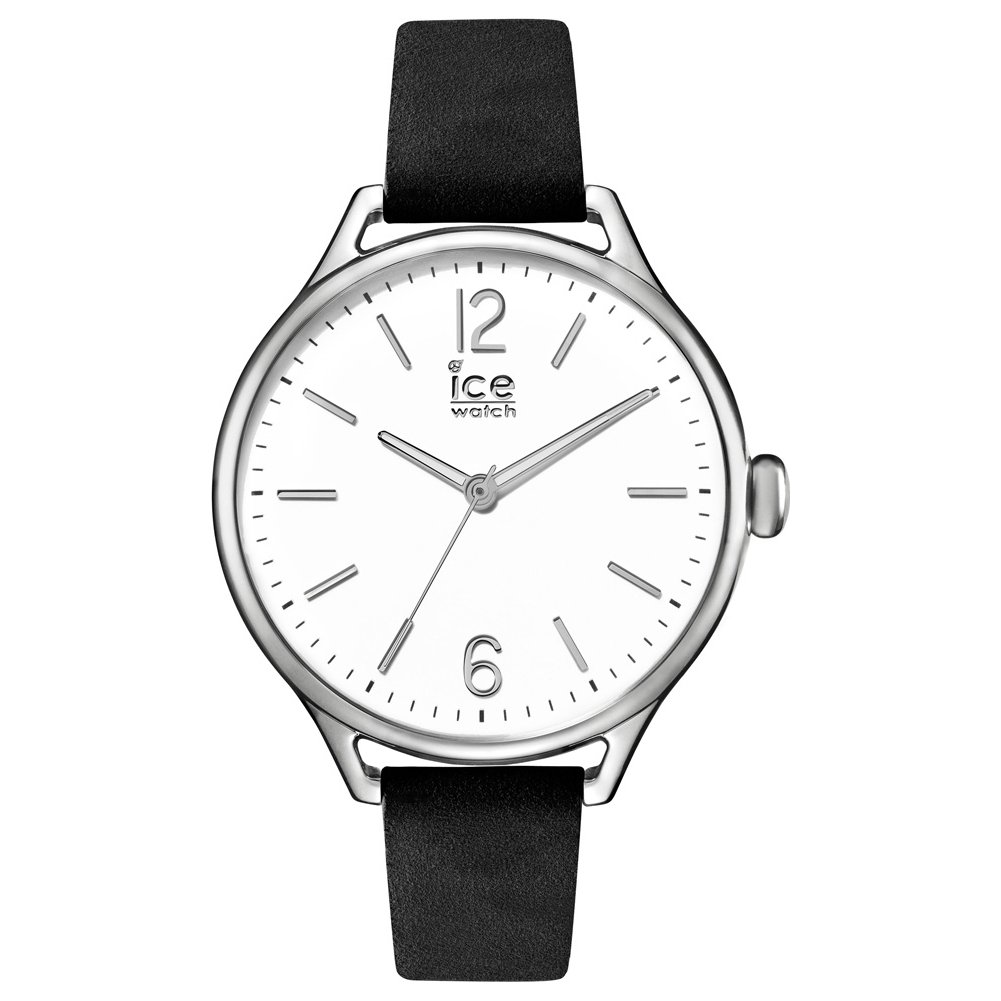
Image: ICE-WATCH Ice Time Black Silver watch. This image displays the watch face with its silver dial, black hands, and the black leather strap with a buckle clasp.
Key Features:
- Model: 013053
- Color: Black Silver
- Display Type: Analog
- Movement Type: Chronograph (Quartz)
- Water Resistance: 100 Meters (Impermeable)
- Case Material: Stainless Steel
- Strap Material: Leather
- Dial Window Material: Mineral Glass
- Case Diameter: 41 Millimeters
- Weight: 33 Grams
2. Setup
2.1 Setting the Time
- Gently pull the crown (the small knob on the side of the watch case) out to the first or second position. The number of positions depends on whether your watch has a date function. For time setting, pull it to the outermost position.
- Turn the crown clockwise or counter-clockwise to adjust the hour and minute hands to the correct time.
- Once the time is set, push the crown back into its original position against the watch case. This will start the watch movement.
2.2 Adjusting the Strap
The watch features a leather strap with a buckle clasp. To adjust, simply thread the strap through the buckle and secure it at a comfortable fit on your wrist. Ensure it is snug but not too tight to allow for proper circulation.
3. Operating the Watch
3.1 Basic Timekeeping
Your ICE-WATCH displays time using analog hour, minute, and second hands. Once the time is set, the watch will continuously display the current time.
3.2 Using the Chronograph Function
This watch is equipped with a chronograph function for measuring elapsed time. Typically, there are two pushers on the side of the watch case, in addition to the crown.
- Start: Press the top pusher (usually at the 2 o'clock position) to start the chronograph. The chronograph second hand will begin to move.
- Stop: Press the top pusher again to stop the chronograph. The elapsed time will be indicated by the chronograph hands.
- Reset: After stopping the chronograph, press the bottom pusher (usually at the 4 o'clock position) to reset all chronograph hands to their zero positions.
- Lap Time (if applicable): Some chronographs allow for lap time measurement. Consult a more detailed movement-specific guide if your watch has this feature.
4. Maintenance
4.1 Cleaning Your Watch
- Wipe the watch case and mineral glass with a soft, dry, lint-free cloth.
- For the leather strap, avoid excessive moisture. If it gets wet, gently pat it dry and allow it to air dry completely away from direct heat or sunlight.
- Do not use chemical cleaners, solvents, or abrasive materials, as these can damage the watch's finish and strap.
4.2 Water Resistance
Your watch is water-resistant up to 100 meters (10 ATM). This means it is suitable for swimming and snorkeling. However, it is not suitable for diving. Always ensure the crown is fully pushed in before exposing the watch to water. Avoid operating the pushers or crown while the watch is wet or submerged. Prolonged exposure to hot water, steam, or chemicals (like those in swimming pools or cleaning products) can compromise water resistance over time.
4.3 Battery Replacement
The watch is powered by a battery. When the watch stops or the second hand begins to skip (indicating a low battery), it is time for a replacement. Battery replacement should be performed by a qualified watch technician to ensure proper sealing and maintain water resistance.
4.4 Leather Strap Care
Leather straps are susceptible to wear and tear. To prolong their life:
- Avoid prolonged exposure to direct sunlight, extreme temperatures, and humidity.
- Keep the strap away from oils, cosmetics, and chemical substances.
- Clean with a slightly damp, soft cloth if necessary, and allow to air dry.
5. Troubleshooting
5.1 Watch Not Running
- Check the Crown: Ensure the crown is fully pushed in against the watch case. If it is pulled out, the watch will not run.
- Battery: The battery may be depleted. Refer to section 4.3 for battery replacement.
5.2 Inaccurate Time
- Battery: A low battery can cause the watch to run slowly or erratically.
- Magnetic Fields: Exposure to strong magnetic fields (e.g., from speakers, refrigerators, or certain electronic devices) can affect the watch's accuracy. Move the watch away from such sources.
- Impact: A severe impact may affect the internal mechanism. If issues persist, seek professional service.
6. Specifications
- Model Number: 013053
- ASIN: B01MDLPLW9
- Brand: ICE-WATCH
- Display: Analog
- Movement Type: Chronograph (Quartz)
- Water Resistance Depth: 100 Meters
- Case Material: Stainless Steel
- Dial Window Material: Mineral
- Strap Material: Leather
- Clasp Type: Buckle
- Case Diameter: 41 Millimeters
- Case Thickness: 11 Millimeters
- Band Width: 14 Millimeters
- Item Weight: 33 Grams
- Power Source: Battery Powered (1 product specific battery included)
- Product Dimensions (L x W x H): 7 x 29 x 3 cm
7. Warranty and Support
7.1 Manufacturer's Warranty
This ICE-WATCH product comes with a 2-year manufacturer's warranty. This warranty covers manufacturing defects under normal use. It does not cover damage resulting from accidents, improper use, unauthorized repairs, or normal wear and tear of the strap or battery.
7.2 Customer Support
For warranty claims, technical assistance, or service inquiries, please contact your authorized ICE-WATCH retailer or visit the official ICE-WATCH website for customer service contact information. Please have your proof of purchase and watch model number (013053) available when seeking support.


