
1. Important Safety Instructions
- Read these instructions thoroughly before operating the device.
- Keep these instructions for future reference.
- Do not expose this appliance to dripping or splashing water. Do not place objects filled with liquids, such as vases, on the appliance.
- Do not block any ventilation openings. Install in accordance with the manufacturer's instructions.
- Do not install near any heat sources such as radiators, heat registers, stoves, or other apparatus (including amplifiers) that produce heat.
- Protect the power cord from being walked on or pinched, particularly at plugs, convenience receptacles, and the point where they exit from the appliance.
- Only use attachments/accessories specified by the manufacturer.
- Unplug this appliance during lightning storms or when unused for long periods of time.
- Refer all servicing to qualified service personnel. Servicing is required when the apparatus has been damaged in any way.
2. Product Overview
The Auna MC 120 is a compact vertical stereo system designed for versatile audio playback. It features a CD player, MP3 playback via USB and SD card, an AUX input for external devices, and an FM radio. The system also includes an alarm clock with two programmable alarms and can be wall-mounted or used with its integrated stand. A remote control is provided for convenient operation.
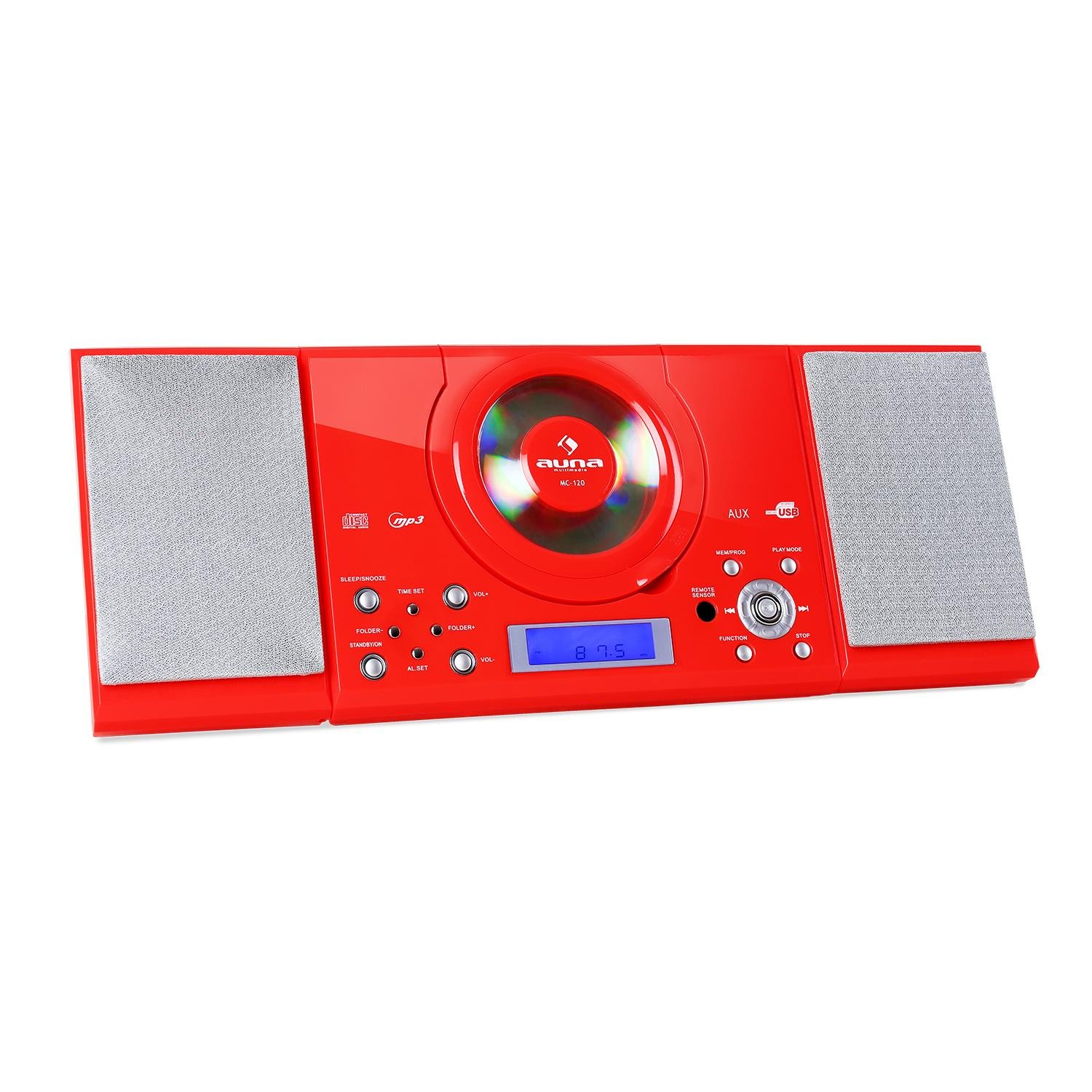
Figure 2.1: Front view of the Auna MC 120 Compact Vertical Stereo System, showing the central CD player, display, and control buttons.
3. Package Contents
- Auna MC 120 Stereo System
- Remote Control
- Power Adapter
- User Manual
4. Setup
4.1 Placement and Power Connection
- Choose a stable, flat surface for the stereo system, or prepare a wall for mounting. Ensure adequate ventilation around the unit.
- Connect the power adapter to the DC IN port on the rear of the unit.
- Plug the power adapter into a standard wall outlet.
4.2 Wall Mounting
The Auna MC 120 can be mounted on a wall using the integrated mounting holes on the rear panel.
- Identify a suitable wall location, ensuring it can support the weight of the unit.
- Mark the positions for two screws on the wall, matching the spacing of the mounting holes on the unit's rear.
- Drill pilot holes and insert appropriate wall anchors if necessary.
- Insert screws into the wall, leaving a small gap between the screw head and the wall.
- Carefully align the unit's mounting holes with the screws and slide the unit downwards to secure it.

Figure 4.1: Rear view of the Auna MC 120, showing the foldable stand and wall mounting holes.

Figure 4.2: Detailed view of the rear panel, highlighting power input and safety labels.
5. Operating Instructions
5.1 Power On/Off and Volume Control
- Press the POWER button (on unit or remote) to turn the system on or off.
- Adjust the volume using the VOL+ and VOL- buttons on the unit or the + and - buttons on the remote control.
5.2 Mode Selection
Press the FUNCTION button on the unit or remote to cycle through available modes: CD, USB, SD, AUX, FM.
5.3 CD/MP3 Playback
- CD Playback: Open the CD compartment, insert a CD with the label side facing up, and close the compartment. The system will automatically switch to CD mode and begin playback.
- USB/SD Playback: Insert a USB flash drive into the USB port or an SD card into the SD slot. The system will switch to USB/SD mode. Use the FOLDER+ / FOLDER- buttons to navigate folders and SKIP buttons to select tracks.

Figure 5.1: USB stick inserted into the dedicated USB port on the Auna MC 120.
- Play/Pause: Press the PLAY/PAUSE button.
- Skip Tracks: Press the SKIP FORWARD or SKIP BACKWARD buttons.
- Fast Forward/Rewind: Press and hold the SKIP FORWARD or SKIP BACKWARD buttons.
- Stop: Press the STOP button.
5.4 FM Radio Operation
- Switch to FM mode using the FUNCTION button.
- Press and hold the PLAY/PAUSE button to initiate an automatic scan for FM stations. The system will save found stations as presets.
- Use the CH+ / CH- buttons on the remote or SKIP FORWARD / SKIP BACKWARD buttons on the unit to navigate through preset stations.
5.5 AUX Input
Connect an external audio device (e.g., smartphone, MP3 player) to the AUX IN port using a 3.5mm audio cable. Switch the system to AUX mode using the FUNCTION button. Audio will play from the connected device.
5.6 Clock and Alarm Functions
- Setting the Clock: In standby mode, press and hold the TIME SET button. Use the SKIP buttons to adjust hours and minutes, and TIME SET again to confirm.
- Setting Alarms: In standby mode, press and hold the AL SET button. Use the SKIP buttons to set the alarm time and AL SET again to confirm. You can set two alarms (AL1, AL2).
- Activating/Deactivating Alarms: Press the AL SET button repeatedly to cycle through AL1 ON, AL2 ON, AL1 OFF, AL2 OFF.
5.7 Sleep/Snooze Function
- Sleep Timer: Press the SLEEP button repeatedly to set a sleep timer (e.g., 15, 30, 60, 90 minutes). The system will turn off automatically after the set time.
- Snooze: When an alarm sounds, press the SNOOZE button (on remote) to temporarily silence the alarm for a few minutes.
5.8 Remote Control
The remote control provides full functionality for the stereo system. Ensure batteries are correctly inserted.

Figure 5.2: The remote control for the Auna MC 120, showing power, play mode, memory/program, sleep, volume, channel, function, and snooze buttons.
6. Maintenance
6.1 Cleaning
- Always unplug the unit from the power outlet before cleaning.
- Use a soft, dry cloth to clean the exterior surfaces.
- Do not use abrasive cleaners, waxes, or solvents as they may damage the finish.
6.2 CD/USB/SD Card Care
- Handle CDs by their edges to avoid fingerprints and scratches.
- Clean CDs with a soft, lint-free cloth, wiping from the center outwards.
- Ensure USB drives and SD cards are free of dust and debris before insertion.
7. Troubleshooting
| Problem | Possible Cause | Solution |
|---|---|---|
| No power | Power cord not connected; Power outlet faulty | Check power cord connection; Try a different outlet |
| No sound | Volume too low; Incorrect mode selected; Mute activated | Increase volume; Select correct mode (CD, USB, AUX, FM); Deactivate mute |
| CD/USB/SD not playing | Disc/device inserted incorrectly; Disc/file format not supported; Disc/device damaged | Reinsert disc/device correctly; Ensure MP3 format for USB/SD; Try a different disc/device |
| Remote control not working | Batteries depleted/incorrectly inserted; Obstruction between remote and unit | Replace batteries, check polarity; Remove obstructions, ensure line of sight |
| Poor FM reception | Antenna not extended/positioned correctly; Weak signal | Extend and adjust the FM antenna; Try repositioning the unit |
8. Technical Specifications
- Brand: Auna
- Model: MC 120
- Connectivity Technology: Auxiliary
- Supported Audio Formats: MP3
- Speaker Type: Stereo
- Power Source: Corded Electric
- Compatible Devices: MP3 Player
- Audio Output Mode: Stereo
- Manufacturer: AUNA
- Part Number: MG4-MC-120 RED
9. Warranty and Support
This product is covered by a manufacturer's warranty. For detailed warranty information, please refer to the warranty card included in your package or contact Auna customer support. For technical assistance or service inquiries, please visit the official Auna website or contact their support team directly.


