
Introduction
This manual provides instructions for the JustFine Replacement Remote Control. This remote is designed to function as a direct replacement for your original Insignia LED LCD HDTV remote, offering immediate usability without the need for programming. Please read this manual thoroughly to ensure proper operation and care of your new remote control.
Compatibility
This replacement remote control is compatible with the following Insignia LED LCD HDTV models:
- NS-40D510NA15
- NS50D550NA15
- NS-46L400NA14
- NS55D440NA14
- NS-55D550NA15
Setup
Battery Installation
The remote control requires two AA batteries (not included) for operation. Follow these steps to install the batteries:
- Locate the battery compartment cover on the back of the remote control.
- Press down on the tab and slide the cover downwards to open the compartment.
- Insert two AA batteries, ensuring the positive (+) and negative (-) terminals align correctly with the markings inside the compartment.
- Slide the battery compartment cover back into place until it clicks securely.

Image: Back of the remote control with the battery compartment.
Operating the Remote Control
This remote control is pre-programmed and ready for use with compatible Insignia LED LCD HDTVs once batteries are installed. No additional programming is required.
Basic Functions
- Power Button: Turns the TV on or off.
- Input Button: Cycles through available input sources (e.g., HDMI 1, HDMI 2, AV).
- Volume Up/Down: Adjusts the audio volume level.
- Channel Up/Down: Changes the TV channel.
- Mute Button: Silences or restores the TV audio.
- Number Buttons (0-9): Directly select TV channels or input numerical values.
- Navigation Arrows (Up, Down, Left, Right): Navigate through menus and options.
- Enter Button: Confirms selections in menus.
- Exit Button: Exits current menu or function.
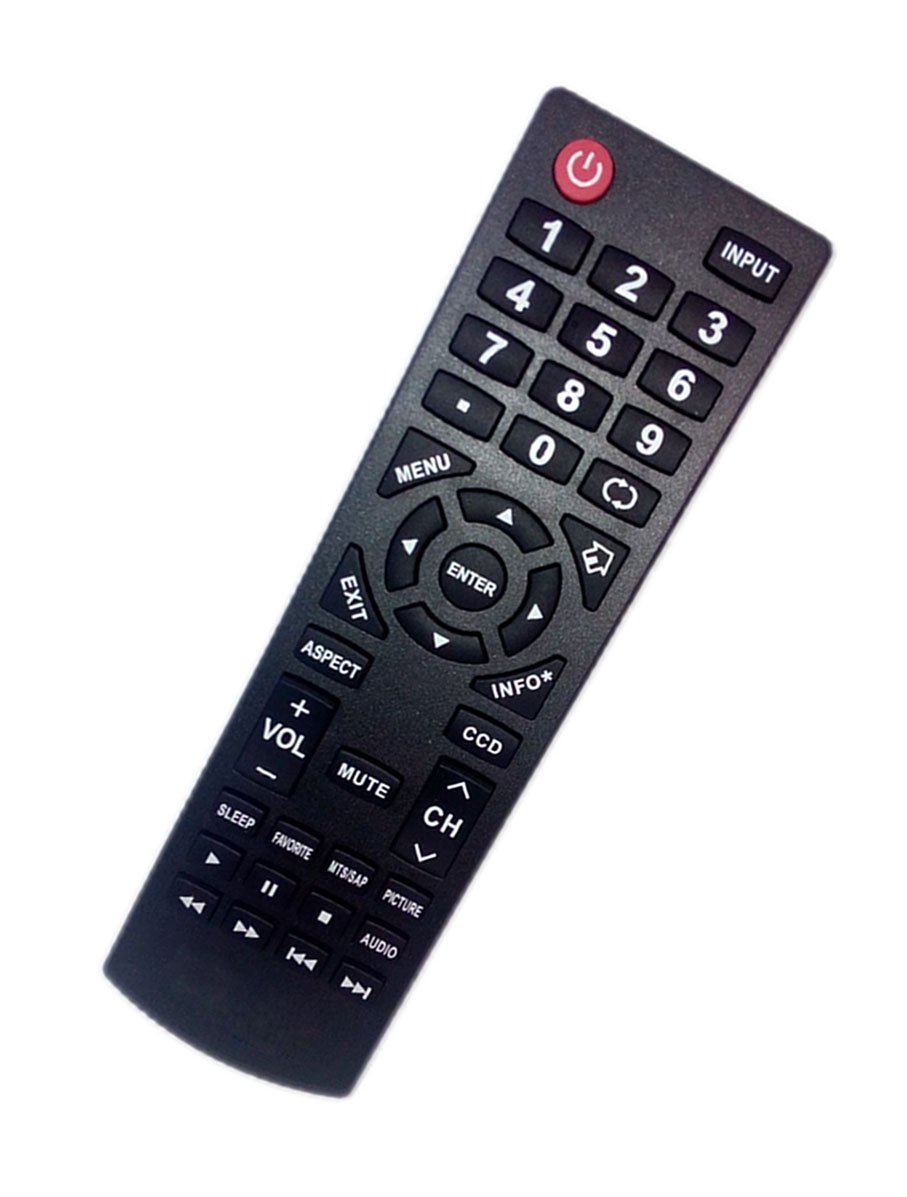
Image: Front view of the remote control, highlighting various function buttons.
Maintenance
Battery Replacement
Replace batteries when the remote's performance diminishes or it stops responding. Always replace both batteries at the same time with new AA batteries. Do not mix old and new batteries, or different types of batteries.
Cleaning
To clean the remote control, wipe it with a soft, dry cloth. Do not use liquid cleaners or abrasive materials, as these can damage the remote's surface or internal components.
Troubleshooting
Common Issues and Solutions
- Remote is not responding:
- Ensure fresh AA batteries are correctly installed with proper polarity.
- Check for any obstructions between the remote and the TV's infrared sensor.
- Point the remote directly at the TV.
- Certain buttons are not working:
- This remote is pre-programmed for the listed Insignia TV models. Verify your TV model is listed under the compatibility section.
- Clean the remote's surface, especially around the unresponsive buttons, to remove any debris.
- TV does not turn on/off with the remote:
- Confirm the TV is plugged into a working power outlet.
- Try turning the TV on/off using its physical power button to ensure the TV itself is functional.
Specifications
- Brand: JustFine
- Model Number: LYSB01MCWBPUE-ELECTRNCS
- UPC: 714874978210
- Compatible Devices: Television (Insignia LED LCD HDTVs)
- Connectivity Technology: Infrared
- Controller Type: Button Control
- Maximum Range: 10 Meters (approximately 33 feet)
- Battery Type: 2 x AA (not included)
- Item Weight: 0.17 Pounds (approximately 77 grams)
- Special Feature: Ergonomic design
Warranty and Support
Warranty Information
This product comes with a 30-day quality warranty. Please retain your proof of purchase for warranty claims.
Customer Support
For any problems or inquiries regarding your JustFine replacement remote control, please contact us directly via email. Our customer service team is available to assist you.