
1. Introduction and Overview
This document provides instructions for the JustFine Replacement Remote Control, designed for use with specific Denon Home Theater AV Receiver Systems. This remote is a pre-programmed replacement unit, meaning no additional programming is required for its basic functions. Simply insert the appropriate batteries, and it is ready for use.
Compatible Denon Models:
- AVR-1913
- RC-1167
- AVR-2113CI
- AVR-E400
2. Setup: Battery Installation
The remote control requires batteries for operation. Batteries are not included with the purchase.
- Locate the battery compartment on the back of the remote control.
- Slide the battery compartment cover downwards or in the direction indicated by an arrow to open it.
- Insert two (2) AAA batteries (not included), ensuring the positive (+) and negative (-) terminals align correctly with the markings inside the compartment.
- Replace the battery compartment cover by sliding it back into position until it clicks securely.
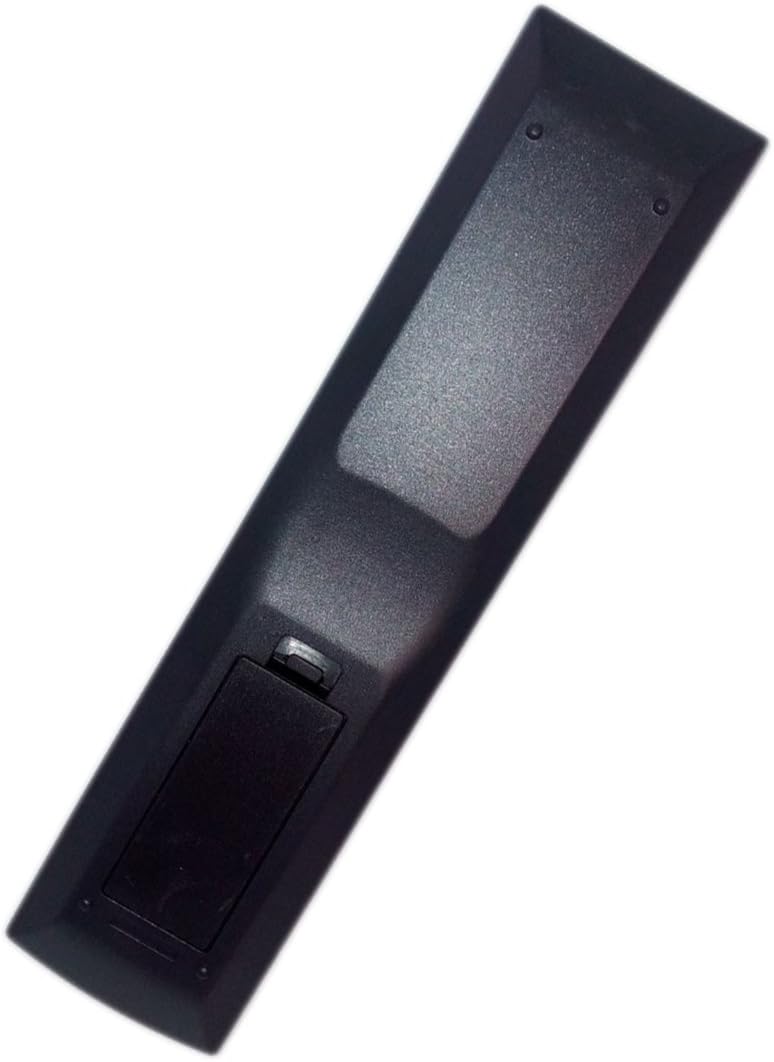
Figure 2.1: Back view of the remote control, illustrating the battery compartment location.
After installing the batteries, the remote control is ready for immediate use with your compatible Denon AV receiver system.
3. Operating the Remote Control
This replacement remote control is pre-programmed to function with the specified Denon AV receiver models. No manual programming is required. Ensure a clear line of sight between the remote control and your AV receiver for optimal performance.

Figure 3.1: Front view of the remote control with button layout.
Key Button Functions:
- POWER: Turns the AV receiver on or off.
- SLEEP: Activates the sleep timer function.
- ZONE2: Controls functions for a second audio zone.
- SOURCE SELECT Buttons (CBL/SAT, DVD, Blu-ray, GAME, AUX, MEDIA PLAYER, iPod/USB, TV AUDIO, FM, NETWORK): Selects the desired input source for the AV receiver.
- CHANNEL (+/-): Changes channels (if applicable to selected source).
- VOLUME (+/-): Increases or decreases the master volume level.
- MUTE: Toggles the audio mute function on or off.
- Navigation Pad (Up, Down, Left, Right, ENTER): Used for menu navigation and selection.
- INFO: Displays information about the current source or settings.
- OPTION: Accesses context-sensitive options menus.
- BACK: Returns to the previous menu or screen.
- SETUP: Accesses the main setup menu of the AV receiver.
- SOUND MODE Buttons (MOVIE, MUSIC, GAME, PURE): Selects various sound modes for different content types.
- FAVORITE STATION (1, 2, 3): Recalls preset favorite radio stations.
- TUNE (+/-): Adjusts radio frequency manually.
- Playback Controls (Rewind, Play/Pause, Fast Forward, Stop): Controls media playback for compatible sources.
4. Maintenance
Cleaning:
To clean the remote control, gently wipe its surface with a soft, dry cloth. For stubborn dirt, slightly dampen the cloth with water or a mild, non-abrasive cleaner. Avoid using harsh chemicals, solvents, or abrasive materials, as these can damage the remote's finish or internal components.
Battery Replacement:
Replace batteries when the remote control's response becomes sluggish or stops functioning. Refer to Section 2 for detailed battery installation instructions. Always replace both batteries at the same time with new ones of the same type (AAA). Do not mix old and new batteries, or different types of batteries.
Storage:
When storing the remote control for extended periods, remove the batteries to prevent leakage, which can cause damage to the device.
5. Troubleshooting
If you encounter issues with your remote control, please refer to the following common troubleshooting steps:
- Remote Not Responding:
- Ensure batteries are correctly inserted with the proper polarity.
- Replace old batteries with new ones.
- Check for any obstructions between the remote control and the AV receiver's infrared sensor.
- Ensure you are within the effective operating range and pointing the remote directly at the receiver.
- Specific Buttons Not Working:
- Verify that the remote is compatible with your specific Denon AV receiver model (AVR-1913, RC-1167, AVR-2113CI, AVR-E400).
- Some buttons may have functions specific to certain input sources or receiver modes. Ensure the correct source is selected.
If these steps do not resolve the issue, please contact customer support for further assistance.
6. Specifications
| Product Dimensions | 4.53 x 1.57 x 1.38 inches |
| Item Weight | 2.65 ounces |
| Connectivity Technology | Infrared |
| Compatible Devices | Home Theater (Denon AVR-1913, RC-1167, AVR-2113CI, AVR-E400) |
| Max Number of Supported Devices | 1 |
| Special Feature | Ergonomic |
| Model Number | LYSB01MCRRAJP-ELECTRNCS |
| ASIN | B01MCRRAJP |
7. Warranty and Support
This product comes with a 30-day quality warranty. It is also sold with a money-back guarantee and offers Hassle-Free returns.
For any problems or inquiries regarding the remote control, please contact the manufacturer or seller directly via email for assistance.