
Kaiser KAS-9012
Kaiser KAS-9012 Wireless Amplified Speaker Kit
User Manual
Introduction
Thank you for choosing the Kaiser KAS-9012 Wireless Amplified Speaker Kit. This manual provides essential information for the safe and efficient operation of your new speaker system. Please read it thoroughly before use and retain it for future reference.
The KAS-9012 is a portable amplified speaker system featuring 9700W PMPO / 28W RMS audio power, a 12-inch woofer, 2x3-inch speakers, audio-rhythmic LED lights, and a rechargeable battery offering up to 8 hours of continuous music playback. It supports Bluetooth connectivity and includes scratch discs for volume and playback control.
Safety Information
- Do not expose the unit to rain or moisture to prevent fire or electric shock.
- Do not open the speaker cabinet. There are no user-serviceable parts inside. Refer all servicing to qualified personnel.
- Ensure proper ventilation. Do not block any ventilation openings.
- Keep the speaker away from heat sources such as radiators, heat registers, stoves, or other apparatus (including amplifiers) that produce heat.
- Protect the power cord from being walked on or pinched, particularly at plugs, convenience receptacles, and the point where they exit from the apparatus.
- Unplug this apparatus during lightning storms or when unused for long periods of time.
- This product is not waterproof. Avoid contact with liquids.
Package Contents
Please check that all items listed below are included in your package:
- Kaiser KAS-9012 Amplified Speaker Unit
- Microphone
- Remote Control
- Power Cable
- User Manual (this document)
Product Overview
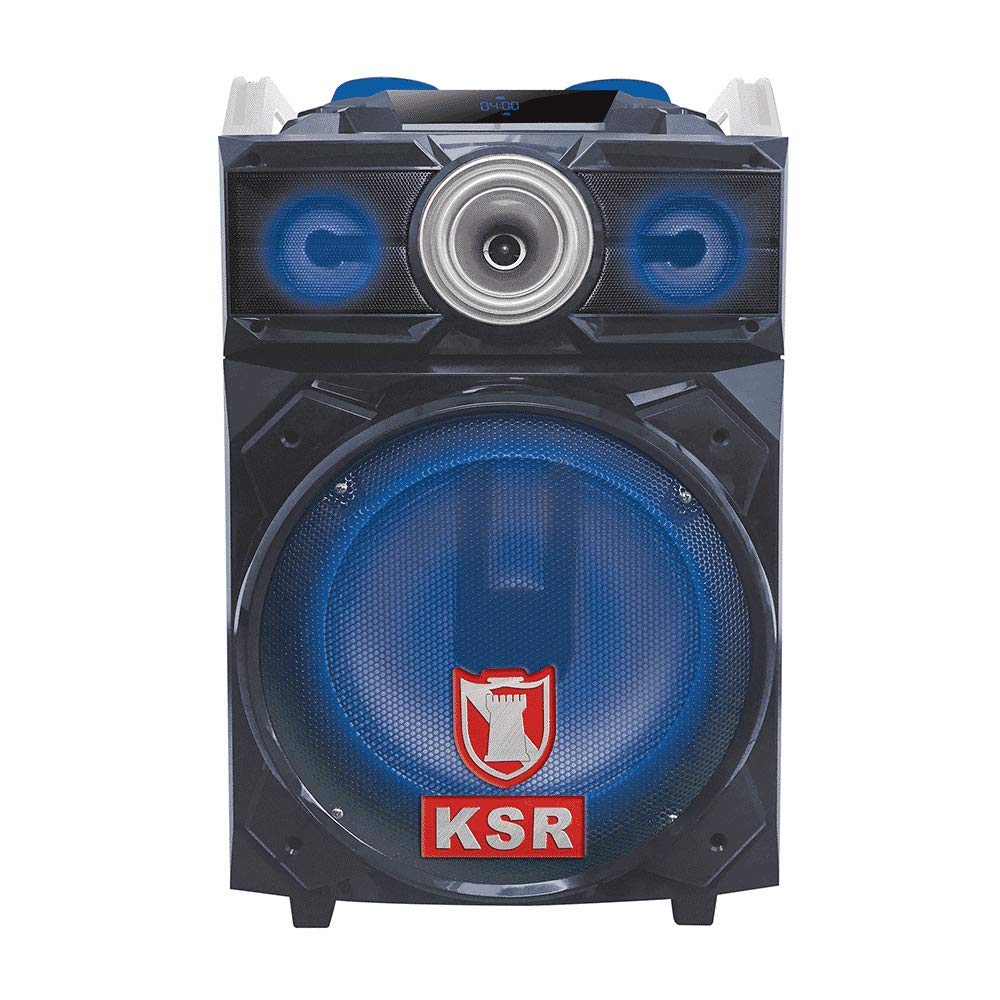
Figure 1: Front view of the Kaiser KAS-9012 Wireless Amplified Speaker Kit, showing the main speaker, control panel, and LED lights.
The Kaiser KAS-9012 is designed for powerful and portable audio. It features a robust enclosure, a comprehensive control panel, and various connectivity options to suit different audio sources.
Key Features:
- High Power Output: 9700W PMPO / 28W RMS.
- Integrated 12-inch Woofer and 2x3-inch Speakers.
- Bluetooth Wireless Connectivity.
- Audio-Rhythmic LED Lights (deactivatable).
- Rechargeable Battery with up to 8 hours playback.
- Scratch Discs for Volume and Playback Control.
- Multiple Input Options: USB, SD Card, AUX, Microphone.
- Remote Control Operation.
Controls and Connections
Familiarize yourself with the control panel and connection ports on your KAS-9012 speaker.
Front Panel Controls:
- Power Button: Turns the unit on or off.
- Mode Button: Switches between Bluetooth, USB, SD, AUX, and FM radio modes.
- Play/Pause Button: Plays or pauses audio playback.
- Previous/Next Track Buttons: Navigates through tracks.
- Volume Knobs: Adjusts master volume, microphone volume, and echo.
- Scratch Discs: For DJ-style sound effects and fine-tuning volume/playback.
- LED Light Button: Activates or deactivates the audio-rhythmic LED lights.
- Display Screen: Shows current mode, track information, and battery status.
Rear Panel Connections:
- Charging Port: Connect the power cable to recharge the internal battery.
- USB Port: For playing audio from USB flash drives.
- SD Card Slot: For playing audio from SD memory cards.
- AUX Input (3.5mm): Connect external audio devices using an AUX cable.
- Microphone Input (6.35mm): Connect the included microphone or another compatible microphone.
Setup
1. Charging the Battery
- Before first use, fully charge the speaker's internal battery.
- Connect the provided power cable to the charging port on the rear panel of the speaker.
- Plug the other end of the power cable into a standard electrical outlet.
- The charging indicator light (if present) will illuminate. Once fully charged, the light may change color or turn off.
- A full charge typically takes several hours and provides up to 8 hours of playback.
2. Initial Power-On
- Press and hold the Power Button on the front panel for a few seconds until the display screen illuminates.
- The speaker will typically start in Bluetooth mode by default.
Operating Instructions
1. Bluetooth Pairing
- Ensure the speaker is powered on and in Bluetooth mode. The display will show "BLUE" or a Bluetooth icon, and you may hear an audible prompt.
- On your mobile device (smartphone, tablet, etc.), enable Bluetooth and search for available devices.
- Select "KAS-9012" from the list of devices.
- Once paired, the speaker will confirm with an audible sound, and the Bluetooth indicator on the display will become solid.
- You can now play audio from your device through the KAS-9012 speaker.
2. USB/SD Card Playback
- Insert a USB flash drive or SD card (with MP3 audio files) into the respective port/slot.
- Press the Mode Button until the display shows "USB" or "SD". The speaker will automatically begin playing audio files.
- Use the Play/Pause and Previous/Next Track buttons to control playback.
3. AUX Input
- Connect an external audio device (e.g., MP3 player, laptop) to the AUX Input using a 3.5mm audio cable.
- Press the Mode Button until the display shows "AUX".
- Control playback and volume from your connected device.
4. Microphone Usage
- Plug the microphone into the Microphone Input port.
- Adjust the microphone volume using the dedicated knob on the control panel.
- Adjust the echo effect using the echo knob for desired vocal effects.
5. LED Lights Control
Press the LED Light Button to toggle the audio-rhythmic LED lights on or off according to your preference.
6. Scratch Discs
The scratch discs allow for DJ-style sound manipulation and can also be used for precise volume adjustments or track scrubbing depending on the active mode.
Maintenance
Cleaning
- Always unplug the speaker from the power source before cleaning.
- Use a soft, dry cloth to wipe the exterior surfaces of the speaker.
- Do not use abrasive cleaners, waxes, or solvents as they may damage the finish.
- Avoid spraying liquids directly onto the speaker.
Storage
- When not in use for extended periods, store the speaker in a cool, dry place.
- It is recommended to fully charge the battery every 3-6 months to maintain its lifespan.
Troubleshooting
| Problem | Possible Cause | Solution |
|---|---|---|
| No power | Battery is depleted; Power cable not connected. | Charge the battery; Ensure power cable is securely connected to both speaker and outlet. |
| No sound | Volume too low; Incorrect mode selected; Device not paired (Bluetooth). | Increase master volume; Select correct input mode (Bluetooth, USB, AUX); Re-pair Bluetooth device. |
| Bluetooth connection unstable | Device too far from speaker; Interference. | Move device closer to speaker (within 10 meters); Avoid obstacles between devices; Turn off other Bluetooth devices. |
| Microphone not working | Microphone not plugged in correctly; Microphone volume too low. | Ensure microphone is fully inserted into the input; Increase microphone volume knob. |
Specifications
| Model: | KAS-9012 |
| Brand: | Kaiser |
| Audio Power Output: | 9700W PMPO / 28W RMS (Max Speaker Output Power: 180 Watts) |
| Speaker Configuration: | 12-inch Woofer, 2x3-inch Speakers |
| Frequency Response: | 20 KHz |
| Connectivity Technology: | Bluetooth |
| Audio Output Mode: | Stereo (2.0 Channels) |
| Impedance: | 4 Ohms |
| Power Source: | Rechargeable Battery |
| Average Battery Life: | Up to 8 Hours |
| Control Method: | Buttons, Remote Control |
| Compatible Devices: | Smartphone, Tablet, MP3 Player, Game Consoles |
| Item Weight: | 15.5 Kilograms |
| Waterproof: | No |
Warranty and Support
Product Warranty
The Kaiser KAS-9012 Wireless Amplified Speaker Kit comes with a 3-month limited warranty from the date of purchase. This warranty covers manufacturing defects under normal use. It does not cover damage caused by misuse, accidents, unauthorized modifications, or normal wear and tear.
Please retain your proof of purchase for warranty claims.
Customer Support
For technical assistance, troubleshooting, or warranty inquiries, please contact Kaiser customer support. Refer to the contact information provided on the product packaging or the official Kaiser website.
You can also visit the Kaiser Store on Amazon for more product information.
Ask a question about this manual
Ask about setup, troubleshooting, compatibility, parts, safety, or missing instructions. Manuals+ will review the question and use this page’s manual context to help answer it.