Product Overview
The KJB DVR269WF LawMate PV-PB20I is a discreet recording device designed for on-the-go surveillance. This unit functions as a fully operational power bank while housing a hidden pinhole camera capable of recording high-definition video at 1080P. It offers extended recording capabilities, providing over 6 hours of video capture on a single charge, making it ideal for covert monitoring without drawing attention.

Figure 1: Front view of the KJB DVR269WF Power Bank DVR, showcasing its discreet design.
Package Contents
Before proceeding with setup, please verify that all components are present in your package:
- PV-PB20I Power Bank DVR Unit
- USB Charging Cable
- MicroSD Card (up to 32GB supported)
- Quick Guide Manual

Figure 2: Included accessories: Quick Guide, USB cable, and microSD cards.
Setup Guide
1. Charging the Device
Before first use, fully charge the PV-PB20I. Connect the supplied USB cable to the device's charging port and the other end to a USB power adapter (not included) or a computer's USB port. The LED indicators will show charging status. A full charge typically takes several hours.
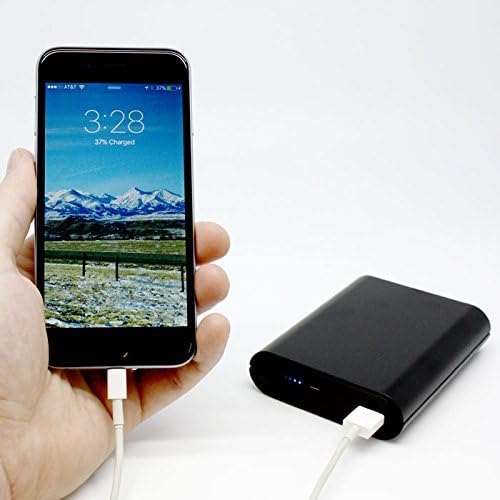
Figure 3: The PV-PB20I can function as a power bank to charge other devices, demonstrating its dual utility.
2. Inserting the MicroSD Card
Locate the microSD card slot on the device. Gently insert the microSD card (up to 32GB, Class 10 recommended) with the gold contacts facing down until it clicks into place. Ensure the card is properly seated to prevent recording errors.
3. Initial Power On and Wi-Fi Setup
Press and hold the power button to turn on the device. The Wi-Fi indicator LED will illuminate. Download the "PV Cam Viewer" app from your smartphone's app store (iOS/Android). Open the app and connect to the device's Wi-Fi network (SSID typically starts with "PV-"). The default password can be found in the quick guide or on the device itself.
Operating Instructions
1. Recording Video
Once connected via the PV Cam Viewer app, you can initiate video recording. The device supports 1080p, 720p, and WVGA resolutions at 30 frames per second. Use the app interface to start and stop recording. The hidden pinhole camera is strategically placed for discreet operation.

Figure 4: Detail of the hidden pinhole camera lens on the PV-PB20I.
2. Live View and Playback
The PV Cam Viewer app allows for live viewing of the camera feed. You can also access recorded videos directly from the app for playback. Ensure a stable Wi-Fi connection for smooth streaming and playback.
3. Downloading Footage
To download recorded footage, connect the device to a computer using the USB cable, or remove the microSD card and insert it into a card reader. The device will appear as a removable storage drive, allowing you to copy video files to your computer.
Maintenance
Battery Care:
- Charge the device fully before extended storage.
- Avoid completely draining the battery frequently to prolong its lifespan.
- Store in a cool, dry place away from direct sunlight.
Cleaning:
Wipe the exterior of the device with a soft, dry cloth. Do not use liquid cleaners or abrasive materials, as they may damage the device or obscure the camera lens.
Storage:
When not in use, store the device in a safe environment to prevent physical damage and maintain optimal performance.
Troubleshooting
- Device not powering on: Ensure the device is fully charged. Connect it to a power source and check the charging indicator.
- Wi-Fi connection issues: Verify that the Wi-Fi function on the device is active. Restart both the device and your smartphone. Ensure you are within range of the device's Wi-Fi signal.
- No recording: Check if a microSD card is properly inserted and has sufficient free space. Ensure the device is powered on and the recording function is activated via the app.
- Poor video quality: Ensure the camera lens is clean and free from obstructions. Check the recording resolution settings in the app.
- App not detecting device: Confirm that the device's Wi-Fi is enabled and you are connected to its network on your smartphone. Try reinstalling the PV Cam Viewer app.
Specifications
| Feature | Detail |
|---|---|
| Model Number | DVR269WF |
| Brand | KJB |
| Connectivity Technology | Wi-Fi |
| Video Resolution | 1080p/720p/WVGA @ 30fps |
| Memory Storage Capacity | Up to 32 GB (MicroSD card) |
| Recording Time | Up to 6.5 hours on one charge |
| Compatible Devices | Smartphone, Tablet, Desktop, Laptop |
| Item Weight | 1.6 pounds |
| Manufacturer | Lawmate International Ltd. |
Warranty and Support
Specific warranty information for the KJB DVR269WF LawMate PV-PB20I is typically provided at the point of purchase or within the product packaging. Please refer to your purchase documentation for details regarding warranty coverage and duration.
For technical support, troubleshooting assistance beyond this manual, or service inquiries, please contact the manufacturer, Lawmate International Ltd., or your authorized KJB dealer. Contact information can usually be found on the manufacturer's official website or on the product packaging.


