1. Product Overview
The Duracell CopperTop 9V Alkaline Battery (Model MN1604B2Z) is engineered for reliable, long-lasting performance in a variety of household and business devices. These all-purpose 9 Volt batteries are suitable for items such as smoke detectors, garage door openers, and other compatible electronics.

Image: Duracell CopperTop 9V Alkaline Batteries in a 2-count package, highlighting the 5-year guarantee in storage.

Image: A single Duracell 9V battery with text emphasizing 'Long Lasting Power'.
Key Features:
- Long Lasting Power: Designed for extended performance.
- Guaranteed for 5 Years in Storage: Ensures readiness when needed.
- Versatile Use: Ideal for household items including smoke detectors and garage door openers.
- Trusted Brand: Duracell CopperTop is a widely recognized battery brand.
2. Safety Information
Please read and understand all safety warnings before using these batteries. Improper use can result in leakage, fire, or explosion, leading to personal injury or property damage.
General Warnings:
- May explode or leak, and cause burn injury, if recharged, disposed of in fire, mixed with a different battery type, inserted backward, or disassembled.
- Replace all used batteries at the same time.
- Keep in original package until ready to use.
- Do not carry loose batteries in your pocket or purse.
- Do not remove the battery label.
Legal Disclaimer:
Statements regarding dietary supplements have not been evaluated by the FDA and are not intended to diagnose, treat, cure, or prevent any disease or health condition.
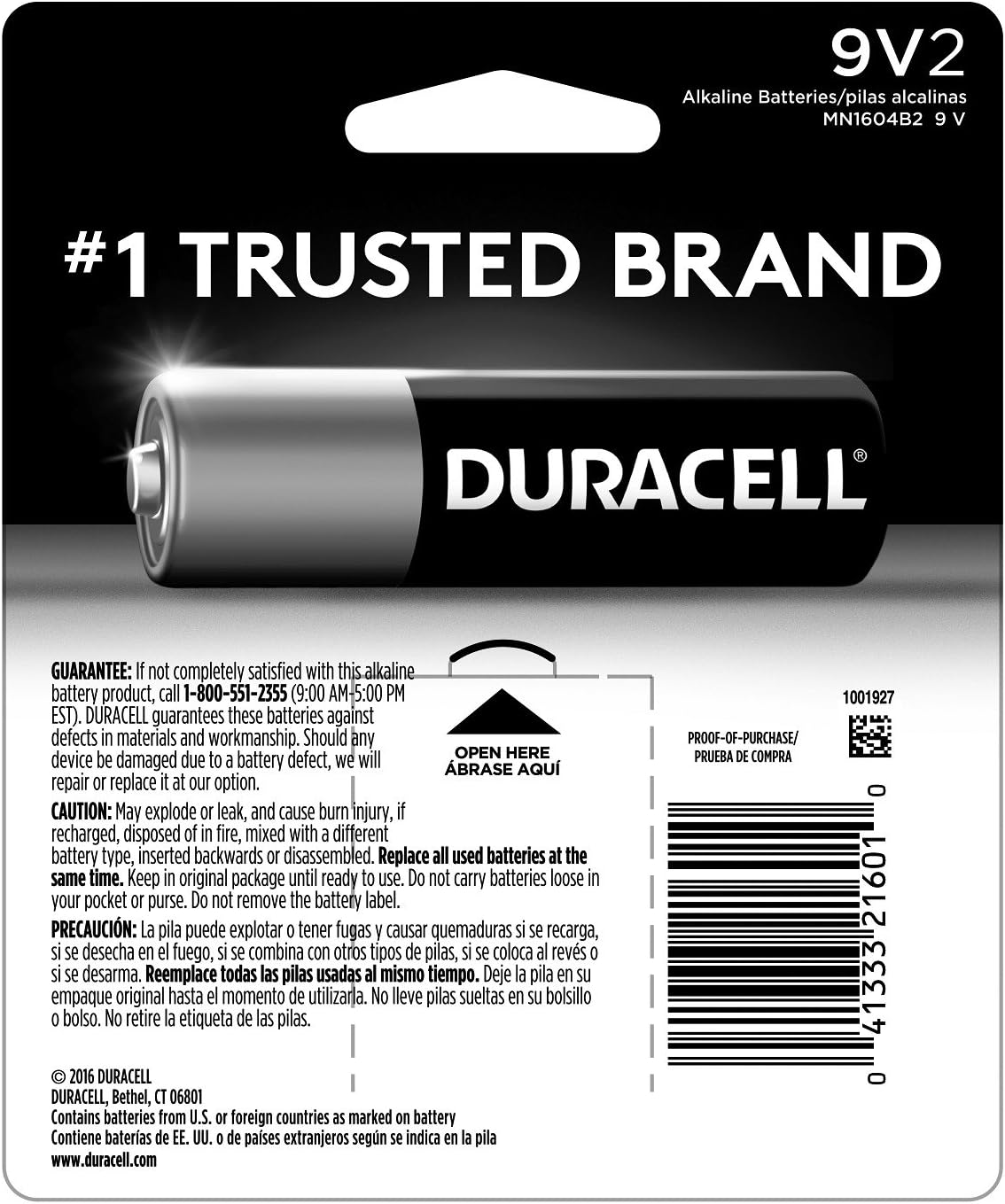
Image: The reverse side of the Duracell 9V battery packaging, displaying safety warnings, guarantee details, and the UPC (041333216010).
3. Setup and Installation
To install your Duracell CopperTop 9V battery, follow these general steps. Always refer to your device's instruction manual for specific battery installation procedures.
- Identify the battery compartment on your device.
- Open the battery compartment cover.
- Observe the polarity markings (+ and -) inside the compartment.
- Align the positive (+) and negative (-) terminals of the 9V battery with the corresponding markings in the device. The 9V battery has distinct male and female terminals that typically ensure correct orientation.
- Insert the battery firmly until it is securely seated.
- Close the battery compartment cover.
- Test your device to ensure proper function.
Example Installation in a Smoke Detector:
Video: A demonstration of installing a Duracell 9V battery into a smoke detector, showing the process of opening the compartment, inserting the battery, and closing it.
4. Operating Instructions
Once installed, Duracell CopperTop 9V batteries provide power to your compatible electronic devices. No specific operating instructions are required for the battery itself, as its function is to power the device it is installed in. Always follow the operating instructions for the device using the battery.
Recommended Uses:
- Smoke Detectors
- Carbon Monoxide Detectors
- Garage Door Openers
- Medical Devices
- Toys and Games
- Clocks

Image: An illustration depicting various devices such as headphones, a game controller, a remote control, and a flashlight, all powered by batteries.
5. Maintenance and Storage
Proper maintenance and storage ensure the longevity and safety of your Duracell CopperTop 9V batteries.
Storage:
- Store batteries in their original packaging until ready for use.
- Keep batteries in a cool, dry place at normal room temperature.
- Avoid storing batteries in direct sunlight or in areas with extreme temperatures.
- Do not store loose batteries together to prevent short-circuiting.

Image: A Duracell 9V battery prominently displayed with the text 'Guaranteed 5 Years in Storage', indicating its shelf life.
6. Troubleshooting
If your device is not functioning correctly after installing new batteries, consider the following troubleshooting steps:
- Check Polarity: Ensure the batteries are inserted with the correct positive (+) and negative (-) orientation.
- Verify Battery Contacts: Make sure the battery terminals are clean and making good contact with the device's connectors.
- Replace All Batteries: If using multiple batteries, replace all of them simultaneously, even if only one appears to be dead. Mixing old and new batteries or different battery types can reduce performance and lead to leakage.
- Device Malfunction: If the device still does not work, the issue may be with the device itself, not the batteries. Refer to your device's manual or contact its manufacturer for further assistance.
7. Specifications
| Specification | Detail |
|---|---|
| Brand | DURACELL |
| Model Number | MN1604B2Z |
| Battery Cell Composition | Alkaline |
| Battery Capacity | 9 Volts |
| Number of Batteries | 2 (as per product listing) |
| Dimensions (approximate) | 48.5 mm (height) x 26.5 mm (width) x 17.5 mm (depth) |

Image: A Duracell battery shown with a hand for scale, indicating a height of 50.5 mm.
8. Warranty and Support
Duracell guarantees these batteries against defects in material and workmanship. Should any device be damaged due to a battery defect, Duracell will repair or replace it at their option. For warranty claims or support, please refer to the contact information provided on the product packaging or visit the official Duracell website.


