
1. Overview
The Baomain THC15A is a digital programmable timer switch relay designed for precise control of electrical circuits. It features an LCD display for easy programming and monitoring, offering up to 16 ON/OFF programs per week or day. This device is suitable for various applications requiring automated power control, operating with a 110V AC input and a 240V AC output with a 16A contact capacity.
2. Product Features
- Rated Control Voltage: Input 110V AC, Output 240V AC.
- Contact Capacity: 16A (8A), 240V AC.
- Full Time Range: 1 minute to 168 hours.
- Programmable: Up to 16 ON/OFF programs per week or day.
- Internal Battery: 1.2V/40mA (rechargeable) for memory retention.
- Power Failure Memory: Retains settings for up to 60 days.
- Operating Temperature: -10 to +40 °C.
- Net Weight: 120g.
- Screen Size: 1.5 Inches LCD.
3. Safety Information
WARNING: Electrical shock hazard. Installation and wiring should only be performed by a qualified electrician or competent person. Always disconnect power before installation or servicing.
- Ensure the power supply matches the device's rated voltage (110V AC).
- Do not exceed the maximum contact capacity of 16A.
- Install the device in a dry, indoor location, away from moisture and extreme temperatures.
- Keep out of reach of children.
4. Package Contents
The package typically includes:
- 1 x Baomain THC15A Digital Programmable Timer Switch Relay
- 1 x Instruction Manual
5. Product Diagram
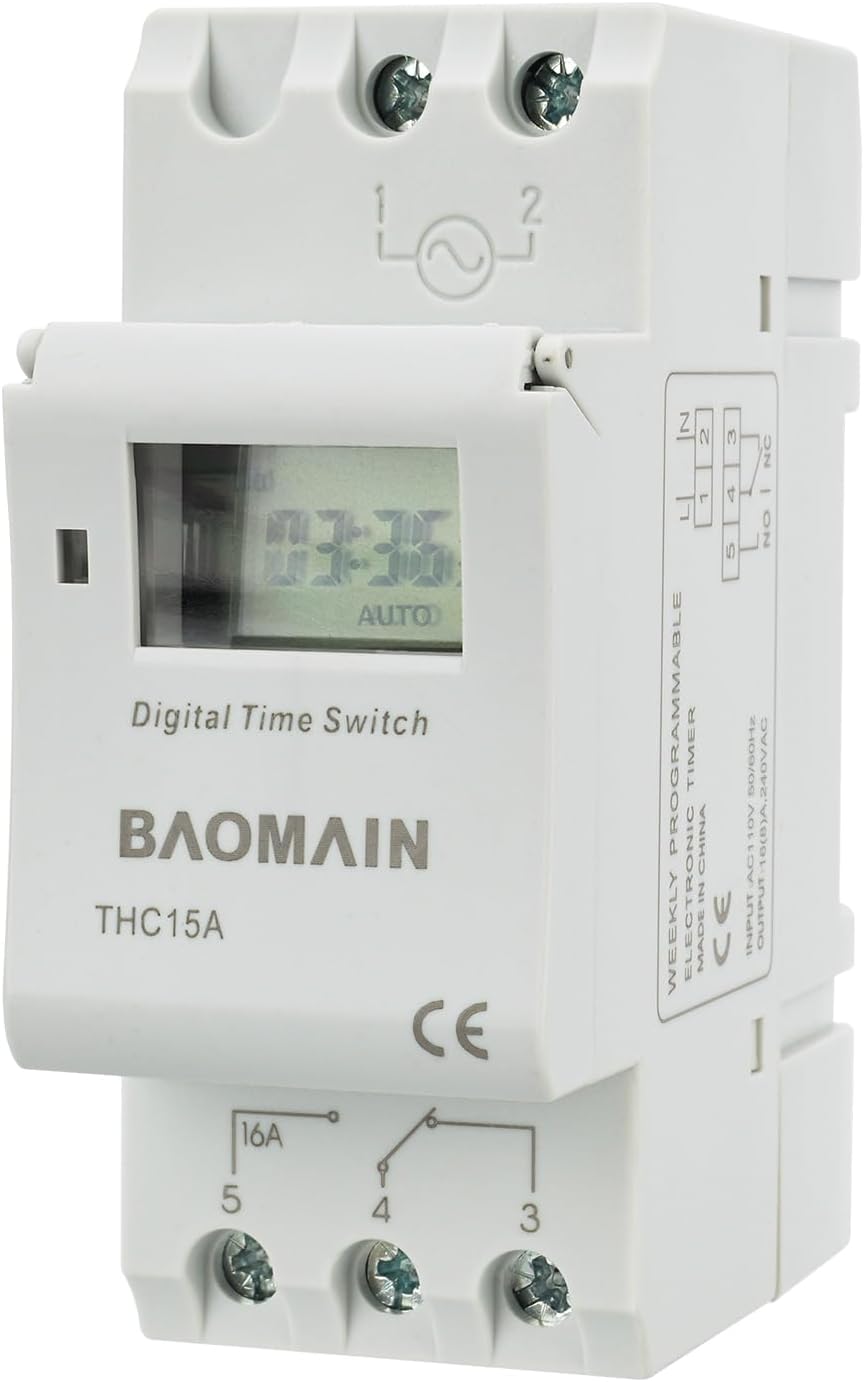
Figure 5.1: Front view of the Baomain THC15A Digital Programmable Timer Switch, showing the LCD display and terminal connections.
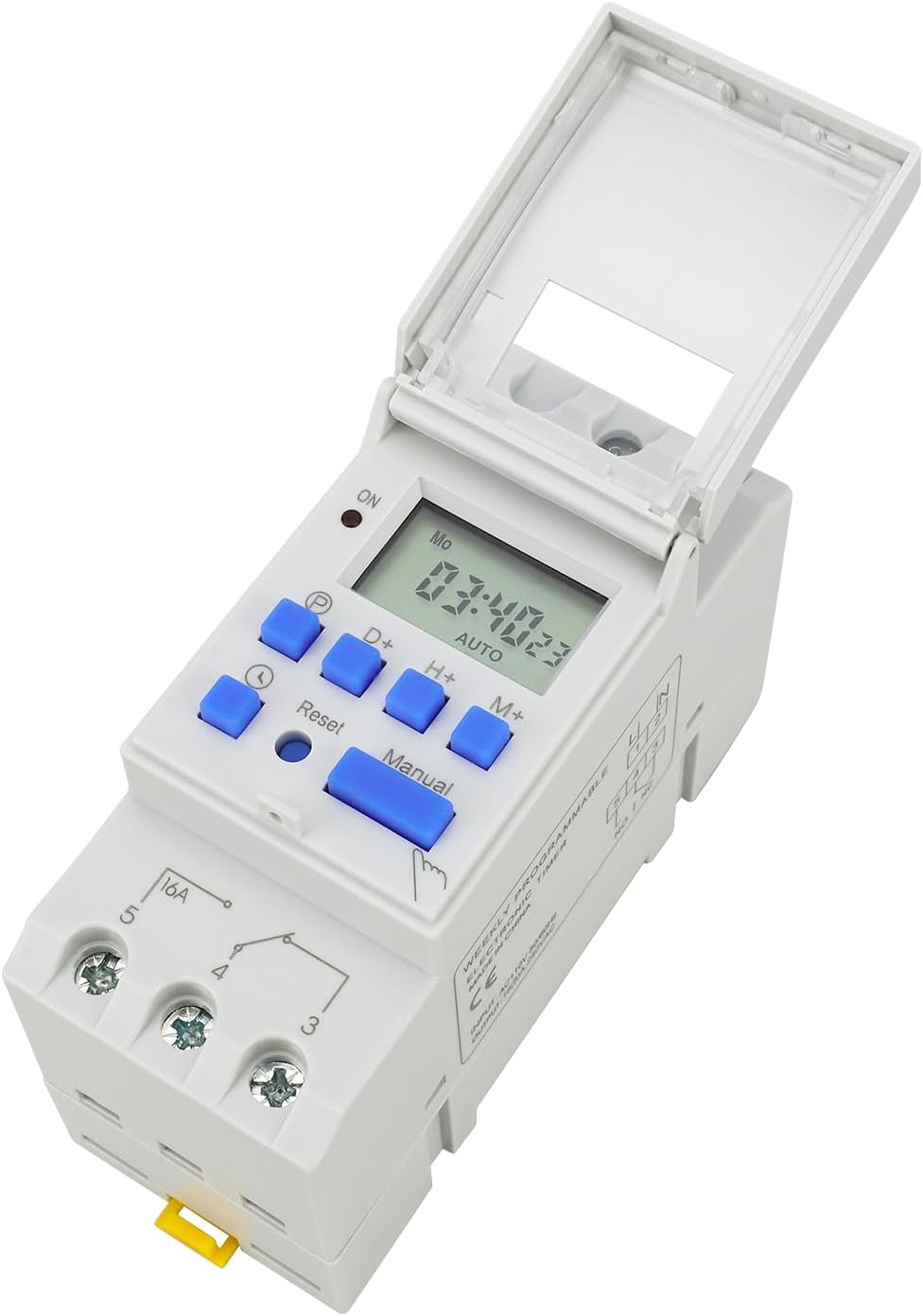
Figure 5.2: Front view with the protective cover open, revealing the control buttons (P, D+, H+, M+, Reset, Manual, Clock) and LCD screen.

Figure 5.3: Side view illustrating the dimensions of the timer switch (2.56"D x 1.54"W x 3.39"H).

Figure 5.4: Bottom view showing the yellow DIN rail mounting clips for easy installation.
6. Setup and Wiring
The Baomain THC15A is designed for DIN rail mounting. Ensure all power is disconnected before proceeding with wiring.

Figure 6.1: Wiring diagram for the Baomain THC15A Digital Programmable Timer Switch. Terminals 1 and 2 are for AC 110V input. Terminals 3, 4, and 5 are for the relay output (3: Normally Closed, 4: Common, 5: Normally Open).
Wiring Steps:
- Power Input: Connect the 110V AC power supply to terminals 1 (Line) and 2 (Neutral).
- Load Connection:
- For Normally Open (NO) operation (load turns ON when timer activates): Connect one side of your load to terminal 5 and the other side to the neutral line of your power supply. Connect the common terminal 4 to the live line of your power supply.
- For Normally Closed (NC) operation (load turns OFF when timer activates): Connect one side of your load to terminal 3 and the other side to the neutral line of your power supply. Connect the common terminal 4 to the live line of your power supply.
- Ensure all connections are secure and properly insulated.
Video 6.1: An official product video demonstrating the Baomain THC15A 110V Digital LCD Power Programmable Timer Switch Relay, including its physical features and basic operation.
7. Operating Instructions
7.1 Setting Current Time
- Press and hold the CLOCK button.
- While holding CLOCK, press D+ to set the current day (MO, TU, WE, TH, FR, SA, SU).
- While holding CLOCK, press H+ to set the current hour (1-24 hours).
- While holding CLOCK, press M+ to set the current minute (1-60 minutes).
- Release the CLOCK button to save the settings.
7.2 Programming ON/OFF Times
The timer supports up to 16 ON/OFF programs. Follow these steps to set your desired schedule:

Figure 7.1: Detailed programming steps for the Baomain THC15A Digital Programmable Timer Switch, showing button functions and display indicators.
- Press the P (Program) button. The LCD screen will display "1 ON" (first ON program).
- Press D+ to select the desired day combination for this program (e.g., everyday, weekdays, weekends, specific days). Continue pressing D+ to cycle through the 15 available combinations.
- Press H+ to set the hour and M+ to set the minute for the "1 ON" time.
- Press P again. The LCD screen will display "1 OFF" (first OFF program).
- Repeat steps 2 and 3 to set the day combination, hour, and minute for the "1 OFF" time. Ensure the day combination chosen for ON/OFF programs is consistent.
- Continue pressing P and repeating the steps to set up to 16 ON/OFF programs.
- After setting all desired programs, press the CLOCK button to exit programming mode and save the settings. The timer will then operate according to the programmed schedule.
7.3 Manual Control
Press the MANUAL button to cycle through ON, AUTO, and OFF modes. This allows for temporary override of programmed settings without erasing them.
- ON: Output is continuously ON.
- AUTO: Timer operates according to programmed settings.
- OFF: Output is continuously OFF.
7.4 Resetting the Timer
To clear all settings and restore the timer to its factory default, use a pointed object (like a pen tip) to press the RESET button located in the small hole on the front panel.
8. Maintenance
- Keep the device clean and free from dust. Use a soft, dry cloth for cleaning.
- Do not use abrasive cleaners or solvents.
- The internal battery is rechargeable and designed for long-term use. No user maintenance is required for the battery.
9. Troubleshooting
| Problem | Possible Cause | Solution |
|---|---|---|
| Device does not power on. | No power supply or incorrect voltage. | Check power connections and ensure 110V AC supply. |
| Programs not executing. | Timer is in MANUAL ON/OFF mode, or programming errors. | Ensure the timer is in AUTO mode. Review programming steps for errors (E1: Doesn't set the START time, E2: Doesn't set the END time). |
| Incorrect time displayed. | Time not set correctly or power interruption. | Reset and set the current time as per section 7.1. The internal battery should maintain time during short power outages. |
| Buttons are unresponsive. | Buttons might be locked. | Press the CLOCK button 4 times continuously to unlock the buttons. Repeat to lock. |
10. Specifications
| Specification | Value |
|---|---|
| Brand | Baomain |
| Model Number | THC15A |
| Rated Control Voltage (Input) | 110V AC |
| Output Voltage | 240V AC |
| Contact Capacity | 16A (8A) |
| Full Time Range | 1 Minute - 168 Hours |
| Programmable Settings | 16 ON/OFF times per week or day |
| Internal Battery | 1.2V/40mA (rechargeable) |
| Power Failure Memory | 60 Days |
| Operating Temperature | -10 to +40 °C |
| Material | Plastic |
| Product Dimensions (D x W x H) | 2.56" x 1.54" x 3.39" (65mm x 39mm x 86mm) |
| Item Weight | 120 Grams (4.2 ounces) |
| Screen Size | 1.5 Inches |
11. Warranty and Support
For warranty information or technical support, please contact Baomain customer service through their official website or the retailer where the product was purchased. Please have your model number (THC15A) and purchase details ready.