
1. Safety Information
WARNING: Electrical components can cause serious injury or death. Installation should only be performed by a qualified technician. Always disconnect power before handling or installing this product.
- Ensure power to the appliance is completely disconnected and verified before beginning any work.
- Discharge any existing capacitor before removal to prevent electrical shock.
- Wear appropriate personal protective equipment, including insulated gloves and safety glasses.
- Verify correct voltage and capacitance ratings before installation.
- Improper installation can lead to equipment damage or personal injury.
2. Product Overview
This UpStart Components 60/5 MFD 440V Dual Round Run Capacitor (Model: CAP-97F9897-DL4) is a replacement component designed for use in various applications, including Carrier/Bryant 561CJ048 systems. It is a dual-run capacitor, meaning it contains two capacitors in one unit, typically used for both the compressor and fan motor in HVAC systems. Its primary function is to store electrical energy and release it to help start and run electric motors efficiently.

Figure 2.1: Front view of the UpStart Components 60/5 MFD 440V Dual Round Run Capacitor, showing the product label with specifications.
3. Specifications
| Feature | Specification |
|---|---|
| Brand | UpStart Components |
| Model Number | CAP-97F9897-DL4 |
| Capacitance | 60/5 MFD (Microfarad) |
| Operating Voltage | 440 Volts AC |
| Shape | Round |
| Material | Plastic |
| Frequency | 50/60 Hz |
4. Installation and Setup
This section provides general guidelines for replacing a dual run capacitor. Always refer to the specific service manual for your appliance for detailed instructions.
4.1 Pre-Installation Checks
- Power Disconnection: Ensure the main power to the appliance is turned off at the breaker or fuse box. Verify with a voltage tester.
- Old Capacitor Discharge: Carefully discharge the old capacitor using an insulated screwdriver or a resistor to prevent shock.
- Specification Matching:
- The voltage rating of the new capacitor must be equal to or higher than the original. Never use a lower voltage capacitor.
- The capacitance (MFD/uF) rating must precisely match the original capacitor.
- The Hz rating should match the original.
- The terminal type and configuration should match for proper connection.
- Consider the physical size and shape only if space within the appliance is limited.
4.2 Replacement Procedure
- Identify Terminals: Dual run capacitors typically have three terminals: "HERM" (for compressor), "FAN" (for fan motor), and "C" (common). Note the wiring configuration of the old capacitor.
- Disconnect Wires: Carefully disconnect the wires from the old capacitor, noting which wire goes to which terminal. Taking a photo before disconnecting can be helpful.
- Remove Old Capacitor: Unmount the old capacitor from its bracket.
- Install New Capacitor: Mount the new UpStart Components capacitor securely in the same location.
- Connect Wires: Connect the wires to the corresponding terminals on the new capacitor ("HERM", "FAN", "C"). Ensure connections are secure.
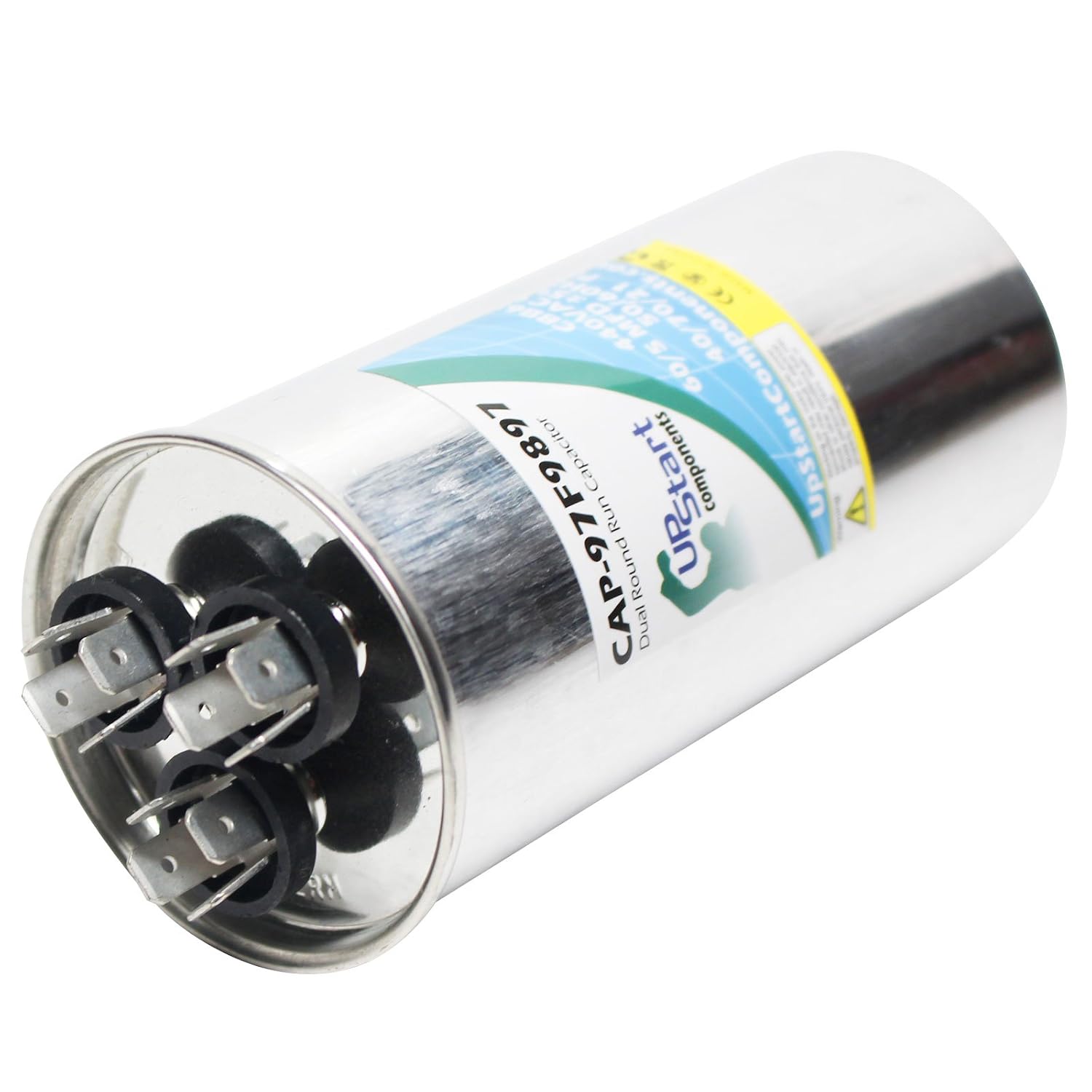
Figure 4.1: Angled view of the capacitor, illustrating the terminal layout for connection.
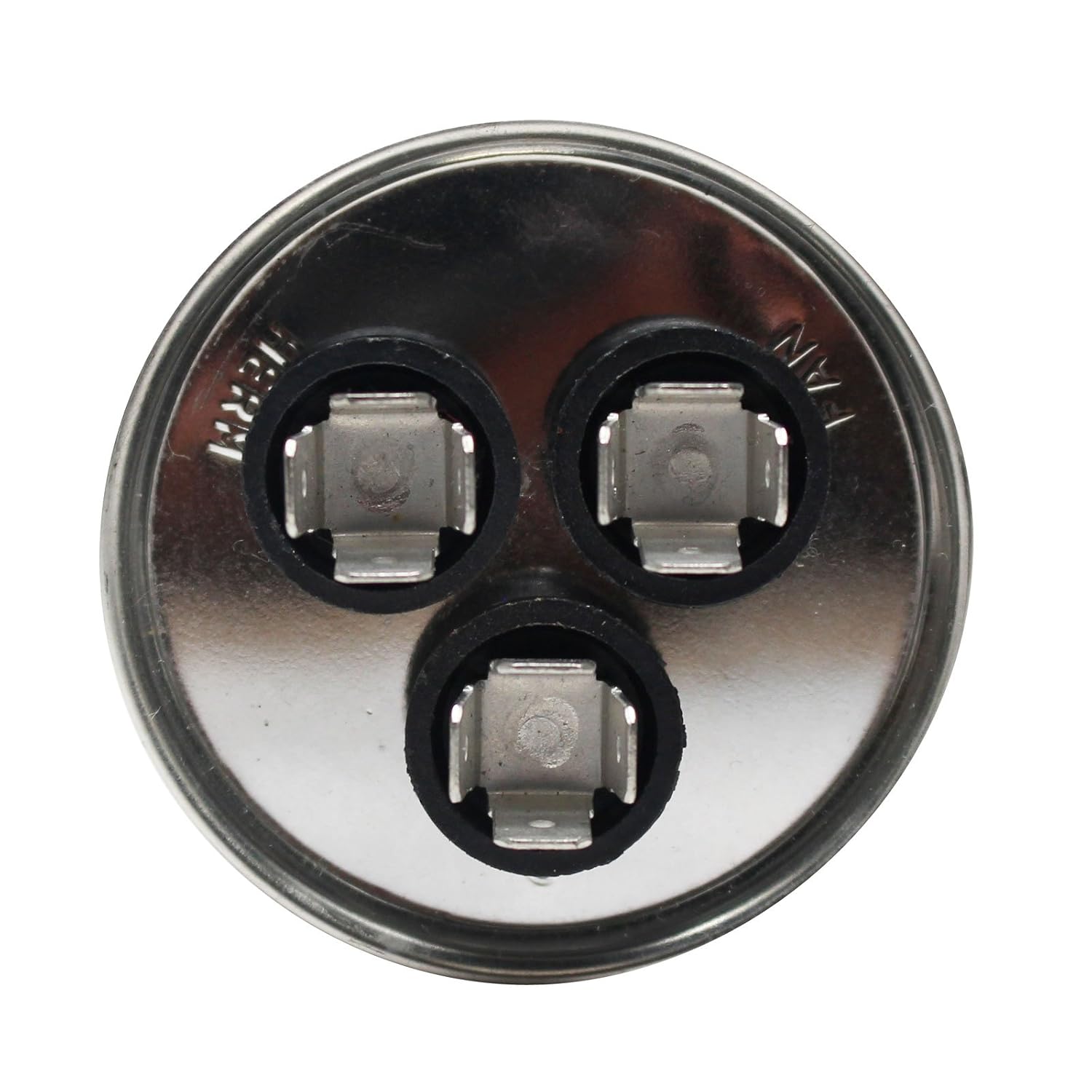
Figure 4.2: Top-down view of the capacitor terminals, showing the distinct connections for HERM, FAN, and Common.
4.3 Post-Installation
Once all connections are secure and the capacitor is mounted, restore power to the appliance and test its operation. Listen for unusual noises and observe for proper functioning.
5. Operation
The 60/5 MFD 440V Dual Round Run Capacitor operates continuously while the motor is running. It provides a phase shift to the motor's start winding, creating a rotating magnetic field that helps the motor start. Once the motor is running, it continues to provide a continuous phase shift to the run winding, improving motor efficiency and power factor. The "60 MFD" section typically supports the compressor motor, while the "5 MFD" section supports the fan motor.
6. Maintenance
Capacitors are generally maintenance-free components. However, periodic inspection by a qualified technician is recommended as part of routine appliance maintenance. During inspection, check for:
- Bulging: A swollen or bulging top indicates internal pressure and imminent failure.
- Leaking: Any signs of oil or fluid leakage around the terminals or casing.
- Corrosion: Rust or corrosion on the terminals.
- Loose Connections: Ensure all wire connections are tight and secure.
If any of these signs are observed, the capacitor should be replaced by a qualified professional.
7. Troubleshooting
If your appliance is experiencing issues related to motor starting or running, the capacitor may be a suspect. Common symptoms of a failing capacitor include:
- Motor Hums but Doesn't Start: This is a classic sign of a failed start winding or capacitor.
- Motor Starts Slowly or Runs Weakly: Indicates a weakened run capacitor.
- Appliance Not Cooling/Heating Effectively: If the compressor or fan motor is not running at full capacity.
- Visible Damage: As mentioned in maintenance, bulging or leaking are clear indicators of failure.
- No Continuity Across Terminals: A multimeter can be used to test for continuity and capacitance. If there is no continuity or the capacitance reading is significantly off, the capacitor is likely faulty.
CAUTION: Capacitor testing involves working with stored electrical energy. Only qualified personnel should perform these tests.
If you suspect a capacitor failure, it is recommended to consult a professional HVAC technician for diagnosis and replacement.
8. Warranty and Support
For information regarding warranty coverage, technical support, or replacement parts for your UpStart Components product, please refer to the contact information provided with your purchase or visit the official UpStart Components website. Keep your purchase receipt as proof of purchase.