
QFX SBX31510
QFX 15" PA Speaker (Model SBX31510)
User Manual
Introduction
This manual provides comprehensive instructions for the setup, operation, maintenance, and troubleshooting of your QFX 15" PA Speaker, model SBX31510. This high-power speaker is designed for various audio applications, including music playback, live performances, and broadcasting, featuring Bluetooth connectivity, FM radio, USB/SD playback, and multiple audio inputs.

The QFX 15" PA Speaker, model SBX31510, shown from the front with its integrated blue LED lighting active. This view highlights the main speaker grille and the overall robust design of the unit.
Setup
Follow these steps to set up your QFX PA Speaker for first use.
- Unpacking: Carefully remove the speaker from its packaging. Inspect the unit for any signs of damage during transit. Retain the packaging for future storage or transport.
- Placement: Position the speaker on a stable, flat surface. Ensure adequate ventilation around the unit. The speaker is designed for floor standing use and includes wheels and a handle for easy portability.
- Power Connection:
- AC Power: Connect the provided AC power cable to the speaker's AC input (110-240V, 60-50Hz) and then to a standard wall outlet.
- DC Power (12V): For portable use, the speaker supports a DC 12V input. Connect a compatible 12V power source (not included) to the DC input jack.
- Initial Power On: Locate the power switch, typically on the control panel or rear of the unit. Switch it to the "ON" position. The display and LED lights should illuminate.

An angled view of the QFX 15" PA Speaker, showcasing its side handle and integrated wheels, which facilitate easy transport and positioning of the unit.
Operating Instructions
This section details the various functions and controls of your QFX PA Speaker.
Control Panel Overview
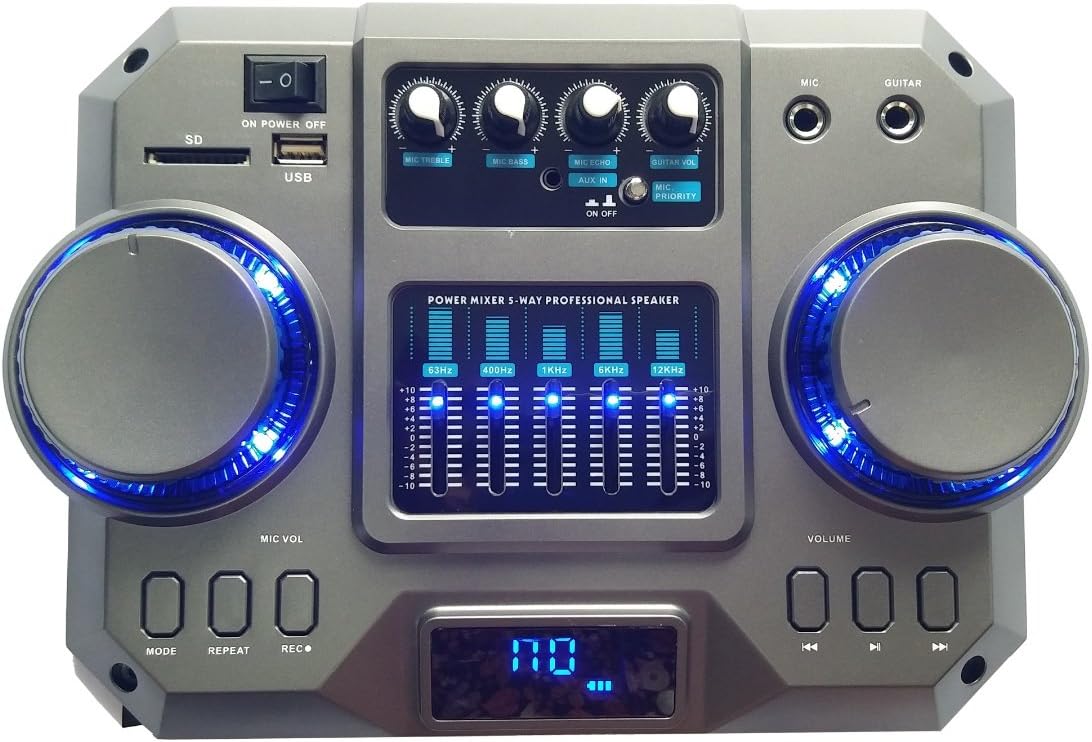
A detailed view of the QFX 15" PA Speaker's top control panel, featuring input jacks, volume knobs, microphone controls, a 5-band graphic equalizer, and media playback buttons.
The main control panel, located on the top of the speaker, provides access to all audio inputs, playback controls, and sound adjustments. Familiarize yourself with the layout before operation.
Power On/Off
Press the "POWER" button on the control panel to turn the speaker on or off. A brief startup sequence will initiate when powered on.
Mode Selection
Press the "MODE" button to cycle through available input sources: Bluetooth, FM Radio, USB, SD, and Auxiliary (AUX).
Bluetooth Pairing
- Ensure the speaker is in Bluetooth mode (display will show "BT").
- On your mobile device, enable Bluetooth and search for available devices.
- Select "QFX SBX31510" (or similar name) from the list.
- Once paired, the speaker will emit a confirmation tone, and you can begin streaming audio.
FM Radio Operation
- Switch to FM Radio mode using the "MODE" button.
- Press the "PLAY/PAUSE" button to initiate an automatic scan for available stations. The speaker will save detected stations.
- Use the "PREVIOUS" and "NEXT" buttons to navigate through saved stations.
USB/SD Playback
- Insert a USB flash drive or SD card into the respective slot on the control panel.
- The speaker will automatically switch to USB/SD mode and begin playing compatible audio files.
- Use the "PLAY/PAUSE", "PREVIOUS", and "NEXT" buttons for playback control. The "REPEAT" button allows for single track or folder repeat.
Microphone and Guitar Inputs
- Connect a microphone to the "MIC" input and a guitar to the "GUITAR" input.
- Adjust the "MIC VOL" and "GUITAR VOL" knobs to control the respective input levels.
- Use the "MIC PRIORITY" switch to automatically lower background music when the microphone is in use.
- The "ECHO" knob controls the echo effect for the microphone.
Recording Function
To record audio from the microphone or auxiliary input to a USB drive or SD card:
- Ensure a USB drive or SD card is inserted.
- Press the "REC" button to start recording.
- Press "REC" again to stop recording. The recorded file will be saved to the USB/SD media.
Equalizer Adjustment
The 5-band graphic equalizer allows you to fine-tune the audio output. Adjust the sliders for 63Hz, 400Hz, 1KHz, 5KHz, and 12KHz frequencies to customize your sound profile.
LED Lights
The speaker features RGB LED panels that dance to the beat of the music. These lights automatically activate when the speaker is powered on. There is no specific control for the LED lights mentioned beyond their automatic function.
Remote Control
The included remote control provides convenient access to most functions, including power, mode selection, volume, track control, and equalizer presets.
Maintenance
Proper care and maintenance will extend the life of your QFX PA Speaker.
- Cleaning: Disconnect the power before cleaning. Use a soft, dry cloth to wipe down the exterior of the speaker. Do not use abrasive cleaners, waxes, or solvents. For stubborn dirt, a slightly damp cloth can be used, followed by a dry cloth.
- Storage: When not in use for extended periods, store the speaker in a cool, dry place, away from direct sunlight and extreme temperatures. It is recommended to use the original packaging for storage to protect against dust and physical damage.
- Ventilation: Ensure that the speaker's ventilation openings are not blocked during operation or storage to prevent overheating.
Troubleshooting
If you encounter issues with your speaker, refer to the following common problems and solutions.
| Problem | Possible Cause | Solution |
|---|---|---|
| No power | Power cable not connected; Power switch off; Outlet malfunction. | Ensure power cable is securely connected. Turn power switch to ON. Test outlet with another device. |
| No sound output | Volume too low; Incorrect input mode; Audio cable issues; Device not paired (Bluetooth). | Increase master volume. Select correct input mode. Check audio cables. Re-pair Bluetooth device. |
| Bluetooth not connecting | Speaker not in pairing mode; Device too far; Interference; Previously paired device connected. | Ensure speaker is in BT mode. Move device closer. Turn off other Bluetooth devices. Disconnect from previously paired devices. |
| USB/SD playback issues | Incompatible file format; Corrupted media; Incorrect mode. | Ensure files are compatible (e.g., MP3). Try a different USB/SD card. Verify speaker is in USB/SD mode. |
| Microphone/Guitar not working | Volume knob too low; Cable not connected; Microphone/Guitar issue. | Increase MIC VOL/GUITAR VOL. Ensure cables are fully inserted. Test microphone/guitar with another system. |
Specifications
| Model Number | SBX31510 |
| Brand | QFX |
| Mounting Type | Floor Standing |
| Power Source | Corded Electric |
| Connectivity Technology | Bluetooth, USB, SD, Aux |
| Connector Type | Aux |
| Material | Plastic, Metal |
| Item Weight | 53.5 pounds (approx. 24.27 kg) |
| Number of Channels | 5 (referring to equalizer bands) |
| Audio Input | Microphone, Guitar, Auxiliary |
| Recommended Uses | Music events, Live performances, Broadcasting/Recording |
| Wattage | 3600 watts (Peak Power) |
| Product Dimensions (L x W x H) | 19.69 x 16.1 x 29.92 inches (approx. 50 x 40.9 x 76 cm) |
| Color | Black |
| UPC | 606540033357 |
| Date First Available | October 26, 2016 |
Warranty and Support
This product is covered by a manufacturer's warranty. For specific warranty terms and conditions, please refer to the documentation included with your purchase or visit the official QFX website. For technical support, troubleshooting assistance beyond this manual, or service inquiries, please contact QFX customer support directly.
Note: Product specifications and features are subject to change without notice.
Ask a question about this manual
Ask about setup, troubleshooting, compatibility, parts, safety, or missing instructions. Manuals+ will review the question and use this page’s manual context to help answer it.