
Introduction
Thank you for purchasing the Kaiser MSA-8508 Mini Amplified Bluetooth Speaker. This manual provides essential information for the safe and efficient operation of your device. Please read it thoroughly before use and retain it for future reference.
Safety Instructions
- Do not expose the speaker to rain or moisture to prevent fire or electric shock.
- Do not open the speaker casing. Refer all servicing to qualified personnel.
- Ensure the power supply voltage matches the requirements specified on the speaker.
- Keep the speaker away from heat sources, direct sunlight, and excessive dust.
- Place the speaker on a stable, flat surface to prevent it from falling.
- Unplug the power cord during lightning storms or when unused for long periods.
Package Contents
Please check that all items are present:
- Kaiser MSA-8508 Mini Amplified Bluetooth Speaker
- Power Cable
- User Manual (this document)
Product Overview
The Kaiser MSA-8508 is a compact amplified speaker designed for portable audio playback. It features Bluetooth connectivity for wireless streaming and an 8-inch speaker for clear sound output.
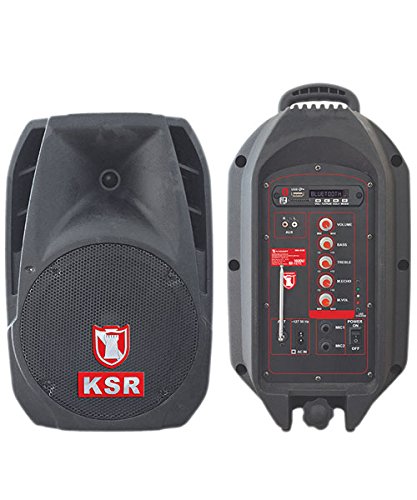
Figure 1: Front view of the Kaiser MSA-8508 Mini Amplified Bluetooth Speaker. This image shows the speaker grille, control panel, and overall compact design of the unit.
Setup
- Unpacking: Carefully remove the speaker and all accessories from the packaging.
- Placement: Place the speaker on a stable, flat surface. Ensure there is adequate ventilation around the unit.
- Power Connection:
- Connect the power cable to the AC input port on the back of the speaker.
- Plug the other end of the power cable into a standard electrical outlet.
- Ensure the power switch is in the "OFF" position before connecting to power.
- Power On: Flip the power switch to the "ON" position. The power indicator light should illuminate.
Operating Instructions
Bluetooth Pairing
- Ensure the speaker is powered on.
- Press the "Mode" button on the speaker's control panel until "Bluetooth" mode is selected. The Bluetooth indicator light will flash, indicating it is in pairing mode.
- On your smartphone, tablet, or other Bluetooth-enabled device, go to the Bluetooth settings.
- Search for available devices. You should see "Kaiser MSA-8508" or a similar name appear in the list.
- Select "Kaiser MSA-8508" to pair. Once successfully paired, the Bluetooth indicator light on the speaker will stop flashing and remain solid.
- You can now play audio from your device through the speaker.
Audio Playback
- Volume Control: Use the master volume knob on the speaker or the volume controls on your connected device to adjust the audio level.
- Track Control: In Bluetooth mode, you may use the "Previous Track" and "Next Track" buttons on the speaker (if available) or your connected device to navigate through your music.
- Other Inputs: If your speaker has additional input ports (e.g., AUX, USB, SD card), switch to the corresponding mode using the "Mode" button and connect your audio source.
Maintenance
- Cleaning:
- Always unplug the speaker from the power outlet before cleaning.
- Use a soft, dry cloth to wipe the exterior surfaces of the speaker.
- Do not use liquid cleaners, aerosols, or abrasive cleaning agents, as they may damage the finish or internal components.
- Storage:
- If storing the speaker for an extended period, unplug it and store it in a cool, dry place, away from direct sunlight and extreme temperatures.
- Protect the speaker from dust by covering it with a cloth or returning it to its original packaging.
Troubleshooting
| Problem | Possible Cause | Solution |
|---|---|---|
| No power | Power cable not connected; Power outlet not working; Power switch off. | Ensure power cable is securely connected; Test outlet with another device; Turn power switch to "ON". |
| No sound | Volume too low; Incorrect input mode; Device not paired (Bluetooth). | Increase volume on speaker and device; Select correct input mode; Re-pair Bluetooth device. |
| Bluetooth not connecting | Speaker not in pairing mode; Device too far; Interference. | Ensure speaker is in Bluetooth pairing mode; Move device closer to speaker; Avoid obstacles between devices. |
Specifications
| Brand | Kaiser |
| Model | MSA-8508 |
| Output Wattage | 2500 Watts |
| Compatible Devices | Laptop, Smartphone |
| Power Source | Corded Electric |
| Item Weight | 15 Kilograms |
| Color | Black |
Warranty and Support
For warranty information or technical support, please refer to the warranty card included with your product or visit the official Kaiser website. Keep your purchase receipt as proof of purchase for any warranty claims.
For further assistance, you may contact Kaiser customer service through their official channels.