1. Product Overview
This manual provides instructions for the JustFine replacement remote control, designed for use with various Samsung Plasma, LCD, and LED HDTV television models. This remote is pre-programmed and does not require additional setup beyond battery installation.
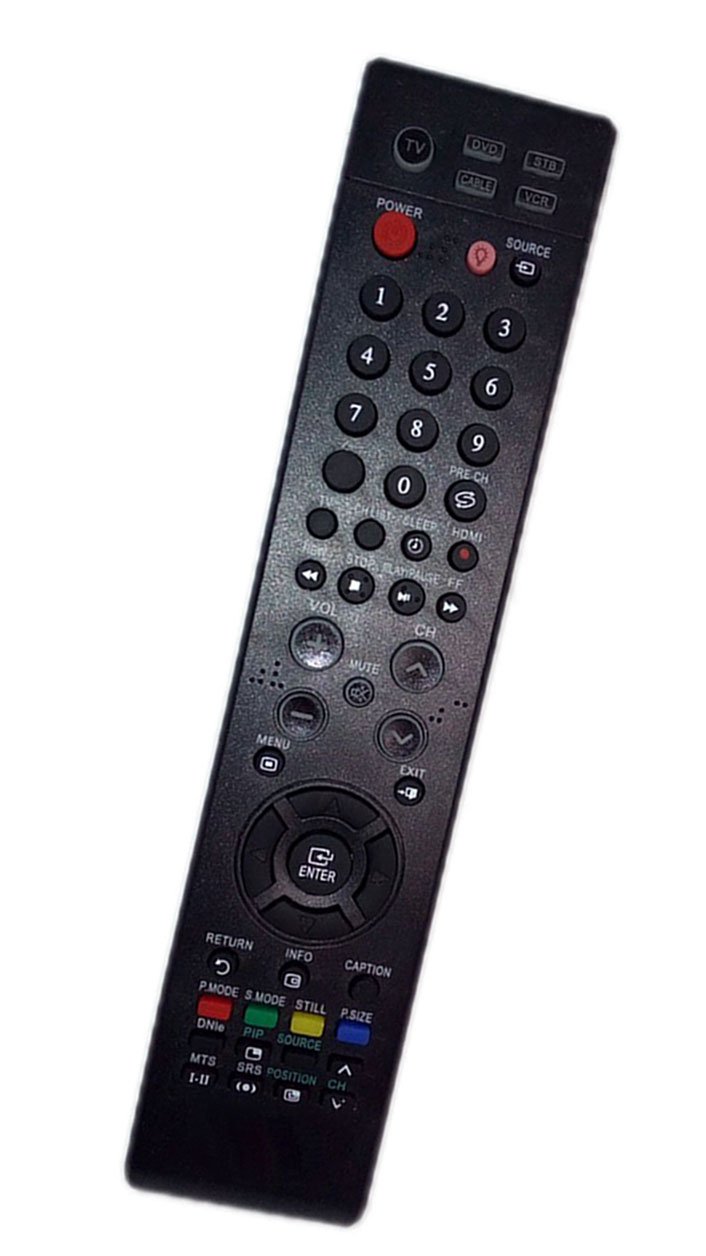
Image 1.1: Front view of the JustFine Replacement Remote Control. This image shows the general layout and design of the remote control.
2. Compatibility
This replacement remote control is compatible with the following Samsung TV models:
- LNT3242HX/XAA
- LNT466F
- LN46S81BX/XAP
- HLT5676SXXAC
- HPS6373
- LNT4065F
- LNT4069FX/XAA
- Other compatible Samsung Plasma, LCD, and LED HDTV TV models.
Please verify your TV model number to ensure compatibility.
3. Setup
The remote control is pre-programmed and ready for use upon battery installation. No additional programming is required.
3.1 Battery Installation
- Locate the battery compartment on the back of the remote control.
- Slide the battery compartment cover downwards or in the direction indicated by an arrow to open it.
- Insert two (2) AAA batteries (not included) into the compartment, ensuring the positive (+) and negative (-) terminals align correctly with the markings inside the compartment.
- Slide the battery compartment cover back into place until it clicks securely.

Image 3.1: Back view of the remote control, highlighting the battery compartment. The cover for the battery compartment is visible at the bottom section of the remote.
Note: Batteries are not included with the remote control. Always use new batteries and dispose of old batteries responsibly.
4. Operating Instructions
Once batteries are installed, the remote control is ready to operate your compatible Samsung TV. Point the remote control directly at the TV's infrared sensor.
4.1 Basic Functions
- Power Button: Press to turn the TV on or off.
- Channel Up/Down: Use to change TV channels.
- Volume Up/Down: Use to adjust the TV volume.
- Mute Button: Press to mute or unmute the TV sound.
- Input/Source Button: Press to cycle through available input sources (HDMI, AV, Component, etc.).
- Number Buttons (0-9): Use to directly enter channel numbers.
- Menu Button: Access the TV's main menu.
- Navigation Buttons (Up, Down, Left, Right, Enter): Used to navigate through TV menus and confirm selections.
Refer to your Samsung TV's original manual for specific functions and menu navigation details, as button labels and functions may vary slightly depending on the TV model.
5. Maintenance
5.1 Battery Replacement
Replace batteries when the remote control's performance degrades or stops functioning. Always replace both batteries at the same time with new ones of the same type (AAA).
5.2 Cleaning
To clean the remote control, wipe it with a soft, dry cloth. Do not use liquid cleaners or abrasive materials, as these can damage the remote's surface or internal components.
5.3 Storage
Store the remote control in a dry place, away from direct sunlight and extreme temperatures. If the remote will not be used for an extended period, remove the batteries to prevent leakage.
6. Troubleshooting
| Problem | Possible Cause | Solution |
|---|---|---|
| Remote not working | Dead or incorrectly inserted batteries. Obstruction between remote and TV. Remote is too far from TV. |
|
| Some buttons not responding | Dirty contacts under buttons. Remote malfunction. |
|
| Remote works intermittently | Weak batteries. Interference. |
|
If troubleshooting steps do not resolve the issue, please contact customer support.
7. Specifications
| Feature | Detail |
|---|---|
| Brand | JustFine |
| Model Number | LYSB01M692QEN |
| Connectivity Technology | Infrared (IR) |
| Compatible Devices | Samsung Plasma, LCD, LED HDTV TVs |
| Max Number of Supported Devices | 1 (Television) |
| Power Source | 2 x AAA Batteries (not included) |
| Product Dimensions | 4.53 x 1.57 x 1.38 inches |
| Item Weight | 2.72 ounces |
| Special Feature | Ergonomic design |
8. Warranty and Support
8.1 Warranty Information
This product comes with a 30-day quality warranty from the date of purchase. This warranty covers manufacturing defects and ensures the product functions as intended under normal use. It does not cover damage caused by misuse, accidents, or unauthorized modifications.
8.2 Customer Support
For any problems, questions, or warranty claims, please contact us via email. Our customer support team is available to assist you.
Please refer to your purchase documentation or the seller's contact information for the specific email address.